15 Ways to Stop Hitting Claude's Usage Limit (2026)
Keep hitting Claude's usage limit? Here are 15 proven ways to save tokens, stretch your plan, and stop seeing "limit reached" — without necessarily paying for Max.
You’re paying for Claude. You sit down to work. Twenty minutes in, mid-thought, right when it’s getting good, you get the message: usage limit reached, come back later.
If you switched to Claude in the last few months, you’ve probably already met that wall (especially if you’re on the Pro plan).
And sometimes it makes no sense. You open a chat, send two messages, and you’re already cut off. You barely did anything.
So I went looking for every tactic I could find for stretching your Claude limit, and kept the 15 that work. We’ll start with the 6 things eating most of your tokens, then the everyday habits that save the most.
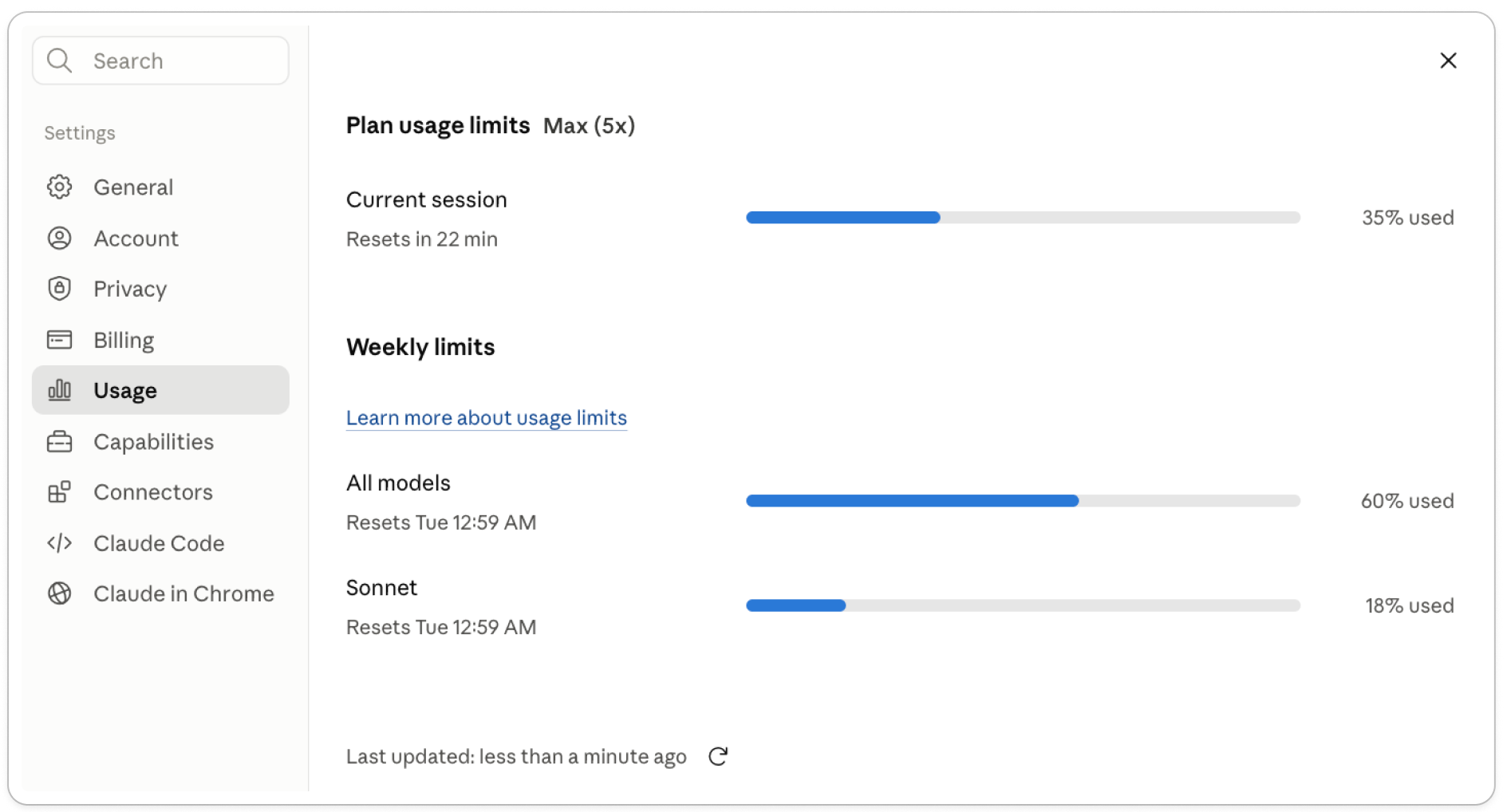
Your usage runs on a rolling 5-hour window and a weekly cap at the same time. And the same bucket is shared across Claude.ai, Claude Code, and Cowork, so burning tokens in one drains the others.
Which brings up the thing that decides how fast you burn through them: tokens.
Claude counts tokens, not messages
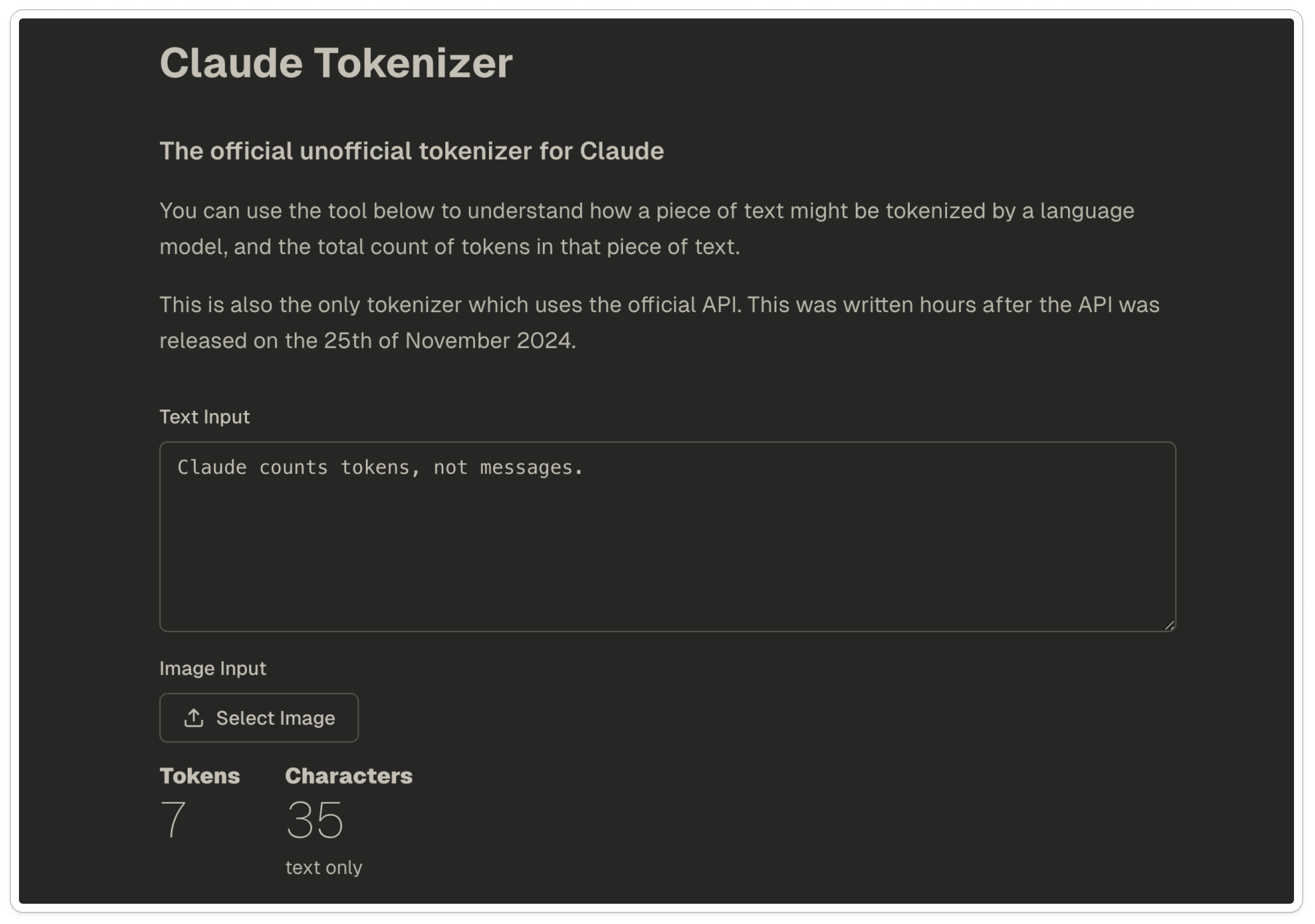
A token is about four characters, roughly three-quarters of a word. Paste your own text into the unofficial Claude tokenizer to see an approximation. Here, “Claude counts tokens, not messages” comes out to 7 tokens.
Back to that moment where you sent one or two messages and got cut off. What probably happened is you sent them into a conversation that was already long, and the length is what cost you.
So if that’s what happened, this is why one or two messages were enough to hit your limit: each one was carrying the whole conversation behind it.
Because when you hit send, Claude adds up your message, every message above it, any files in the chat, and the reply it writes back. That whole pile is one charge. So two people on the same plan can use Claude completely differently and hit the wall at different times, depending on how full the chat is when they message.
Why replies and files cost the most tokens
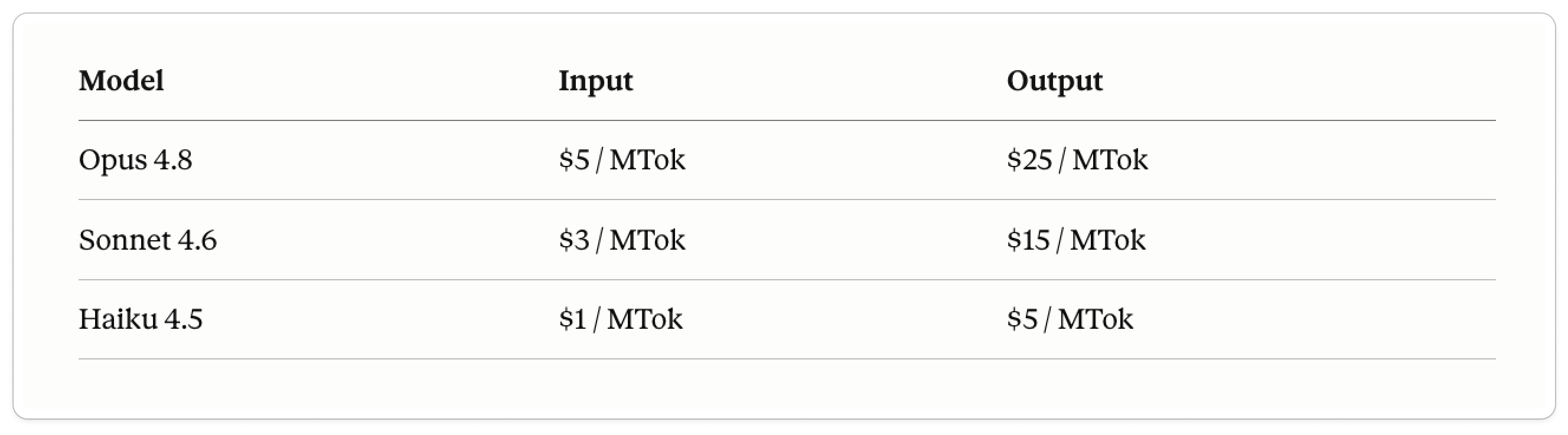
A token Claude writes back costs more than one you send in, so a long answer eats more than a long question.
These are the API rates. On Pro or Max you don’t pay per token, but the ratios still tell you what drains your limit fastest: every model’s output costs 5x its input, and Opus runs about 5x a Haiku token. Same pattern inside your plan.
Files are where it gets way more expensive:
A PDF is the worst offender: Claude both reads the text on each page and turns each page into an image, so you pay twice for the same document, and the bigger the file, the more pages, the more it costs.
Images are heavy too, charged by their resolution. And either way, the file sits in the chat, so you keep paying for it on every turn after.
Newer Claude models burn more tokens for the same text
Anthropic says in their own pricing docs that the newer Opus models use a new tokenizer. These are the default on Pro now, and the new tokenizer counts the same text as up to35% more tokens (hardest on code, structured data, and other languages).
The per-token price hasn’t changed. What changed is how much of your text counts as tokens. So a prompt that cost you a certain amount a few months ago can cost more today, word for word the same.
You can’t turn it off, but it’s a reason to drop to a lighter model when you can and keep your chats lean.
So keep this in mind as you go, because the list below is all ways to spend fewer of these tokens.
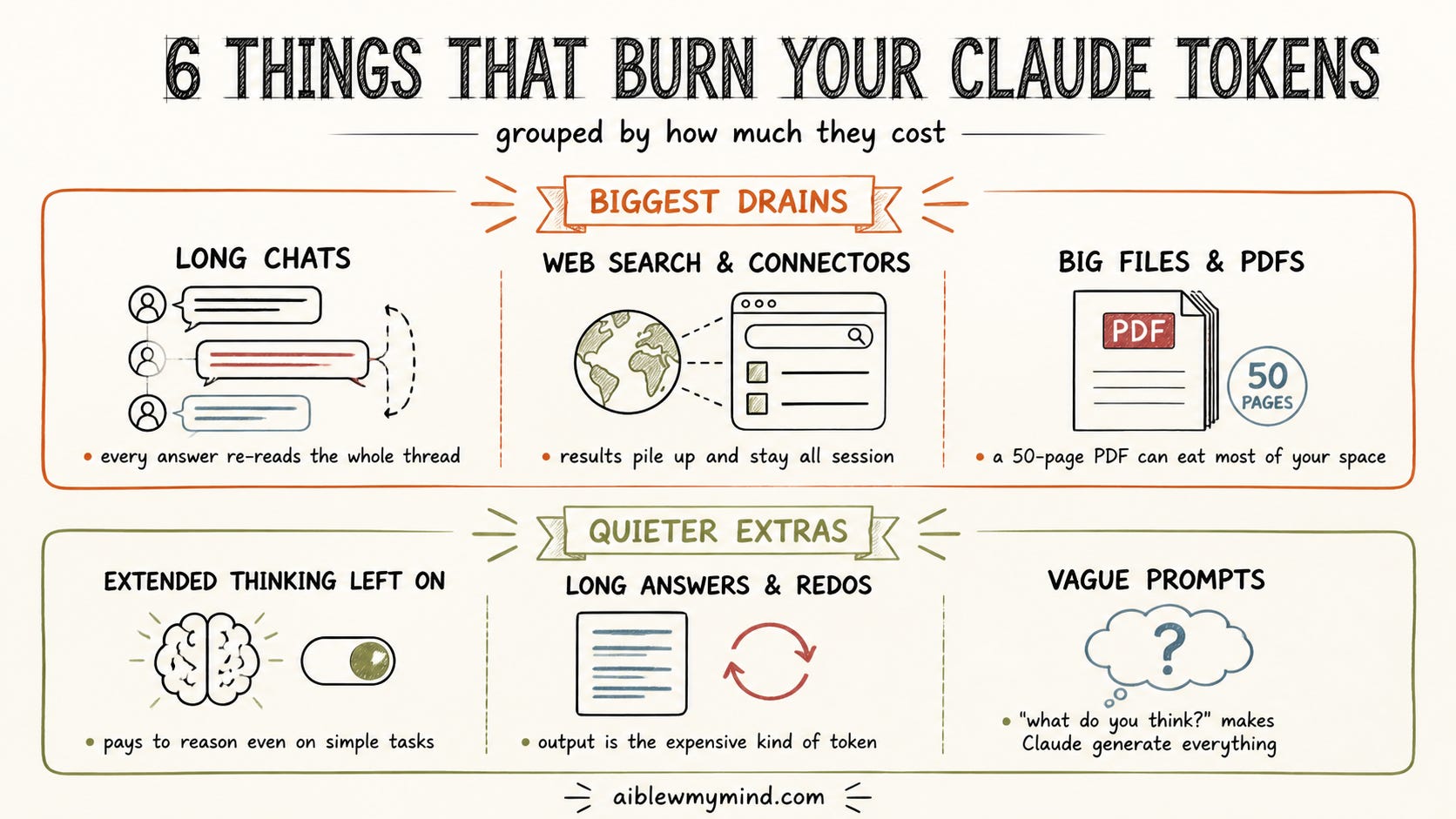
6 things that burn through your Claude tokens fastest
Not everything you do costs the same. Some tasks eat way more tokens than others, so here’s what tends to drain your limit fastest.
Web search, research, and connectors. This one’s sneaky. Every time Claude searches the web or pulls from a connected app, it drops the full result into your chat and leaves it there for the rest of the conversation. One search can add a couple thousand tokens. Do twenty searches in a session and you’ve got a small book’s worth of search results sitting in the chat, getting re-read every time Claude answers, on top of everything else.
PDFs and uploaded files. This is the one that catches almost everyone. When you upload a PDF, Claude reads the text and also turns every page into an image, so you’re paying for both. Anthropic’s documentation puts a single page at 1,500 to 3,000 tokens for the text alone, before the images. A 50-page PDF can run 75,000 to 150,000 tokens just by being in the chat. Your whole working space is around 200,000, so one fat document can eat most of it before you’ve asked your first question. Screenshots, Word docs, spreadsheets, and slides all do the same thing.
Long chats. The one from earlier, and worth saying again because you can’t see it happening. The longer a conversation gets, the more every new answer costs, even the quick ones, because Claude re-reads the whole thing each time.
Extended thinking left on. When this is on, Claude works through its reasoning step by step before it answers. That’s worth it for a hard problem. For something like fixing typos or changing a date in your text, it’s paying extra for thinking the task never needed.
Long answers, and asking Claude to redo its own work. Long, padded answers, big documents it generates, and especially “now go back and improve that” both cost on the way out and then sit in the chat getting re-read after. Ask for what you need and stop there.
Vague, open-ended prompts. “What do you think about this?” tells Claude to give you everything: options, trade-offs, side points, three things you’ll never use. You pay for all of it. A specific ask gets you a specific, cheaper answer.
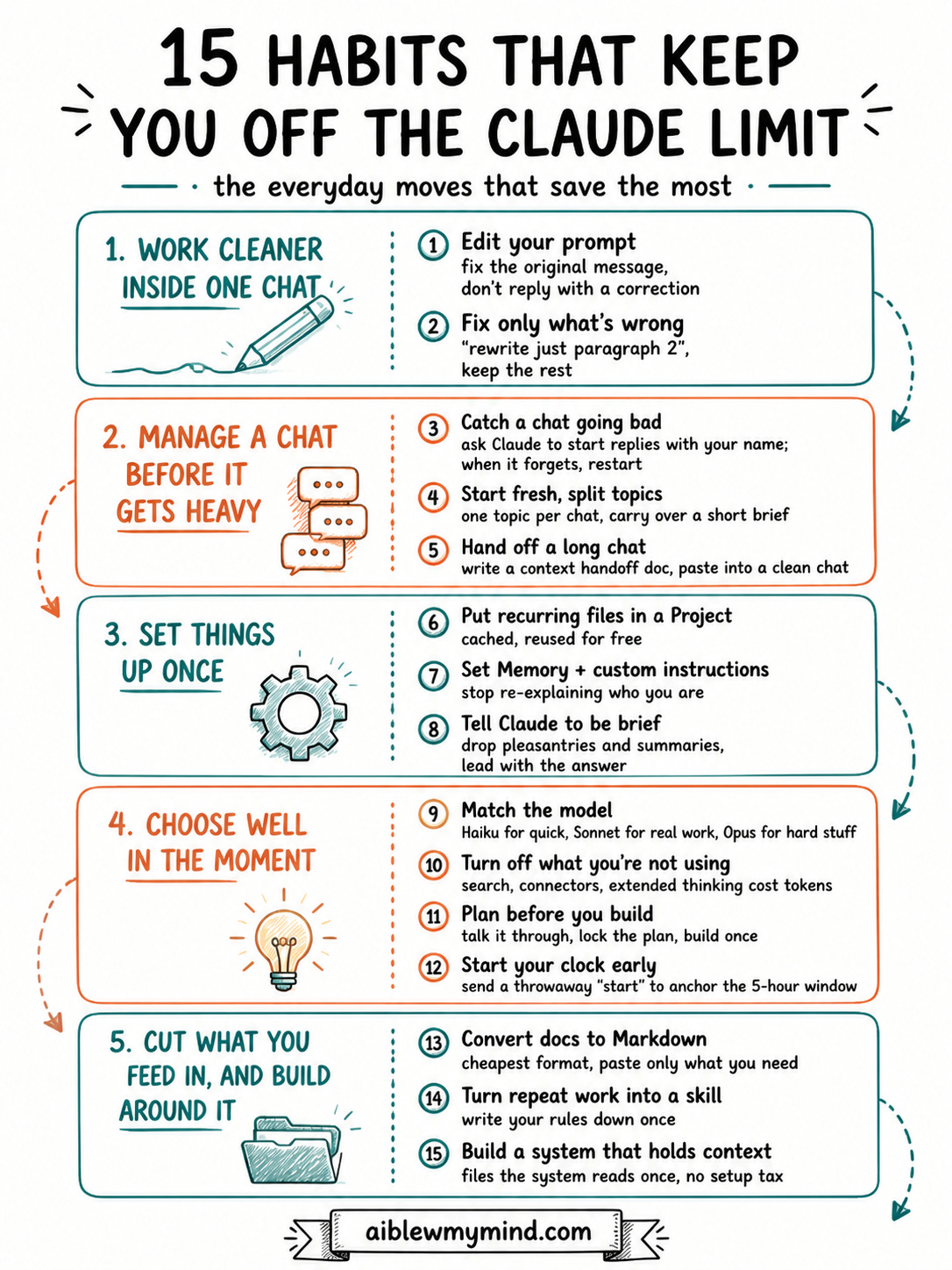
15 habits that save the most Claude tokens
Below are the 15 habits, grouped by when you’d use them. You don’t need all of them. Skim for the ones that fit how you work.
Here’s how they’re split:
Work cleaner inside one chat — get a good answer without piling up corrections.
Manage a chat before it gets heavy — spot when a thread is going bad and get out clean.
Set things up once — a few minutes of setup that saves tokens in every chat after.
Choose well in the moment — small per-message choices that quietly add up.
Cut what you feed in, and build around it — shrink what goes into Claude, then build systems that remember so you stop repeating yourself.
The deeper you go, the more you save, but even the first few will keep you off the limit most days.
Before anything fancy, the cheapest wins are in how you handle a single answer. Most wasted tokens come from piling corrections on top of a chat instead of fixing what’s already there. These two stop one bad answer from snowballing.
Habit 1. Edit your prompt instead of replying
This is the easiest, yet highest-return habit. When Claude’s answer misses, the natural move is to type a correction in the next message. But that’s expensive, because now Claude re-reads the bad answer AND your correction AND everything else, every turn after.
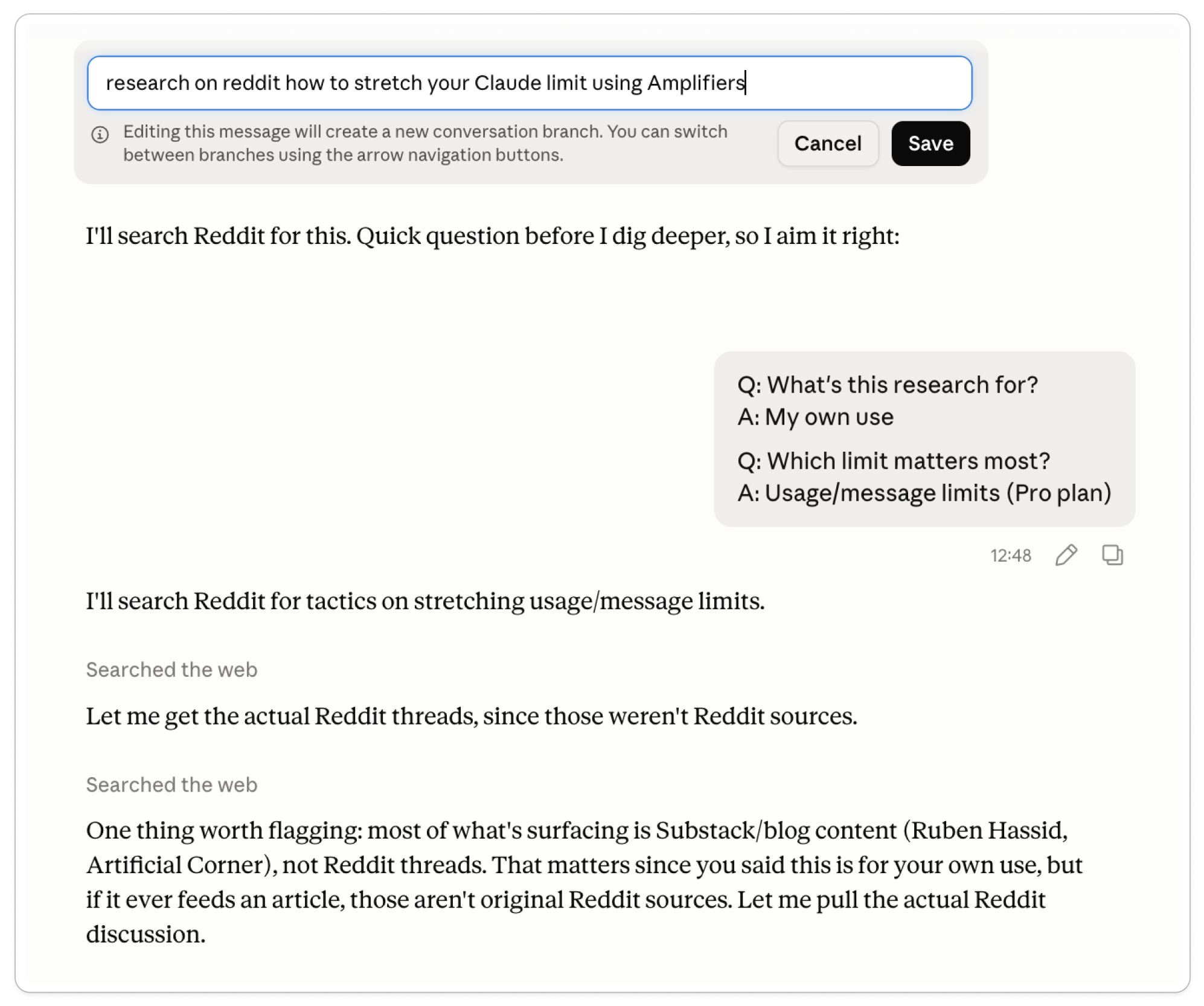
Instead, click the edit (pencil) icon on your original message, fix the wording, and regenerate. The bad exchange gets replaced, not stacked on top.
Fix the prompt, don’t grow the chat:
I forgot to tell Claude to use Amplifiers for the search, and without it, Claude can’t pull from Reddit well. So instead of correcting it underneath and paying for the whole exchange again, I edited the original message.
Habit 2. Or fix just the part that's wrong
Same idea, smaller scale. When a long response is 90% right, don’t regenerate the whole thing. Tell Claude exactly what to change:
“Keep everything, rewrite only the second paragraph to be shorter.”
You stop paying to regenerate the parts that were already fine.
Manage a chat before it gets heavy
Every chat gets more expensive as it grows, because Claude re-reads the whole thing on every turn. These three help you see it happening and get out before it drains you.
Habit 3. Catch a chat going bad before it wastes your tokens
A long chat doesn’t tell you when it’s overloaded. It just gets worse while charging full price for every turn. Here’s how to see it coming.
At the start of a chat, ask Claude to begin every reply with your name:
For the rest of this chat, start every reply with my name.
While it does, the thread is healthy. The moment it forgets, early instructions are slipping and answers are about to degrade. That’s your cue to start fresh. It’s a rough signal (Claude can drop the name for other reasons), but it’s an easy early warning.
Habit 4. Start a fresh chat, and split your topics in different sessions
When a thread starts feeling heavy, or the name trick tells you it’s slipping, copy out what you still need and paste it into a new chat. Claude sees a clean version of the problem instead of dragging 30 messages behind it.
Don’t mix topics in one chat either. Ask about a proposal, then a recipe, then a LinkedIn post, and Claude re-reads the proposal and recipe every time it answers about the post. One topic per chat keeps each one cheap.
When a topic’s worth carrying over, don’t re-explain it. Ask Claude to package it first:
I want to keep working on [topic] in a new chat. Pull just the parts of this conversation that touch it and write me a short brief to carry over: what we’re working on, where it stands right now, and the next thing I planned to do.
Habit 5. Hand off a long chat instead of dragging it
That last prompt is the quick version. When a whole working session is worth saving, not just one topic, use the full handoff.
Long sessions get slow and forgetful, but starting over means re-explaining your whole project, every decision, every preference. So you stay in the bloated one because leaving feels too expensive.
The handoff prompt fixes that:
You are about to be replaced by a fresh instance of yourself that will have NONE of this conversation’s memory. Write a CONTEXT HANDOFF DOCUMENT so the new instance can continue seamlessly. Use these sections:
OBJECTIVE — what we’re trying to do, in 2 to 3 sentences
KEY DECISIONS — what we locked in and why, so it doesn’t get relitigated
CURRENT STATE — exactly where we are and what was just done
CONSTRAINTS & PREFERENCES — my style, tone, format, do’s and don’ts, anything I corrected you on
OPEN THREADS — what’s still unresolved
IMMEDIATE NEXT STEP — the first thing the new instance should do
Be specific, quote my actual preferences, and write it so a stranger could pick up the work cold.
Paste it into a new chat and Claude picks up sharp, with almost none of the bloat. The same brief works in another AI too: if you’re locked out of Claude and need to keep moving, paste it into ChatGPT or Gemini and carry on until your limit resets.
Set things up once, stop repeating yourself
A lot of token waste is re-explaining the same things in every new chat: your files, who you are, how you like answers. Set these once and Claude carries them for you.
Habit 6. Put recurring files in a Project
If you keep re-uploading the same brief, style guide, or reference doc into new chats, you pay for those tokens every time. Upload them once to a Project instead.
Content stored in a Project is cached and doesn’t count against your limit when it’s reused across chats. Upload once, reference forever.
Habit 7. Set Memory and custom instructions once
Every fresh chat where you re-explain who you are, what you do, and how you like things written is three to five messages of pure setup tax.
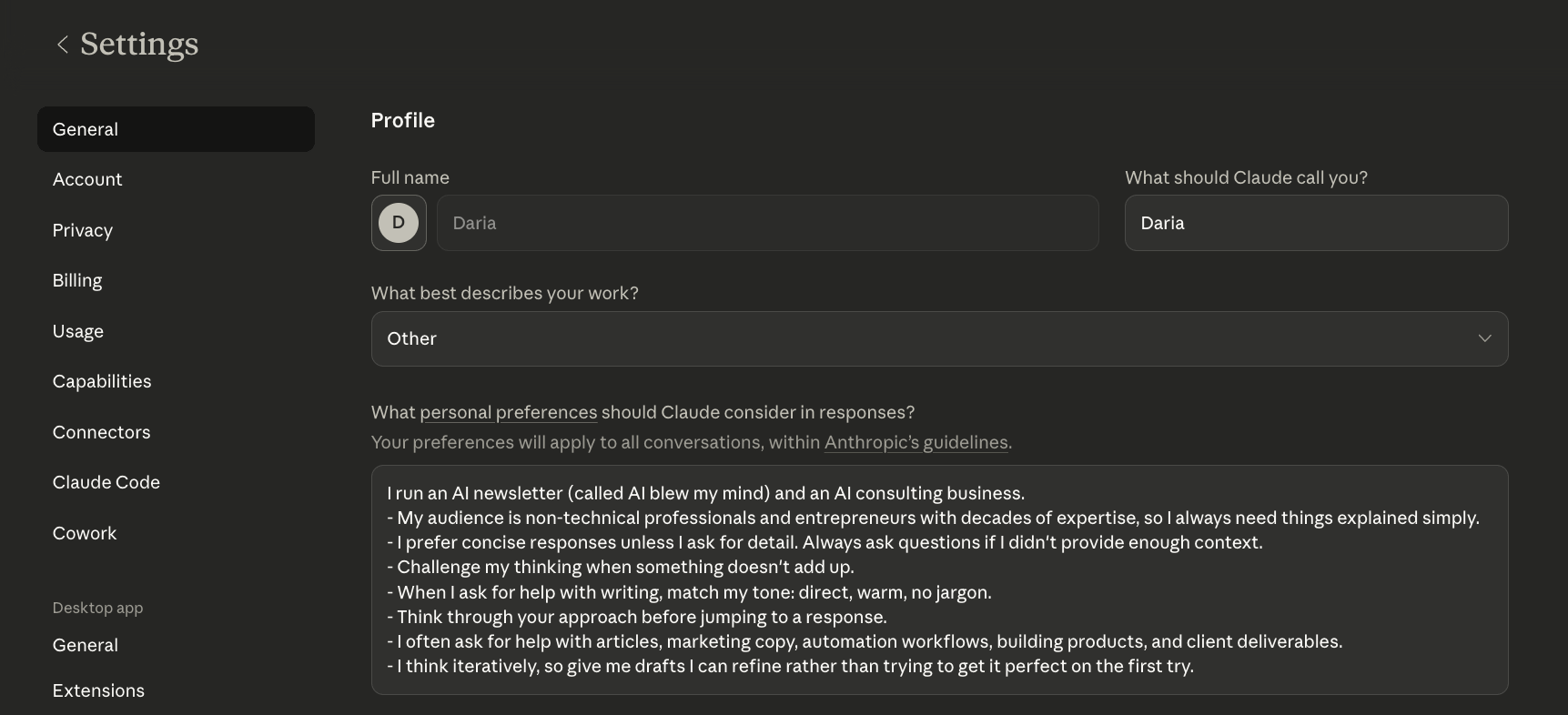
Put that once into Settings → Instructions for Claude, and Claude carries it into every chat automatically. I walked through how to set this up here.
Habit 8. Tell Claude to be brief (the caveman trick)
By default Claude pads its answers: “Great question”, “I’d be happy to”, a recap of what you asked, a summary at the end. All of it costs output tokens.
Someone on Reddit got famous for fixing this by telling Claude to “talk like a caveman”, dropping it to bare words. Their example: a normal answer at 61 tokens, the caveman version at 11, same technical content. Someone even turned it into an installable Claude Code skill you can add if you want it on tap.
You don’t need to go that far, though. A line in your custom instructions or at the top of a conversation does most of it:
Default to short, direct answers. Drop the opening pleasantries and the wrap-up summary. Lead with the answer, add detail only if it’s needed, and stop when you’re done.
Choose well in the moment
These are the small per-message choices. None of them takes setup, you just pick better as you go, and it adds up fast.
Habit 9. Match the model to the task
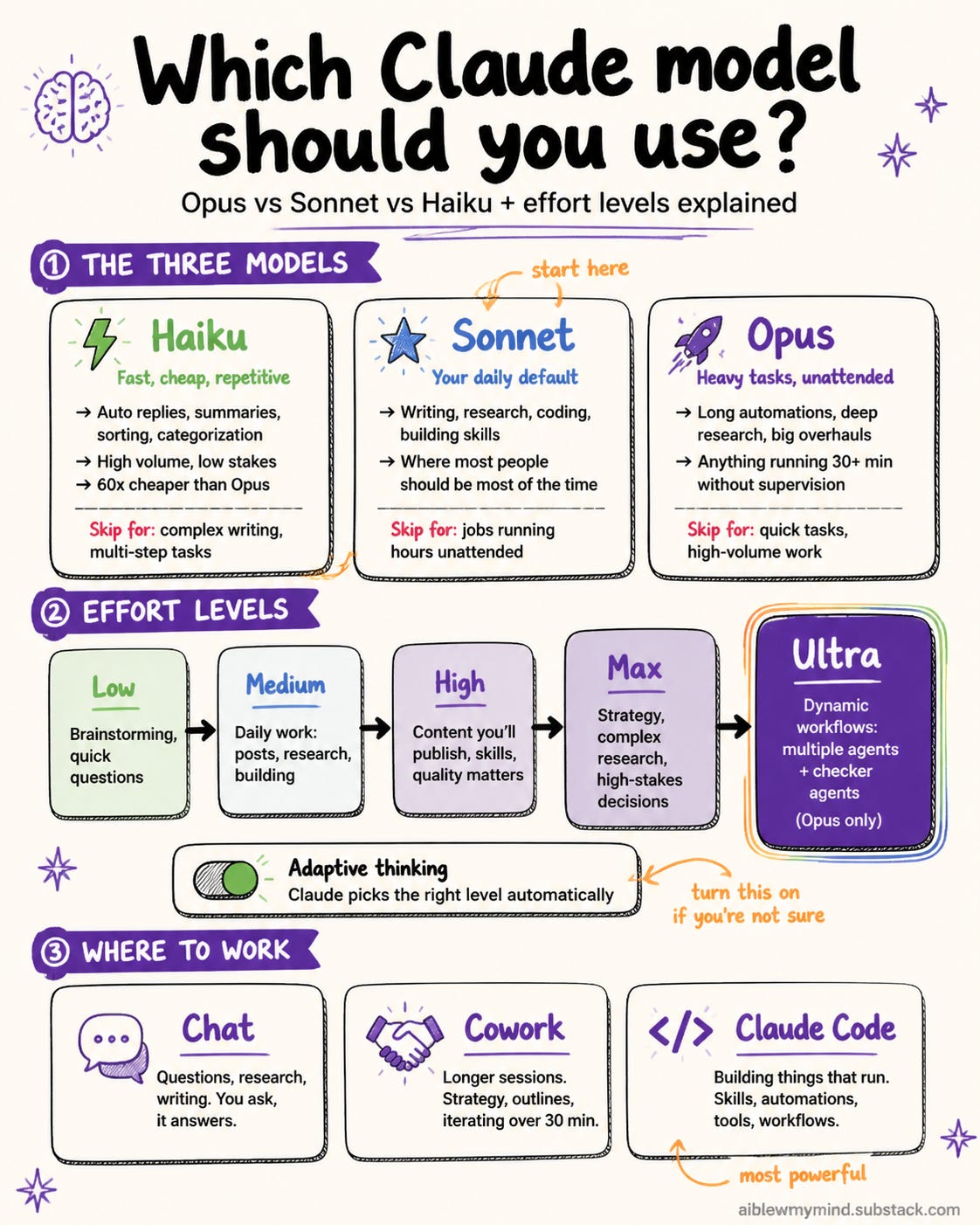
This might be the single highest-impact choice. Haiku handles quick questions, brainstorms, formatting, grammar, and translations at a fraction of the cost.
Save Sonnet for real writing and analysis. Reserve Opus for really hard reasoning. And when you’re close to your limit and need to keep going right now, switching to Haiku is the fastest way to buy yourself room.
A rough rule: Haiku for quick stuff, Sonnet for real work, Opus for the hard stuff.
Habit 10. Turn off what you’re not using
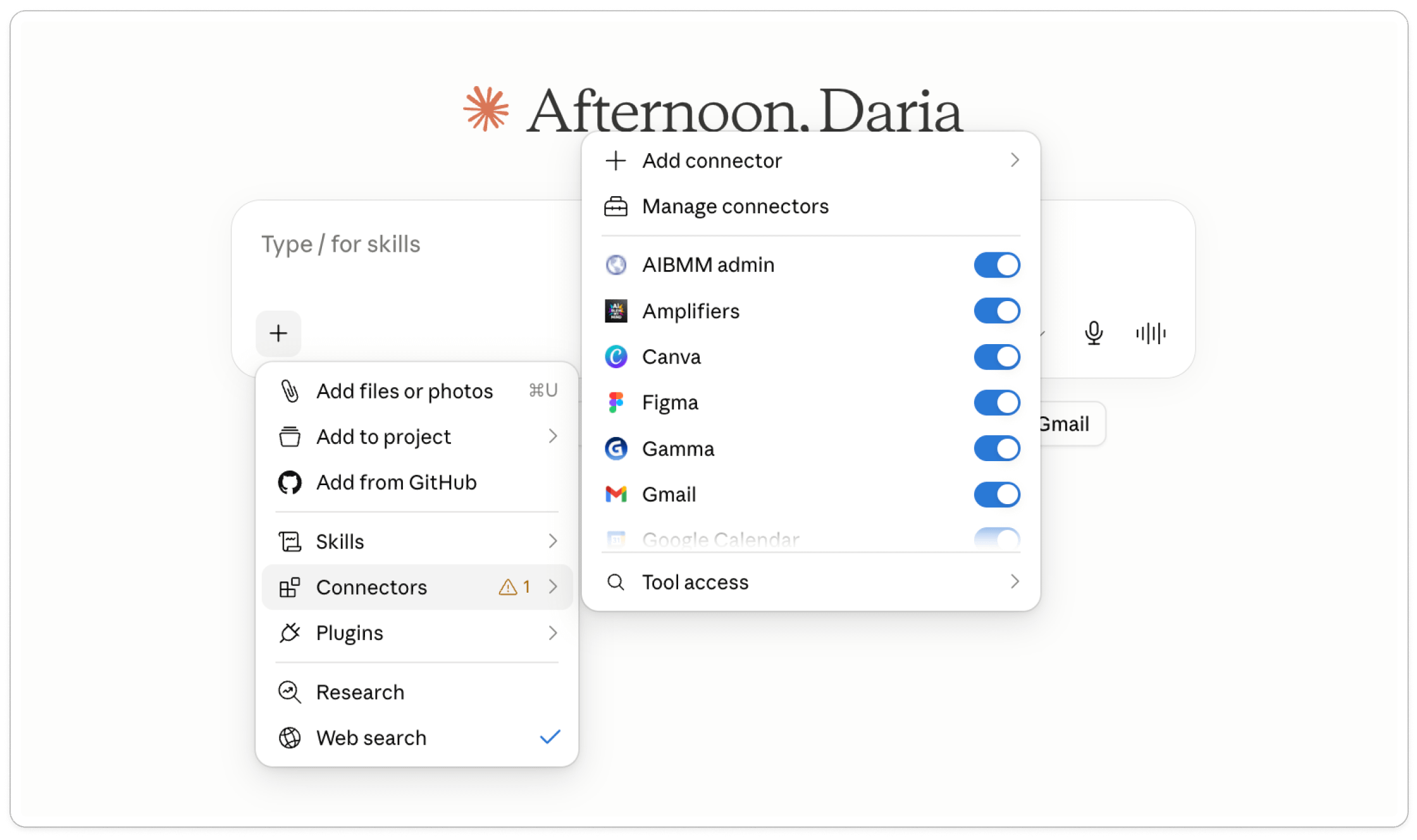
Web search, connectors, and extended thinking all add tokens, even when you didn’t need them for that message. Anthropic flags this directly: tools and connectors are token-intensive, and they suggest turning off the ones you’re not actively using.
If you’re just writing or thinking something through, toggle off search and tools, and leave extended thinking off until a first attempt comes back not good enough.
Simple rule: if you didn’t turn it on for a reason, turn it off.
Habit 11. Plan before you build
Don’t open Claude and say “build me a landing page”. You’ll get something, then spend ten messages dragging it toward what you wanted, and every one of those costs tokens. Talk it through first. Describe what you want, let Claude ask questions, lock the plan, then have it build once.
In Claude Code I do this with the Superpowers plugin every time, for planning and brainstorming, so what it builds matches what I had in mind.
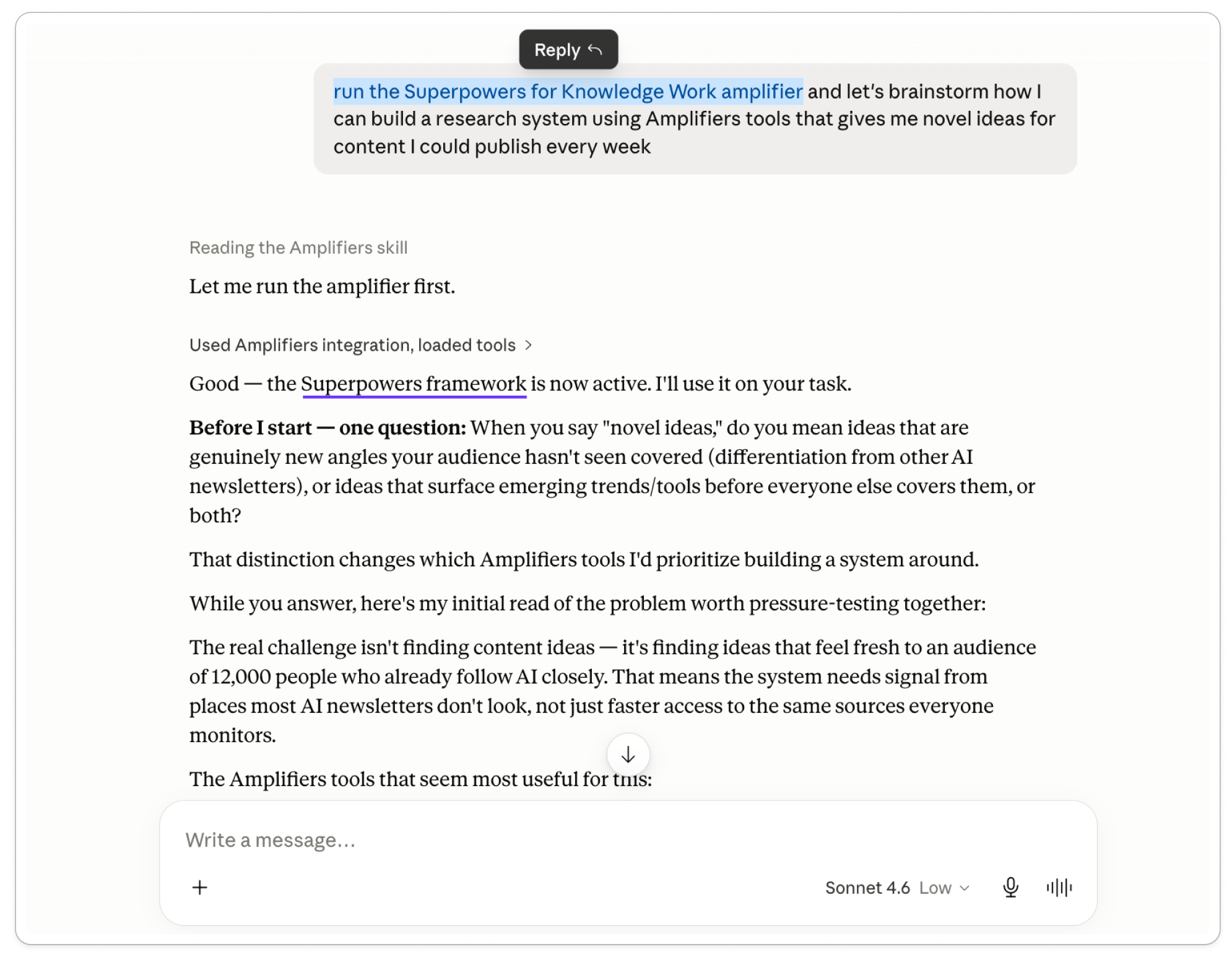
I liked it enough that I made a version for everywhere else: Superpowers for Knowledge Work, inside Amplifiers.
If you’ve got Amplifiers set up, you can run it in regular chat (or any Claude product) on any task, not just code, to make Claude understand the job and plan it out before it produces anything.
Habit 12. Start your clock early to control when it resets
The 5-hour window doesn’t start at midnight or when you open the app. It starts the moment you send your first message, runs exactly five hours, then resets, whether you sent one message or a hundred. It’s use-it-or-lose-it.
Most people waste this by only starting when they sit down to real work, then hitting the wall mid-afternoon with hours left before reset. Flip it.
Send a throwaway message early, a simple “start” when you wake up, and you’ve anchored the window.
Five hours later it refreshes, right as you’re getting going. Do it deliberately and you can run two or three clean sessions in a day instead of burning one and waiting.
Cut what you feed in, and build around it
The deepest savings come from two places: shrinking what goes into Claude, and building setups that remember so you stop feeding the same things in at all. This is the deep end, and it’s where the heaviest users live.
Habit 13. Convert documents to Markdown before uploading
Remember the file tax from earlier: a PDF gets read as text AND turned into a picture of every page, so you pay twice. The fix is to convert the file to Markdown (plain text with light structure) before you upload, then paste in only the part you need.
Markdown is the format LLMs read most cheaply. Microsoft, which built one of these tools, describes it as extremely close to plain text, with minimal markup or formatting, but still provides a way to represent important document structure.
Some tools you can use:
MarkItDown (built by Microsoft, free, 135,000+ GitHub stars). Converts PDF, Word, PowerPoint, Excel, and more. Runs from the command line, so it’s the most technical option here.
LiteDoc (free). Runs entirely in your browser, nothing gets uploaded to a server. Built specifically so you stop burning tokens on raw PDFs.
pdfmarkdown.app (free). Also browser-based, with a side-by-side view so you can catch anything that converted wrong before you save it.
Habit 14. Turn work you repeat into a skill
This one saves the most over time. Think about a task you do often, and what it costs you every time you start it cold.
Take writing as an example. Without a writing skill, every time I ask Claude to write something I have to steer it: not like that, shorter, drop that section, more like this. Every correction is another round in the chat, and every round re-reads everything above it. I’m paying to re-teach Claude my style from scratch, and the text still doesn’t sound like me.
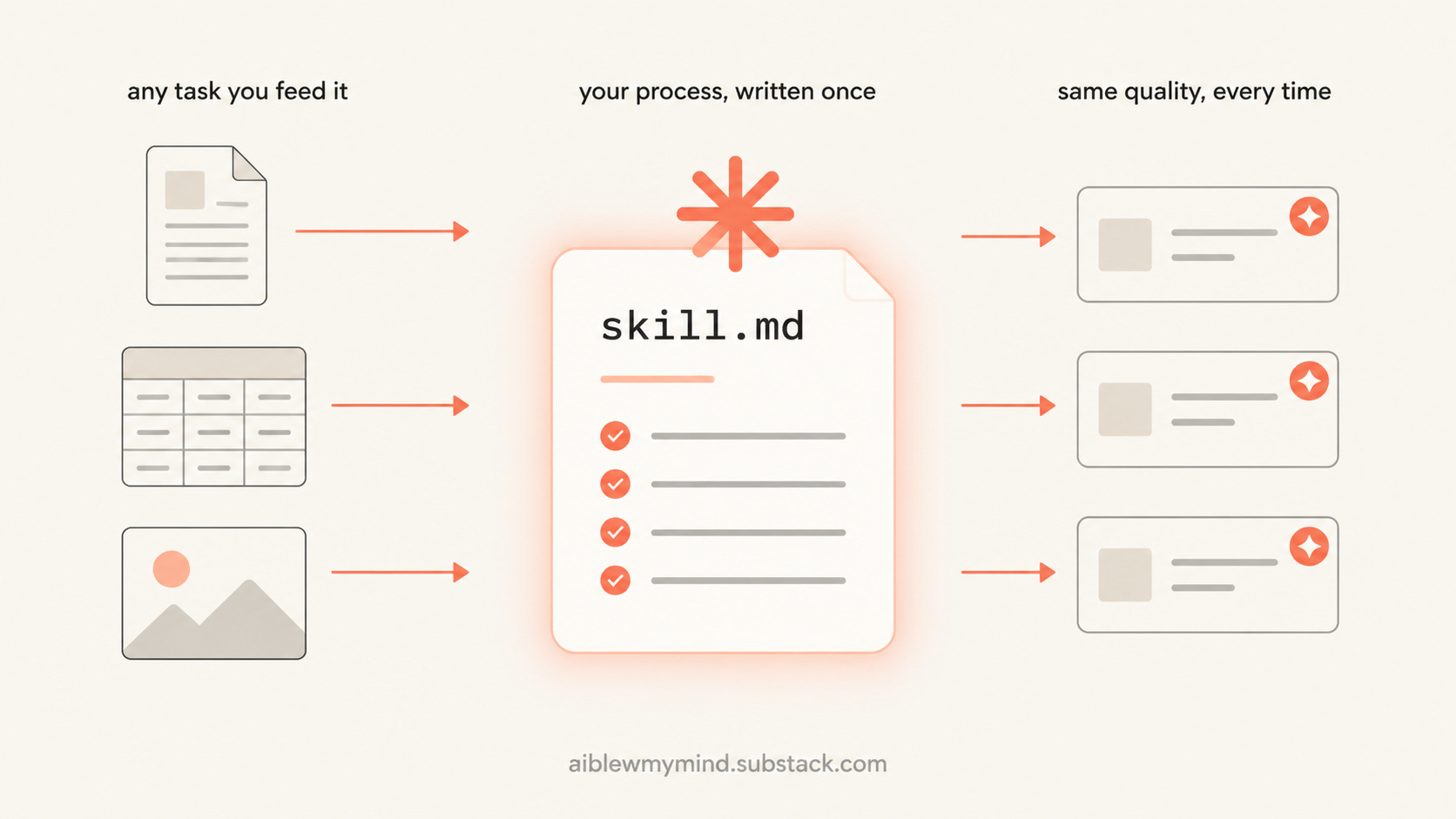
A Claude skill fixes that. A skill is just a markdown file (the cheap format we already talked about) where you write your rules down once. For my writing, I put my voice in a skill. Now Claude reads that at the start and already sounds like me, so I’m not steering it through twenty messages to get there. That one read costs almost nothing. The twenty messages would’ve cost real tokens.
It works the same for anything you do enough to have a standard for. I wrote down how my documents should look once, and now they come out on-brand without me explaining the formatting again. Same for my Instagram carousels, and a lot more. Write the standard down once and you stop paying to repeat it.
The easiest way in: don’t write one from scratch. Take a chat that already went well and turn it into one. I made a free skill that does exactly this, it reads a finished conversation and saves the whole process, corrections and all, as a skill or a repeatable workflow.
Habit 15. Build a system that holds your context for you
The furthest version: stop working in chats for your recurring work and build a system that remembers everything so you never repeat yourself.
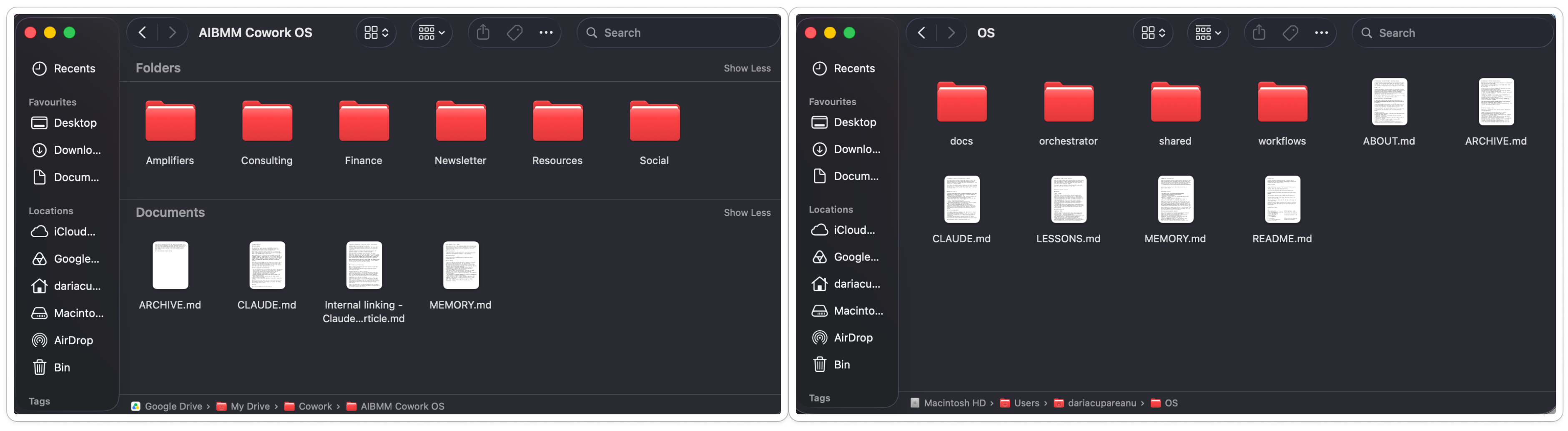
I run mine in Cowork and Claude Code, and underneath, both are just folders of plain markdown files, the same cheap format.
Left: my Cowork operating system, for hands-on work with Claude. Right: my Claude Code system, for automated work that runs in the cloud even when my laptop’s closed. Open either and it’s the same underneath, just markdown files.
The savings come from the memory layer: your context, preferences, and decisions live in files the system reads once at the start, instead of you re-typing them into every new chat. You stop paying the setup tax over and over, and the work comes out better because the system already knows your standard instead of guessing.
So if you’ve got a few workflows you repeat constantly, a system pays for itself in tokens and time both.
The better option for most people is a browser extension. There’s a whole ecosystem of them now. The most established is Claude Usage Tracker, a free, open-source extension that estimates your consumption across files, project knowledge, chat history, and tools, and pings you when your limit resets.
A few caveats before you install anything: these extensions use Claude’s internal, unofficial APIs, so they aren’t built or endorsed by Anthropic, they sometimes break when Claude updates, and the token counts are estimates, not Anthropic’s exact numbers. Treat them as a dashboard that’s roughly right, not a precise meter.
What these habits won't fix
These habits stretch your plan, sometimes by a lot, but they don’t give you infinite Claude.
If you’re doing heavy work, long research sessions, big document analysis, all-day building, you’ll still hit limits eventually, just much later and far less often.
At that point you have two options.
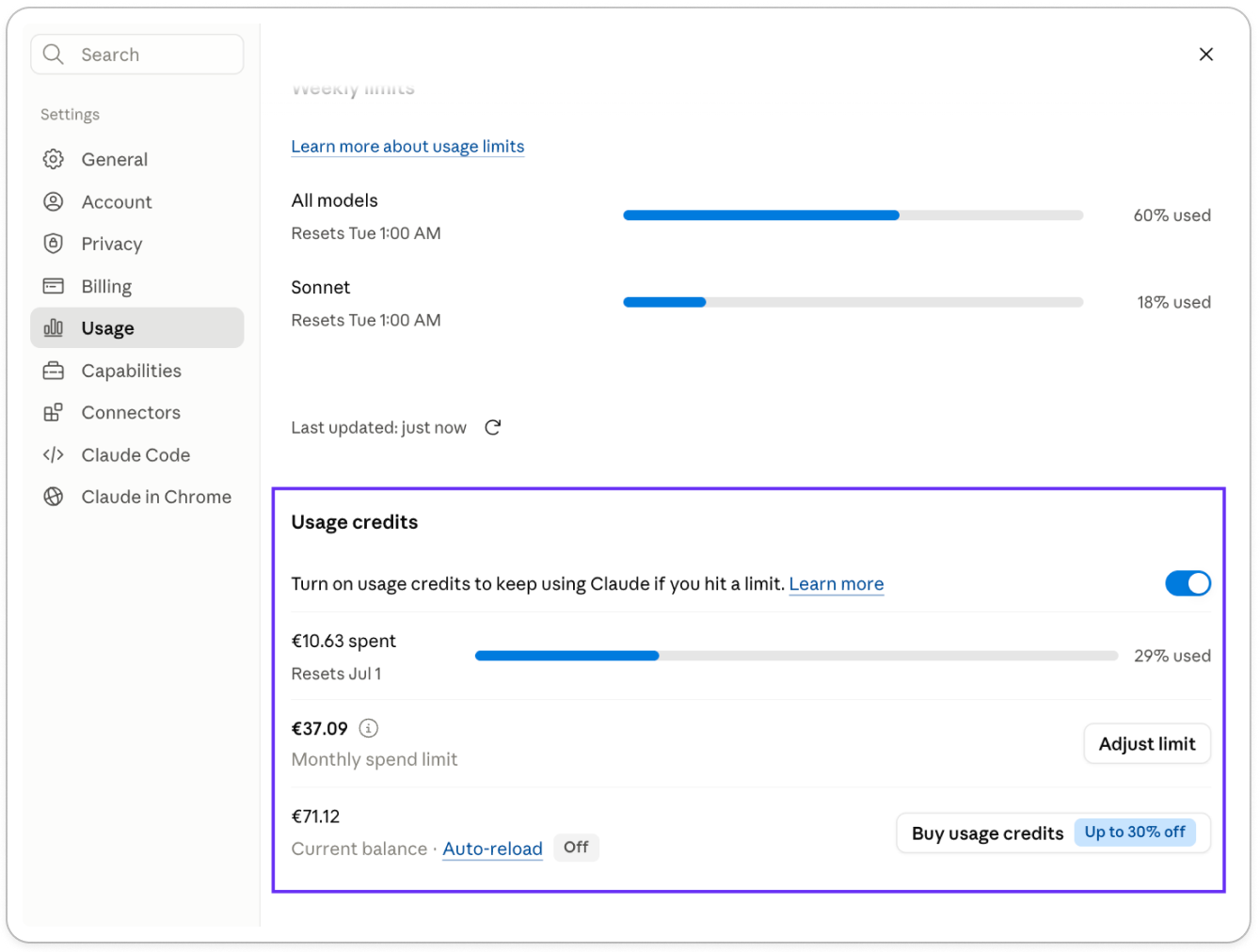
You can turn on usage credits in Settings, which lets you keep working past your limit at pay-as-you-go rates instead of getting blocked.
Or, if you’re buying credits constantly, that’s the signal you’ve outgrown your plan and a bigger one is the cheaper choice.
Is a bigger Claude plan worth it?
Maybe you’re already paying $20, and now you’re being told to spend more, over usage limits that feel like a joke next to what other LLMs let you do. I get why that’s irritating.
But let me put it differently.
If Claude has become central to your work, and you’re still hitting the wall after all of these habits, that’s the sign a bigger plan would pay for itself.
Think about what the interruption actually costs you. You get stopped right before you finish something, and you sit there waiting for the window to reset.
Meanwhile you’re not paying for one chatbot. You’re paying for the writer, designer, developer, and analyst you’d otherwise hire or wait on, in one place. One tool you go deep into beats five shallow $20 subscriptions, because it gives back more and you can build whole systems inside it.
That’s the math that moved me. I upgraded to Max the moment limits started breaking my flow, because my time is worth more than waiting on a reset.
My work is all AI, so my case is extreme, but the logic holds for anyone who can swing the Max plan without stretching: if the tool moves your work forward, weigh the price against what your time is worth and what the interruption costs you when you need it most.
Your turn
Pick the two habits that match how you most often get burned. Just two. Run them for a week and watch how much later the wall shows up.
Then tell me how it goes. Which two did you pick, and what’s been eating your limit, the endless threads, the PDFs, the wrong model? If you’ve got a trick of your own that I didn’t cover, I want to hear it.
And if this saved you some frustration, leave a comment, and share it with someone who’s always hitting “limit reached”. It helps more people than you’d think.
This post is free, but to get access to all premium workflows and tools inside Amplifiers, weekly premium articles, all premium resources inside the AI blew my mind Lab, and exclusive partner discounts, consider upgrading your subscription.
PS. We added dozens of new tools to Amplifiers this week. If research is any part of your work, getting Amplifiers set up in your Claude is a no-brainer. It’s how I research and fact-check these articles now, including this one.
In addition to planning with superpowers, and if using Claude Code like the last suggestion, the claude-men MCP drastically cuts memory context. I’ve been using it for 3 weeks now and while I’m on the max 5x plan, I’ve only hit my limits when I’m doing lots of parallel ai agent work - where I was consistently hitting it every 5 hour period previously.




Thanks! Phenomenal tips! I will save and restack
In addition to planning with superpowers, and if using Claude Code like the last suggestion, the claude-men MCP drastically cuts memory context. I’ve been using it for 3 weeks now and while I’m on the max 5x plan, I’ve only hit my limits when I’m doing lots of parallel ai agent work - where I was consistently hitting it every 5 hour period previously.
https://github.com/thedotmack/claude-mem (85k stars)