
Everything I’ve Written about Claude, In The Order You Should Read It
I keep getting the same question. “Daria, where do I start with Claude?”
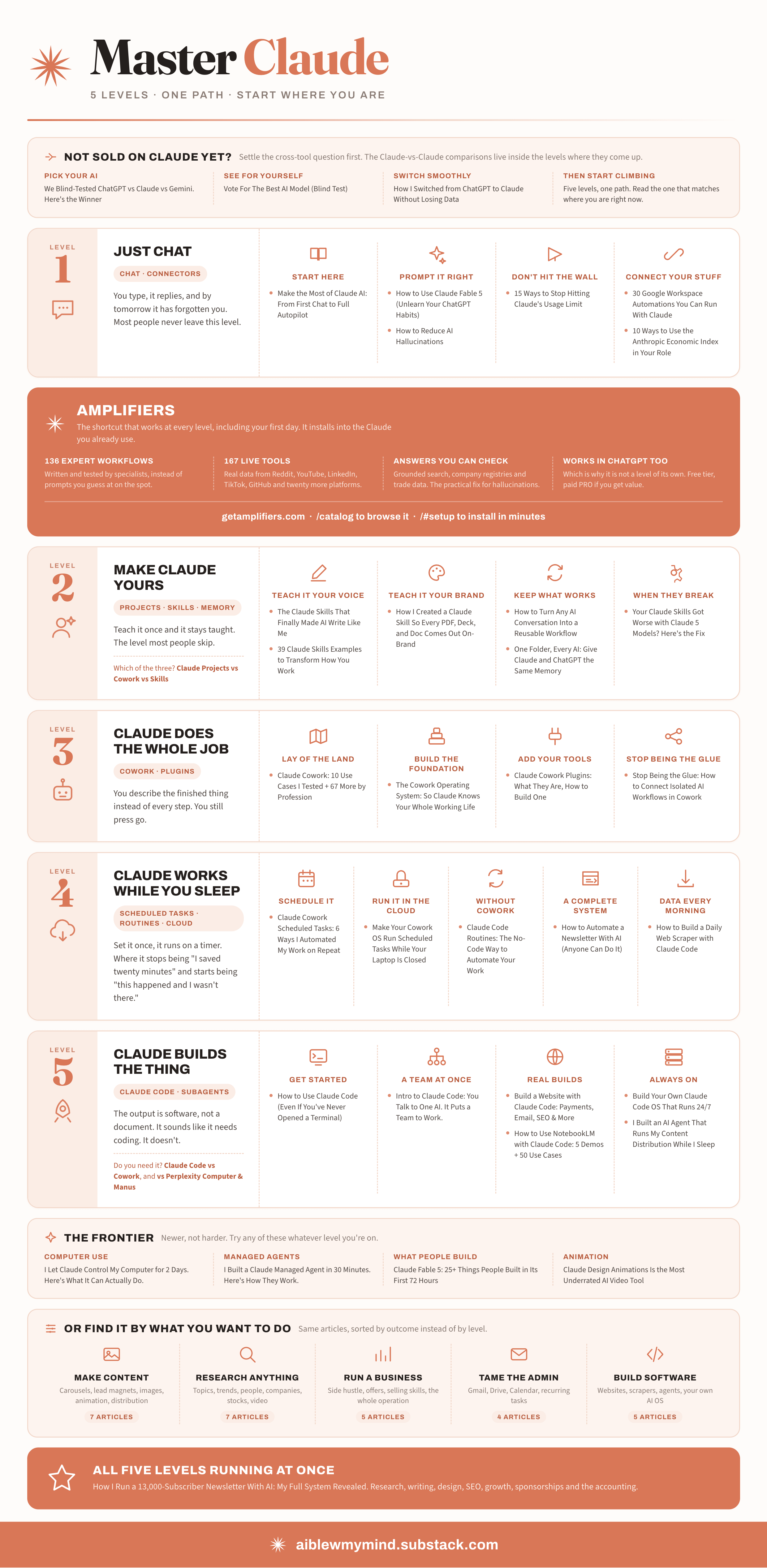
So I went back through every article I’ve written about Claude, Anthropic’s AI assistant, and stacked them like a staircase. Each level is one step up in how much of the work you hand over. Start at the level you’re at. Climb when you’re ready.
Here’s what’s inside:
Not sold on Claude yet? The blind tests, and how to switch without losing your history.
Level 1: Just chat. The basics most people never get past.
Amplifiers. The shortcut that works at every level, including your first day.
Level 2: Make Claude yours. Projects, Skills, memory. Teach it once, it stays taught.
Level 3: Claude does the whole job. Cowork runs the work instead of helping you do it.
Level 4: Claude works while you sleep. Scheduled tasks and routines.
Level 5: Claude builds the thing. Real software with Claude Code, no coding required.
The frontier. Computer Use, Managed Agents, the agent stuff.
Or find it by what you want to do. The same articles, sorted by outcome instead of by level.
You don’t need to read these in order. You need to read the ones that match where you are right now. The bolded article in each level is the one to start with.
Not sold on Claude yet?
We Blind-Tested ChatGPT vs Claude vs Gemini. Here’s the Winner. Same prompts, three models, no branding shown.
How I Switched from ChatGPT to Claude Without Losing Data. Months of history, moved over step by step.
Level 1. Just chat
Chat and connectors. You type, it replies, and by tomorrow it’s forgotten you.
Make the Most of Claude AI: From First Chat to Full Autopilot. The complete guide. If you read one article on this page, read this one.
How to Use Claude Fable 5. Claude wants shorter, less structured prompts than ChatGPT. This is the unlearning.
15 Ways to Stop Hitting Claude’s Usage Limit. Running out mid-task is the most common reason people give up on it.
How to Reduce AI Hallucinations. A hallucination is AI stating something false with complete confidence. How to catch it.
10 Ways to Use the Anthropic Economic Index in Your Role. Your first connector, which is permission for Claude to read something of yours. Prompts by profession.
30 Google Workspace Automations You Can Run With Claude. Connect Gmail, Drive and Calendar, then run 30 ready-made prompts.
Amplifiers: the shortcut that works at every level
Everything else on this page has you building your own prompts and workflows. That’s the right way to learn, and it’s slow. Amplifiers is my own library, it installs straight into the Claude you’re already using, and it’s the one thing here that helps a complete beginner as much as it helps me.
Expert workflows instead of your own prompts. 140+ of them, written and tested by specialists rather than guessed at on the spot.
Live tools, not just a model. 167 of them, pulling real data from Reddit, YouTube, LinkedIn, TikTok, GitHub and twenty other platforms.
Answers you can check. Grounded web search, company registries and trade data, so research comes back with sources. This is the practical fix for the hallucination problem in Level 1.
It works in ChatGPT too, which is why it is not a level of its own. Start on the free tier, upgrade to PRO if you get value.
Browse the whole catalog to see what’s in there, or set it up now. It takes a few minutes and it’s the same steps for Claude or ChatGPT. Everything lives at getamplifiers.com.
Prefer to watch it work before you install anything? These are the articles where I use it on real jobs:
Turn Claude Into Your Personal AI Operating System. My own walkthrough of the setup and what changes afterwards.
30 AI Research Tools That Live Inside Claude and ChatGPT. The clearest look at the live-data side.
The AI Tool That Became as Indispensable to My Work as AI Itself. What it replaced in my business.
How to Turn Dense Technical Documents Into Clear AI Slides. A reader’s real process for turning long reports into accurate slides inside Claude, with every word and number checked.
Stop Googling “Is This Legit?” Let AI Investigate Instead. Checking any shop, ad or message before you pay, with a source for every claim. Tested on 6 real cases, from fake shops to phishing.
More in action: YouTube workflows · Finance workflows · Trend research · Prospect research · Why images stall · Image generation · Side-hustle prompts
Level 2. Make Claude yours
Projects, Skills and memory. Teach it once and it stays taught. The level most people skip.
Now that you’ve met the three names: Claude Projects vs Cowork vs Skills, and when to use each.
The Claude Skills That Finally Made AI Write Like Me. A Skill is a set of instructions you save and name, so Claude follows them every time. This is why they matter.
How to Make AI Write AND Think Like You (So Its Drafts Come Back Almost Final). Get AI drafts that sound like you and reason like you, so you spend minutes polishing instead of hours rewriting.
39 Claude Skills Examples to Transform How You Work. The range, from 23 different people, so you can find your kind of work.
How I Created a Claude Skill So Every PDF, Deck, and Doc Comes Out On-Brand. Teaching Claude your colours, fonts and layout rules.
One Folder, Every AI. Same memory and context for Claude and ChatGPT, so you don’t teach each one separately.
How to Turn Any AI Conversation Into a Reusable Workflow. Turn a chat you already solved into a permanent Skill, in about five minutes.
Your Claude Skills Got Worse with Claude 5 Models?. The repair, for when a model update breaks what you built.
Level 3. Claude does the whole job
Cowork and plugins. You describe the finished thing instead of every step. You still press go.
Claude Cowork: 10 Use Cases I Tested + 67 More by Profession. Cowork is Claude with its own workspace, opening and editing real files. What it can and can’t do.
The Cowork Operating System. Set this up before anything else in Cowork. Everything later sits on it.
Manage Multiple Clients From One AI System. The same OS, scaled to a whole client roster. Shared processes in one place, every client with their own context and skills, and an orchestrator that builds each client’s setup for you.
Claude Cowork Plugins: What They Are, How to Build One. A plugin gives Cowork a tool it didn’t have. Build your own without code.
Stop Being the Glue. For when you have several workflows and you’re still the one copying between them.
Claude Dashboards Tutorial: Turn Messy Business Data Into Dashboards That Update Themselves. Step-by-step tutorial that takes you from messy spreadsheet data to a self-updating Claude dashboard, including a ready-to-copy small business cash flow template and all the prompts you need.
Level 4. Claude works while you sleep
Scheduled tasks, routines, cloud. Set it once and it runs on a timer without you.
Claude Cowork Scheduled Tasks: 6 Ways I Automated My Work on Repeat. The shortest path to something happening while you’re not there.
Run Scheduled Tasks While Your Laptop Is Closed. Moving it to the cloud, because some of this stops when you shut the lid.
Claude Code Routines: The No-Code Way to Automate Your Work. The same idea without Cowork, and no code despite the name.
How to Repurpose Your Content With AI on Autopilot. Something that works while you sleep without building anything yourself. One sentence sets up a workflow that turns everything you publish into posts, carousels, infographics and video scripts.
How to Automate a Newsletter With AI. A complete system, worth copying even if you don’t write a newsletter.
How to Build a Daily Web Scraper with Claude Code. A scraper visits a site and pulls information off it. This one runs every morning.
Level 5. Claude builds the thing
Claude Code and subagents. The output is software, not a document. It sounds like it needs coding. It doesn’t.
Before you start: do you really need Claude Code if you already have Cowork? And how it compares to Perplexity Computer and Manus.
How to Use Claude Code (Even If You’ve Never Opened a Terminal). The Terminal part takes about ten minutes, then it’s the conversation you’re used to.
Intro to Claude Code: You Talk to One AI. It Puts a Team to Work.. Subagents, which is several Claudes working at once on different pieces.
Build a Website with Claude Code: Payments, Email, SEO & More. A real site that takes real money. Not a demo.
Build Your Own Claude Code OS That Runs 24/7. Your own always-on system in the cloud.
I Built an AI Agent That Runs My Content Distribution While I Sleep. An agent doing a real job, with the mistakes I made building it.
How to Use NotebookLM with Claude Code. Wiring an outside tool into your system. 5 demos, 50 use cases.
The frontier
Newer, not harder. Try any of these whatever level you’re on.
I Let Claude Control My Computer for 2 Days. Claude moving your mouse and clicking on your actual screen. Six workflows, including the failures.
I Built a Claude Managed Agent in 30 Minutes. Building something Claude-powered that other people can use.
Claude Fable 5: 25+ Things People Built in Its First 72 Hours. Where the ceiling is right now.
Claude Design Animations. Animation from a description. Nobody’s talking about this one.
Or find it by what you want to do
Same articles, sorted by outcome.
Make content and visuals Instagram carousels · Lead magnets · Everything on-brand · Image generation · Why images stall · Animation · Distribution on autopilot
Research anything 30 research tools · Trends across 9 platforms · Any topic · A prospect in 2 minutes · Companies and stocks · Any YouTube video · NotebookLM · Stocks like a finance pro
Run a business on it 20 side-hustle prompts · How I run mine · Sell Claude Skills · Automate a newsletter · Prospect research
Tame the admin Gmail, Drive and Calendar · 6 things on repeat · Laptop closed · Connect your workflows
Build software A website · A scraper · Subagents · A managed agent · Your own AI OS
All five levels running at once
How I Run a 13,000-Subscriber Newsletter With AI: My Full System Revealed
Research, writing, thumbnails, SEO, growth, sponsorships and the accounting. Every level on this page working together, including the parts that still break.