
The AI Content Research Workflow That Replaced My 3-Hour Tab Marathon
Pulls real view counts, upvotes, and comments from 8 platforms to show you what is going viral, which hooks land, and the questions people keep asking that nobody answers well.

Before I write almost anything, I research it first.
What other people have already written. What’s getting traction. What the top YouTube videos cover. What people argue about on Reddit. What questions keep coming up that nobody answers well.
I do it for two reasons:
To find the gap I can fill, instead of publishing the 100th version of something that already exists.
To broaden my own view. Reading across every platform almost always hands me an angle I hadn’t thought of or a point that already resonated with people that I’ll want in my own piece.
Done properly, this used to take me hours. Sometimes days. Tabs everywhere, half-read articles, three YouTube videos open, a Reddit thread I lost track of.
I even tried handing this research to Claude controlling my computer, after a lot of you told me you wanted an easier way to do it as well. And it works. But it's slow, it burns through credits, and because it scrolls one page at a time the way a person would, it distills far less than you'd want.
So I built a Topic research workflow inside Amplifiers, which already has access to all the social platforms I want to pull from. Now it gives me the research brief I need before writing an article or creating any piece of content, in about 5 minutes.
The video below is a quick look at it running, if you want the glimpse before the detail.
The rest of this is how it works and why it changes how you start any piece of content.
In today’s article:
A word from today’s sponsor: Cuey
Stop pasting the same prompt into three different AIs
You know the drill. Ask ChatGPT, then re-ask Claude, then check Gemini, just to see who’s right. A lot of you do this. I know, because you told me. And it’s the right call. The expensive mistakes are the ones where the AI sounded sure and you believed it.
The problem is it costs you ten minutes and three open tabs every single time.
So when I found Cuey, I was kind of annoyed I’d been doing it the hard way. Because it does all of it for you, without the tabs:
You type your prompt once, inside the AI you’re already in.
Cuey sends it to 30+ other models in the background, so you never open another tab or paste it again.
You get one answer back that shows where the models agree, where they don’t, and which one to trust.
It only surfaces a second opinion when it’s worth your attention, and stays quiet otherwise.
And the good news? I got you 60 days of Pro free. Use code AIMIND60, no card needed.
Compare every model in one tab
What this AI content research workflow does
The workflow is called Topic Research for content creators. It lives inside Amplifiers, the AI blew my mind connector for Claude and ChatGPT, and it runs on the same research tools I covered here, now wired together across 8+ platforms.
Once you’ve set up Amplifiers, using it is as simple as it sounds.
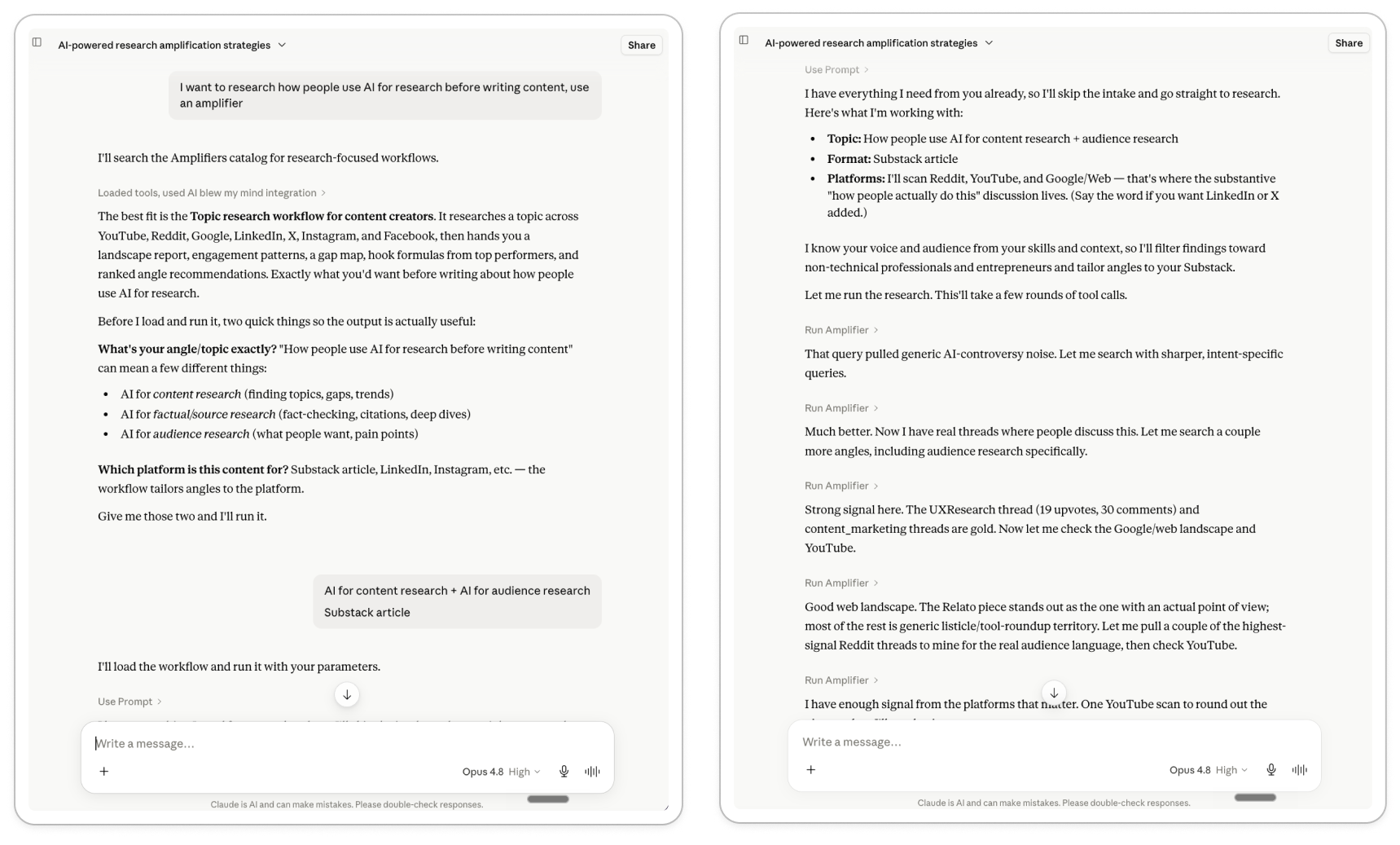
Step 1: You open Claude and ask
Something like “research [this topic] for a piece of content using Amplifiers”.
That’s the trigger. Claude finds the topic research workflow and runs it.
Step 2: You tell it what you’re researching
Two things:
The topic you’re exploring: broad like “AI for consultants”, or specific like “is Codex better than Claude Code for non-technical founders building their first app”, whatever you’re thinking of covering
The kind of content you’re making: an article, a YouTube video, a LinkedIn post, an Instagram reel or carousel, a newsletter, whatever you’re creating
Step 3: You pick the platforms
YouTube, Reddit, Google, LinkedIn, X, Instagram, Facebook, whichever ones matter for this topic. All of them, or just the two you care about.
Step 4: It does the research you used to do by hand (or not at all)
Searches YouTube for what’s performing, then pulls transcripts and comments from the top videos
Searches Reddit for the real questions and frustrations people post
Checks what’s ranking on Google and reads the top articles
Scans LinkedIn, X, Instagram, Facebook, whichever ones you picked
Step 5: It tags everything as it goes
For each piece of content: the angle it takes, the format, the hook, how it performed, and what the comments reveal that the content missed.
The content research report you get back
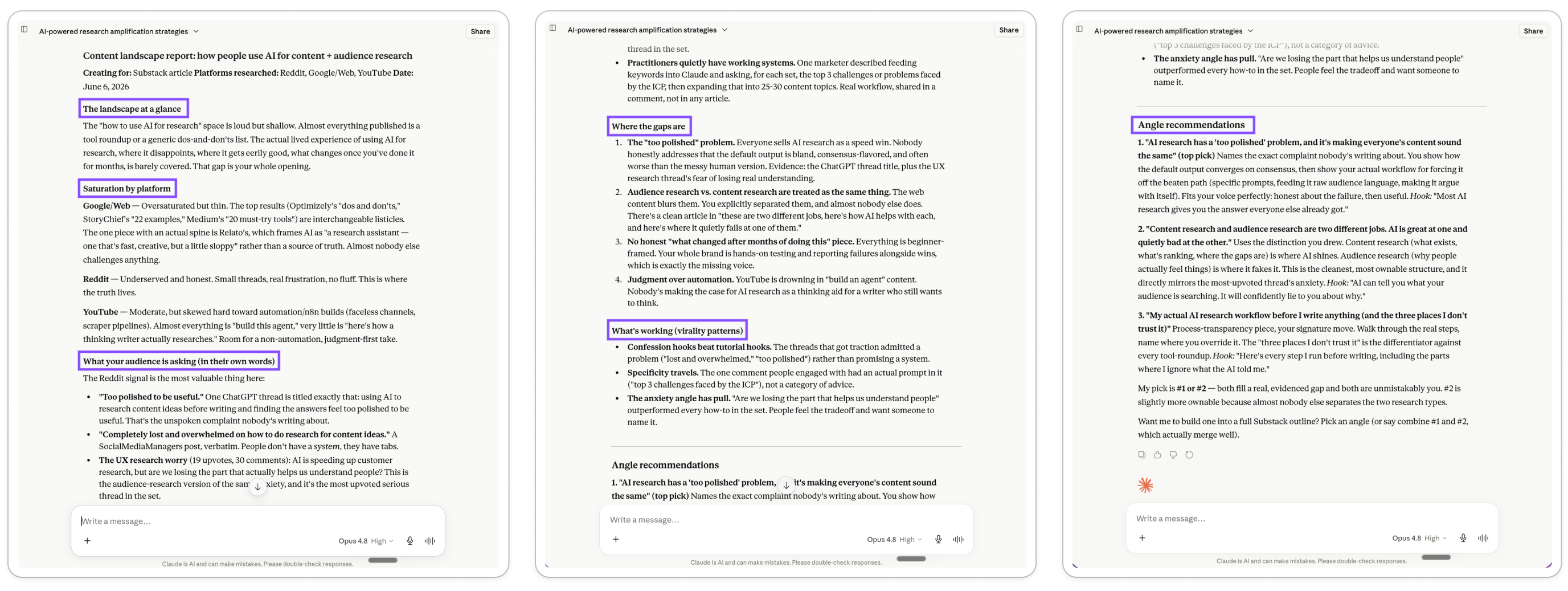
Everything comes back as one structured report:
The landscape at a glance. How much already exists, how good it is, and where the obvious opening is before you get into the details.
Saturation by platform. Which platforms are crowded and which are wide open, plus which angles are already over-covered on each one, so you know where your piece has the best shot at being noticed and which takes to avoid.
Engagement patterns. What’s getting traction across the top performers: the formats, the structures, the emotional angles people respond to, pulled from real view counts, upvotes, and comments.
Hook formulas from top performers. The exact opening moves the best-performing content uses, broken down so you can borrow the pattern.
A gap map. The specific things people are asking that nobody answers well, each backed by a real thread or comment.
3 to 5 ranked angles. Concrete directions you could take the piece, each with a draft hook and a reason it would stand out, ordered by which has the best shot.
And it doesn’t stop at the report. If you pick an angle, it also builds the outline.
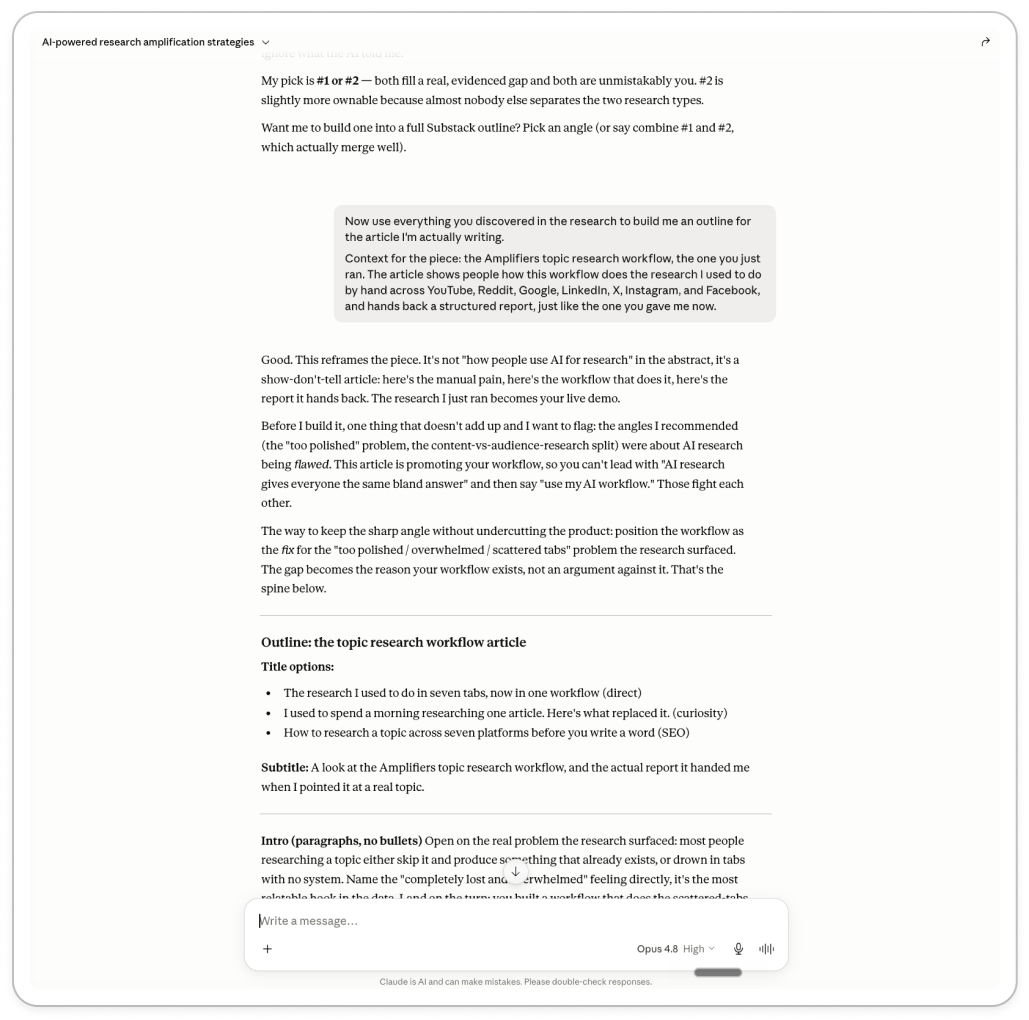
Approve the outline, it writes the draft. So you go from “I want to write about X” to a researched, structured draft in one sitting.
It works for any content format, not just articles
I keep saying “writing”, but that’s just how I use it. The workflow asks where your content lives, and tailors everything to that.
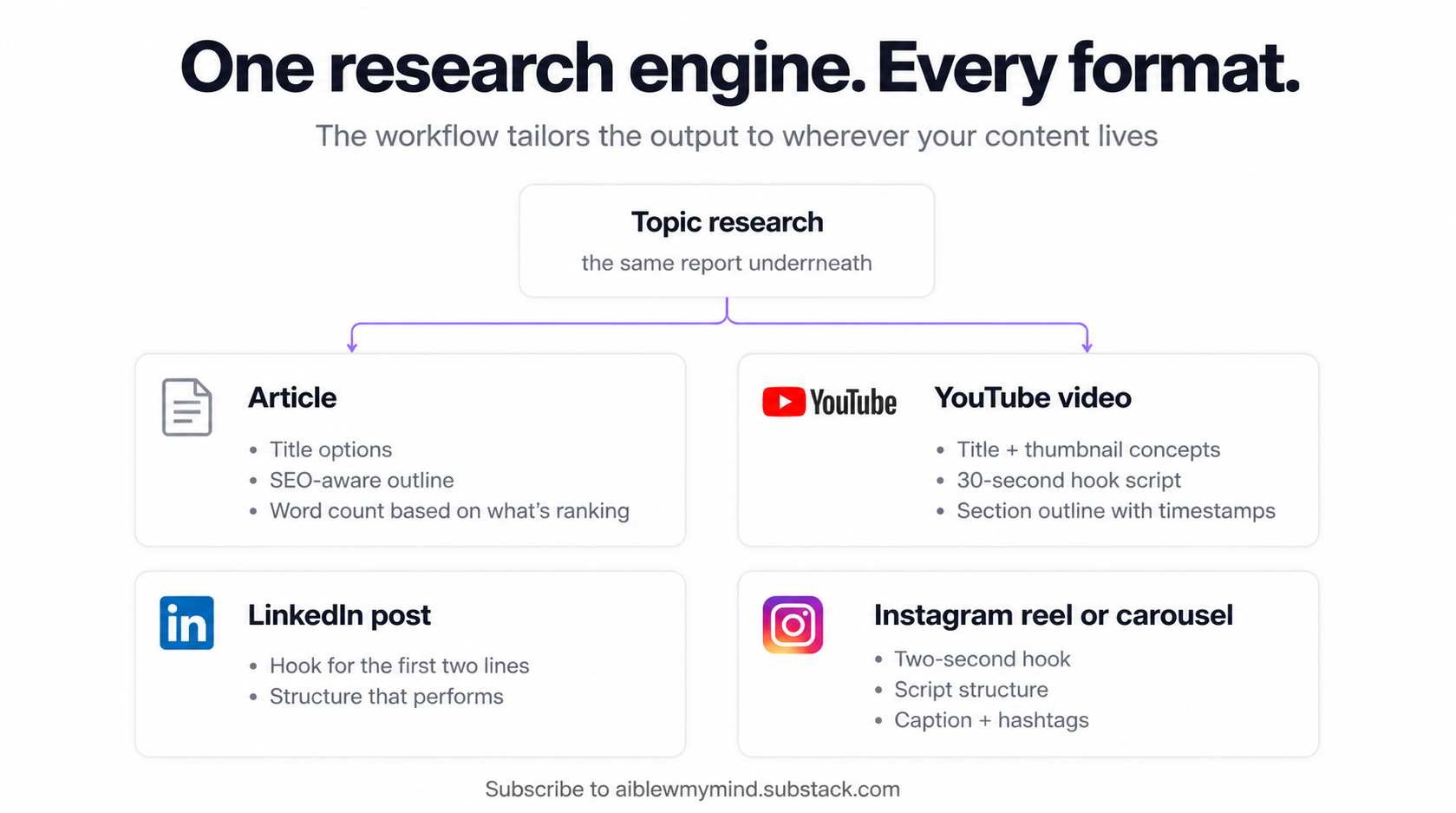
It works the same whether you're building a personal brand or a business, and whatever channel you're creating content for: articles, YouTube, LinkedIn, Instagram, TikTok, X.
Same content research underneath, the output just bends to the format.
Why the data is real (and why it matters most)
If you ask Claude or ChatGPT to find what’s on Reddit about a topic, it’ll give you something. Reddit is well indexed by LLMs, so it can surface a few useful things. But it’s a handful, it’s shallow, and the links it hands you might be made up.
Go to YouTube, LinkedIn, or Instagram and it’s worse. The model can’t reach into those platforms on its own. It migh improvise something, but you have no way to tell what’s real.
That’s the reason Amplifiers exists. When you run this workflow, it’s not pulling from what the model half-remembers. It’s going to each platform and reading what’s there:
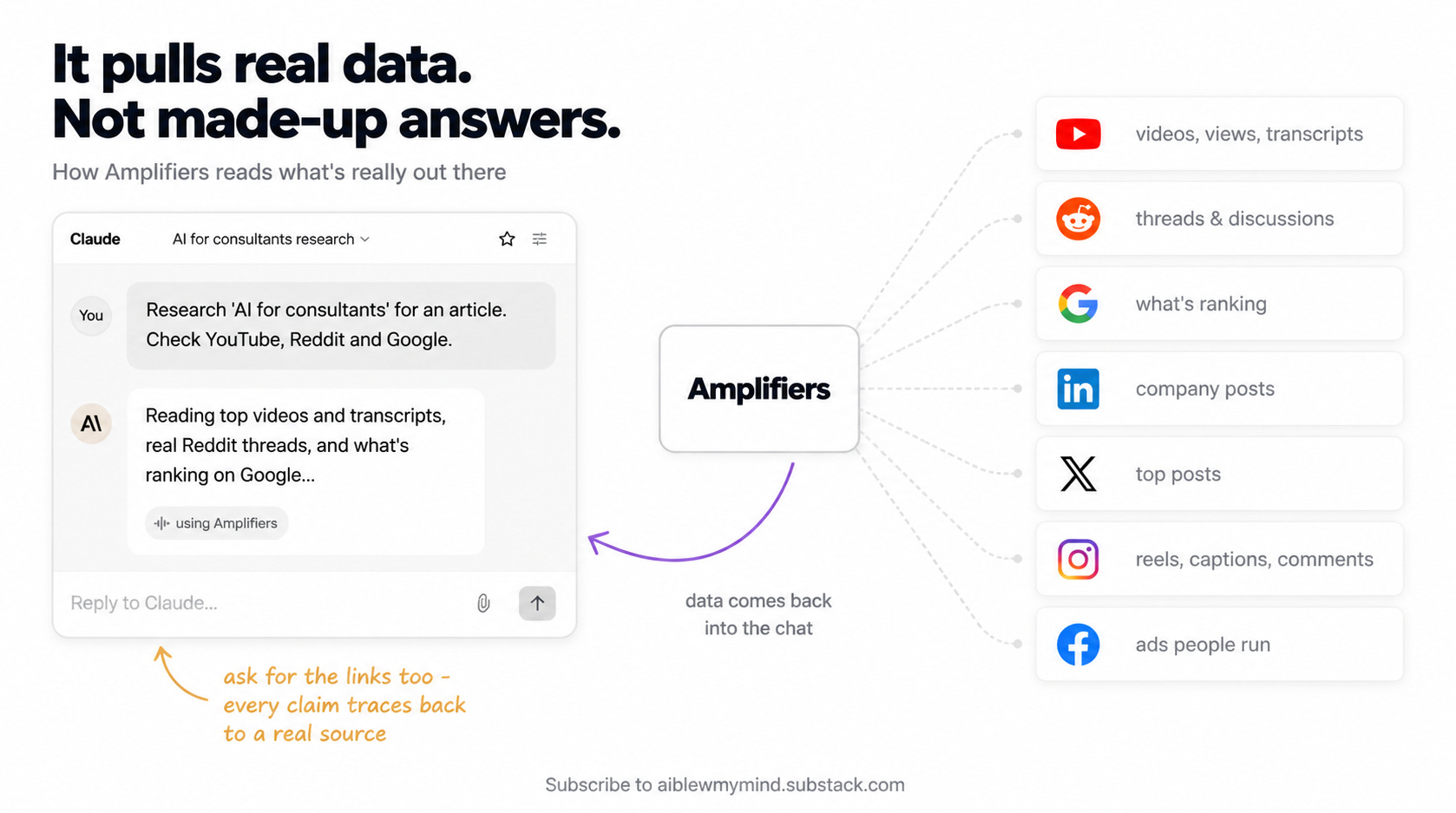
Real YouTube videos with real view counts and transcripts
Real Reddit threads with the real upvotes and comments under them
Real articles currently ranking on Google
Real LinkedIn, X, and Instagram posts, with the engagement they got
So when the report tells you a topic is everywhere on YouTube but barely touched on Instagram, that’s because it looked.
An AI on its own can still help you think through a topic. You can brainstorm with it, shape an angle, talk it out, and that’s useful. But it can’t give you the level of insight you get from the data itself, like the virality patterns, the hooks that are working, and the questions people keep asking that nobody answers well.
That kind of insight comes from reading what’s already out there, which is exactly what the workflow does for you.
It’s the same thing that let me cut prospect research from 30 minutes to 2, just pointed at content instead of people. It’s also how I keep up with the news I care about, pulled from real sources I can open and verify, instead of links a model invented.
Where content research fits in my AI content system
Over the past months I've built a whole stack of tools and systems for content creation and marketing with AI. But all of them come after this one. The research is the part underneath, the step before any asset gets created, because it’s what tells me what’s worth making in the first place.
Most of them are their own articles if you want to go deeper.
Two are writing skills, the ones that shape how the content sounds:
Voice DNA. Makes Claude write like me instead of like a polished stranger. My most popular one.
Audience profiles. So Claude always knows who I’m writing for, covered in the same write-like-me guide above.
The rest are content-creation skills, the ones that turn the writing into a finished, on-brand asset:
The brand skill. Every PDF, deck, and doc comes out on-brand without me touching the design.
The carousel skill. Turns an article into branded Instagram carousels in one go.
The lead magnets skill. Built on top of the brand skill, turns content into branded PDF lead magnets in about five minutes.
Infographics for LinkedIn or my articles, generated right inside Claude now that it can make images.
Research first, then write in my voice, then turn it into the asset.
The research step that comes before everything
This is the workflow I reach for before I write anything, and it’s probably the one you’ll want too.
It does the part that used to eat my hours: reading what’s already out there across every platform, finding the gaps, handing me a brief I can write from. For most content, that’s exactly what you need before you start.
And if you want it to work a little differently, you can shape it.
Maybe you want the report in a different format or you only care about Reddit and Google and would rather skip the rest.
You can build your own version by opening a conversation with Claude (or ChatGPT, if that’s where you work), pointing it at the Amplifiers tools you want to pull from, and iterating until the output is right. Then you document it with the free Claude skill that turns the conversation into a reusable workflow, and save it inside Amplifiers so it’s there every time you need it.
That’s the whole idea. Start with this, and if what you need is different from what I need, build the version that fits you.
Now tell me… Where do you do most of your research now, and is it working for you?
And if this saved you from another evening lost to infinite scrolling, share it with someone who’s still doing their content research the hard way. It helps them get their time back, and it helps this newsletter grow.
This post is free, but to get access to all premium workflows and tools inside Amplifiers (like the Topic research workflow we explored today), weekly premium articles, all premium resources inside the AI blew my mind Lab, and exclusive partner discounts, upgrade here.
Love this! I am also a fan of Hyperagent by Airtable if you haven't tried it out yet!
The gap map is the part worth slowing down for - knowing what people keep asking that nobody answers well is a better brief than anything you'd write yourself. Most content fails not because it's bad, but because it's the 100th version of something that already exists.