
How I Cut Prospect Research from 30 Minutes to 2 (Using AI)
Stop spending 30 minutes Googling prospects. This AI prospect research workflow uses Claude or ChatGPT to deliver a full brief in 2 minutes. Here's how.

Thirty minutes of researching a prospect, and you still walk in with surface-level information. I spend two minutes and get a full brief: company, person, industry pressures, talking points, and exactly how to position myself. I recorded my whole AI prospect research workflow below. Works in Claude and ChatGPT.
If you don’t want to read this article, just watch this 10-minute video:
For everyone who prefers reading, let’s go.
In this article:
Why most prospect research takes 30 minutes (and still misses)
You get a name. Maybe a company. And then you do one of three things:
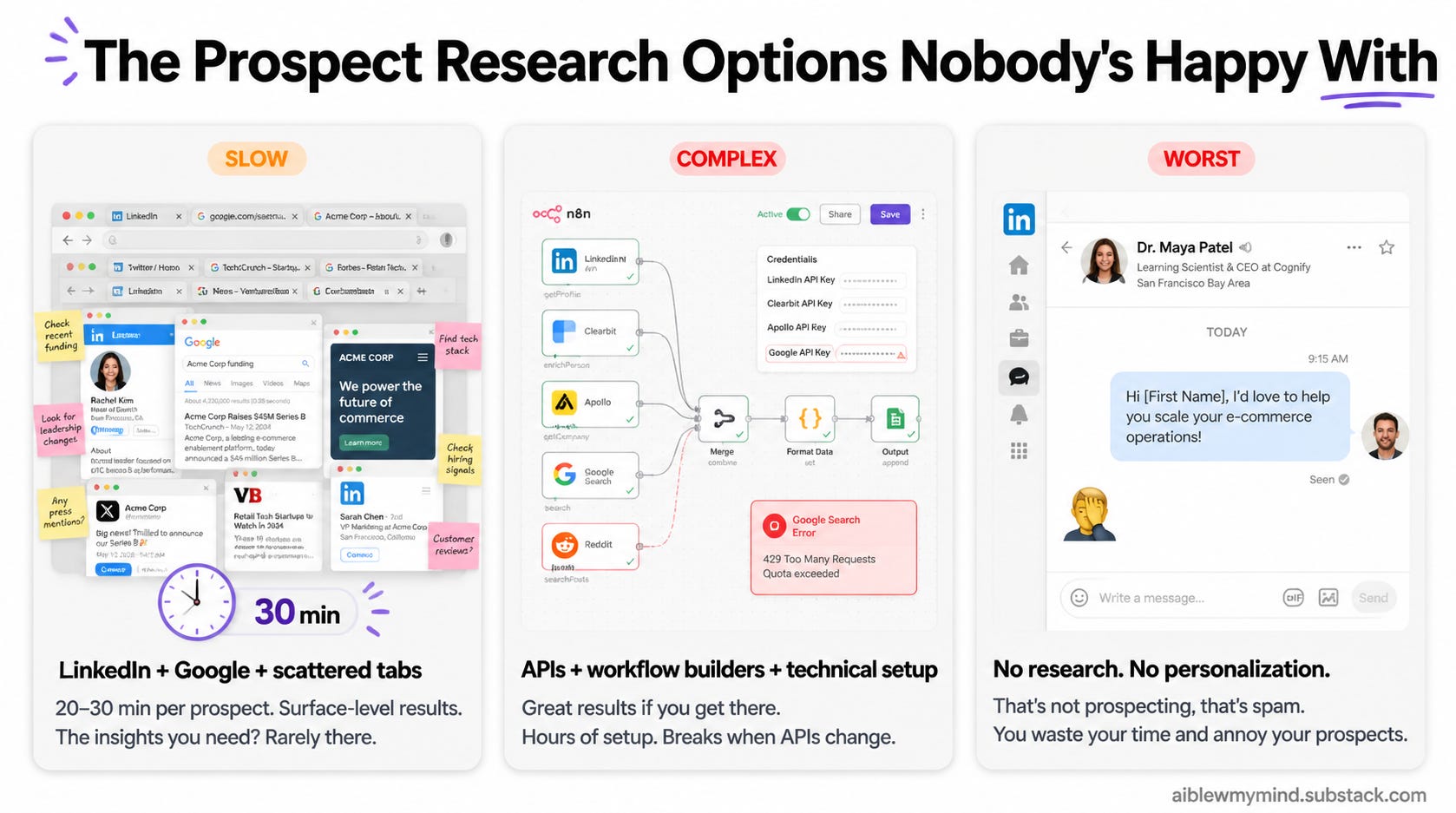
1. The manual way: LinkedIn + Google + scattered tabs
You open their LinkedIn, read their profile, switch to Google, click through a few results, maybe check their Twitter. It takes 20 to 30 minutes per prospect, and even when you put in the time, you end up with surface-level information. Not the kind of context that helps you position yourself well or ask the right questions in a call.
2. The DIY automation way: APIs + workflow builders + technical setup
You connect APIs, set up an n8n or Make workflow, pull data from LinkedIn and social platforms, and add an AI layer that creates the report from all the info. But it takes technical knowledge, API keys, and hours of setup. And if you want to change anything later, you’re back in the workflow builder tweaking nodes. Most non-technical people never get there.
3. The “I’ll just wing it” way
No research at all. You walk into the call cold, write the message off the top of your head, or blast the same pitch to fifty people. I get these on LinkedIn all the time. Messages from people pitching me services that have nothing to do with what I do. It’s obvious they didn’t spend a single minute looking at my profile. That’s not prospecting, that’s spam. And besides wasting your own time, you’re annoying the exact people you’re trying to build a relationship with.
My 2-minute AI prospect research workflow with Amplifiers
Amplifiers already connects Claude and ChatGPT to LinkedIn, Google, Reddit, Twitter/X, company registries, and the open web. The AI Prospect Research Workflow ties all of these tools together into a step-by-step process that Claude runs for you, pulling data from each platform and building a full report based on your goal.
Think of it as the n8n workflow, but without any of the technical setup. You don’t have to manage API keys or connect nodes or figure out how to wire tools together. And if you want the report to focus on something different, you just say so in the conversation. You don’t have to go back and rebuild the workflow. It adapts to what you ask for, which makes it much more flexible than anything you’d build yourself.
And instead of thirty minutes of tab-switching and skimming, you get a full prospect brief in about two minutes.
What's inside an AI Prospect Research brief
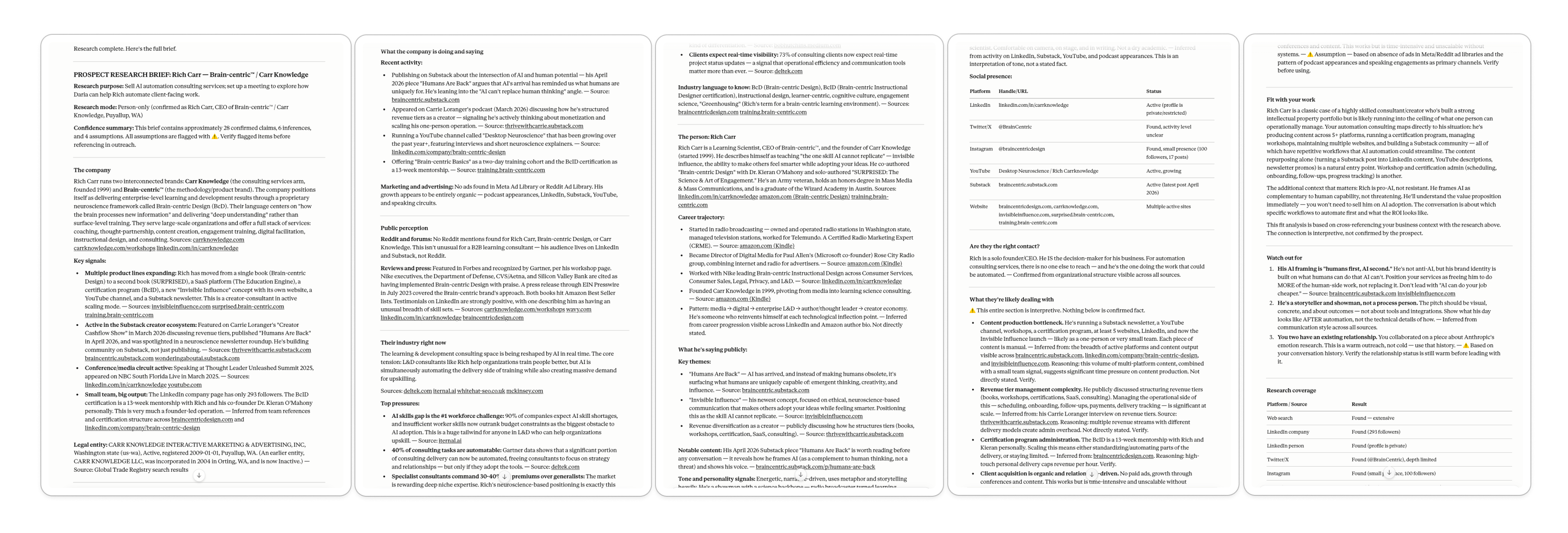
Company overview: What the company does, how it’s positioned, what it’s saying publicly, recent activity, legal entity, marketing and ads presence, reviews and press coverage
Industry context: Top pressures, industry language to know, what’s shifting right now
Person profile: Career trajectory, professional background, what they’re saying publicly, tone and personality signals, social media presence across platforms
Fit with your work: Assumptions about what they’re likely dealing with, where you could step in, what to watch out for when pitching, and whether they’re the right contact
Sources for everything: Links to every claim. Anything Claude couldn’t confirm is flagged as an inference, not stated as fact.
I wanted to demo this on someone real, so I picked Rich Carr, one of my earliest subscribers and a person I have a lot of respect for. He’s a learning scientist and CEO of Brain-centric. The report surfaced things I wouldn't have found on my own, even if I'd spent thirty minutes looking.
Because even if you do put in the time, you’re still just skimming profiles and clicking through search results.
The workflow reads everything it finds across platforms, every post, every article, every public mention, and connects it all to your specific goal. You’d have to scroll for hours to get to the same level of insight, and you’d still miss the connections.
How to research any prospect in 2 minutes (step-by-step)
You give it a name, tell it why you’re researching, and it produces the report. That’s how simple it is to use this workflow.
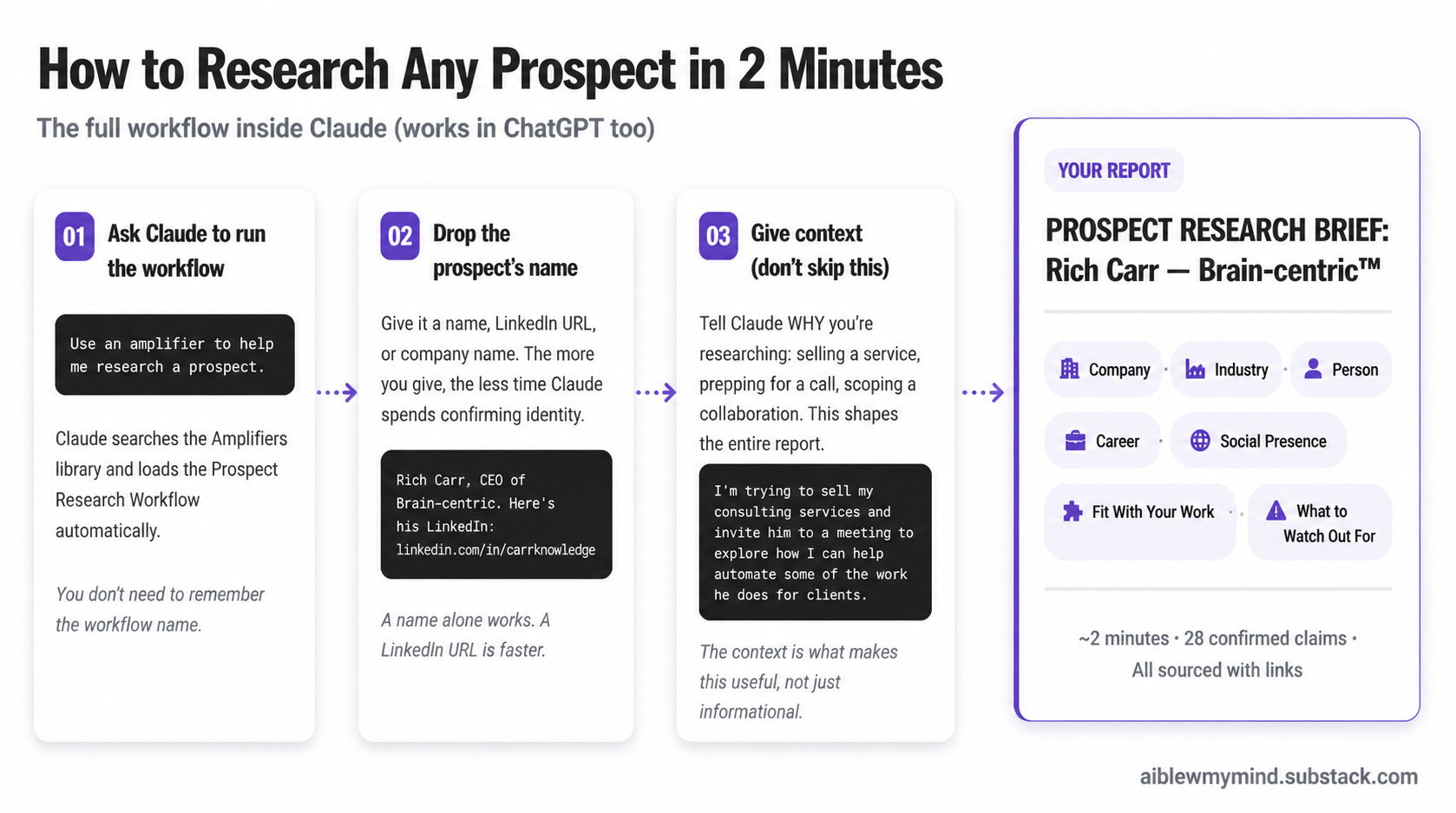
Step 1: Ask Claude to run the workflow
Open a new chat and say something like:
“Use an amplifier to help me research a prospect.”
Claude will search the Amplifiers library and find the Prospect Research Workflow.
Step 2: Give it the prospect’s name
If you have their LinkedIn URL or company name, drop that in too. The more you give it, the less time it spends confirming identity.
Step 3: Give it context (don’t skip this)
Tell Claude why you’re researching this person. Are you selling a service? Preparing for a collaboration? Scoping a proposal? Prepping for a call?
The context shapes the entire report, especially the “fit with your work” and “what to watch out for” sections.
Then you wait about two minutes while Claude does the research and delivers the full report.
What to do after your Prospect Research Brief
The report is the starting point. From there, you can stay in the same chat and ask Claude to:
Draft a cold outreach message based on everything it just found
Write a personalized email that references their recent work
Prepare questions for a discovery call
Help you position your pitch based on their likely challenges
Claude already has all the context from the research, so anything it writes from that point is informed by what it found. And because Claude also knows your preferences, your skills, and how you work, whatever you create next draws from both the research on your prospect and everything Claude already knows about you.
The Prospect Research Workflow and all the research tools it uses are available to premium subscribers. With premium, you get access to every workflow, every research tool, and all 100+ prompts inside Amplifiers.
How to set up Amplifiers in Claude and ChatGPT
For any of this to work, you need to connect Amplifiers to Claude or ChatGPT first, whichever you prefer to work in. It takes about a minute.
In Claude:
Go to Customize in the sidebar, then Connectors, then click the + icon
Select Add custom connector
Name it AI blew my mind and paste this URL: https://mcp.aiblewmymind.com/
Click Add, then go back to Connectors, find AI blew my mind under “Not Connected,” and click Connect
You’ll be redirected to auth.aiblewmymind.com. Create your account using the same email you use for your AI Blew My Mind subscription
That’s it. You’re connected.
In ChatGPT:
Go to chatgpt.com in your browser. Open Settings → Apps → Advanced Settings.
Toggle on Developer mode.
Click Create apps. Name it “AI blew my mind”. In MCP Server URL, paste: https://mcp.aiblewmymind.com/
Set Authentication to OAuth. Click Create, then Connect.
Create your account on auth.aiblewmymind.com using the same email as your AI Blew My Mind subscription to connect.
More AI prospect research workflows and prompts inside Amplifiers
The Prospect Research Workflow is one of many. Inside Amplifiers, there’s a full set of workflows and prompts that cover the entire arc of finding, researching, pitching, winning, and delivering client work.
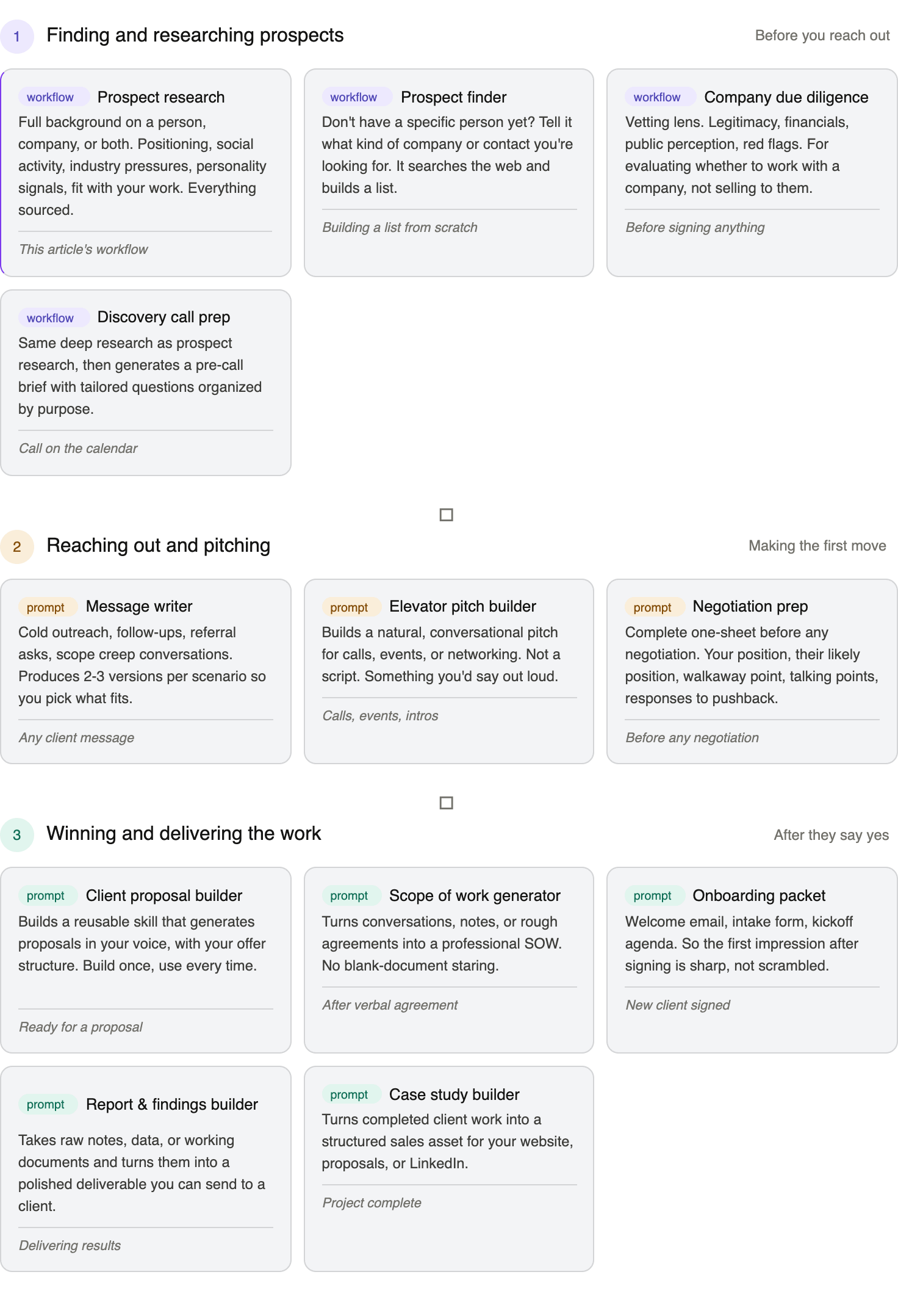
How to find the right Amplifier for any task
There are so many workflows and prompts inside Amplifiers that a lot of you have been asking me how you’re supposed to keep track of everything.
The thing is, you don’t have to. You just tell Claude what you’re trying to do and it finds the right one.
Here are a few ways to navigate Amplifiers:
Task-first: Tell Claude what you’re trying to do and ask “Find an amplifier that can help me with this.”
Browse everything: Ask “What’s everything inside Amplifiers?”
Personalized recommendations: Ask “Based on everything you know about me, which amplifiers would help me most in my work?”
And if you want to run prospect research briefs on multiple people at once, you can give Cowork access to a spreadsheet in a local folder with a list of prospects and ask it to research them one by one. That’s how you scale this.
The new way to do prospect research
I kept this article shorter than usual on purpose. If I were writing about how to build a prospect research system from scratch, connecting APIs, setting up n8n workflows, managing enrichment tools, this would be four or five thousand words. I know because I’ve written those articles.
But that’s the whole point. You don’t have to build any of it.
We added the APIs to 30+ research tools directly inside Amplifiers, so Claude and ChatGPT can pull real data from a bunch of platforms without you touching anything technical.
All you set up is Amplifiers. After that, every workflow runs inside Claude or ChatGPT, right where you’re already working.
Next time you have a call coming up or a cold message to write, try it. Two minutes, and you’ll walk in knowing more about your prospect than most people learn in a week.
Now that you’ve seen how fast AI prospect research can get you a full, detailed brief on anyone, I’m curious: after seeing this, would you still spend thirty minutes Googling a prospect?
The workflows and research tools in this article are available to premium subscribers. As a free subscriber, you can still connect Amplifiers and use a solid set of prompts, but the research tools, live platform data, and workflows like this one are premium.
Daria, please check my website https://pactresearch.net/ - we are clearly working of the same idea
this is just fab