
How I Automated Trend Research Across 9 Platforms (and Stopped Scrolling for Ideas)
An AI trend research workflow that scans 9 platforms — TikTok, YouTube, Reddit, LinkedIn, and more — and hands you a ranked menu of what to create next. Build your own in 30 minutes.

Staying on top of trends used to be a job in itself. Scrolling TikTok for an hour, checking what’s new on Reddit, opening YouTube “just for five minutes”. And even after all that scrolling, I’d still miss the thing everyone in my niche was talking about, because nobody can watch that many platforms at once.
Now I don’t scroll through any of them. Because every Saturday, at 10 AM, an AI trend research workflow I built for my Claude Code OS sweeps TikTok, Instagram, YouTube, Reddit, LinkedIn, X, Threads, Google, and GitHub for everything gaining traction around AI.
It ranks what it finds, and it sends me a full trend menu on Slack.
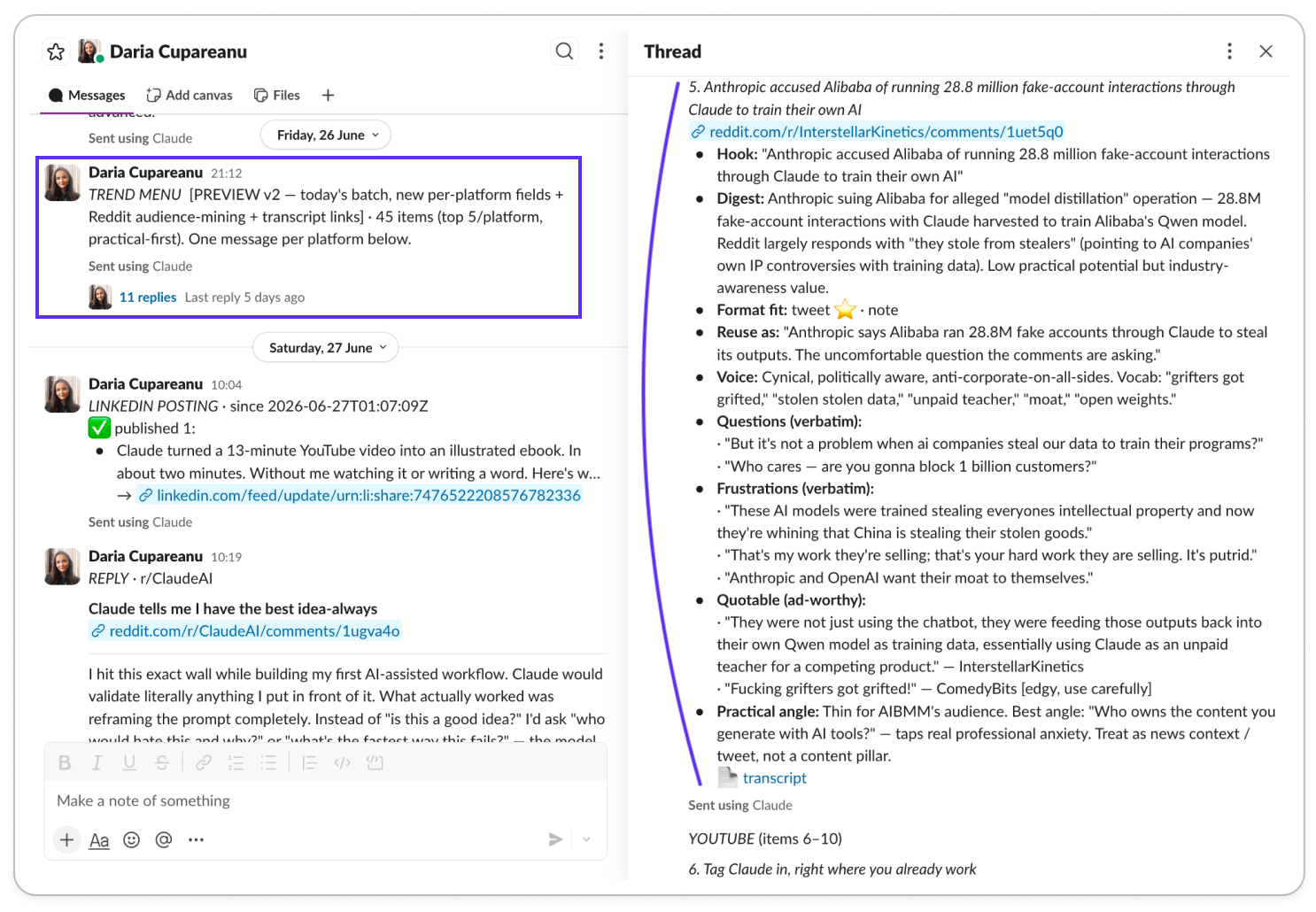
My only job is to read it and reply with the numbers of the topics I want to turn into content, like ordering from a restaurant menu. (What happens after I pick those topics is a whole workflow of its own, so we’ll save that for another article.)
The research engine behind my AI trend monitoring workflow is Amplifiers, and I can’t imagine going back to how I worked before it, because connecting to all these platforms and pulling data from them right inside Claude lets me do research I simply couldn’t do before.
I’ve shown you a few of the things I use Amplifiers for already, from researching everything published on a topic before I write about it so I can spot the gaps, to fact-checking claims or transcribing YouTube videos, to researching prospects. But that’s only a small part of what it can do.
And now that we’ve added many more platforms you can pull real data from, this new workflow became possible. I built it last week for my Claude Code distribution agent, so it could feed itself fresh topics every week without me lifting a finger.
Then I realized the system was much bigger than my use case. So I packaged it up. With the prompts in this guide or my ready-to-use Claude Code workflow folder, you can have your own AI trend monitoring system running in well under 30 minutes.
(And if the words “Claude Code agent” made you flinch: you don’t need one. This works in Cowork and even in a regular Claude chat, and I’ll show you the differences. But if you do want work happening in the cloud while your laptop is off and you’re at the beach, my Claude Code OS starter kit gets you there in about 30 minutes.)
Here’s what we’ll cover today:
What an AI trend research workflow does (and what mine found on its first run)
Why automating trend research beats manual scrolling and expensive listening tools
The blueprint for building your own AI trend research workflow
The build kit: a setup interview that makes Claude build your version, the copy-paste template, a first-run quality check, and my actual workflow folder (emptied of my data) to drop into your Claude Code OS
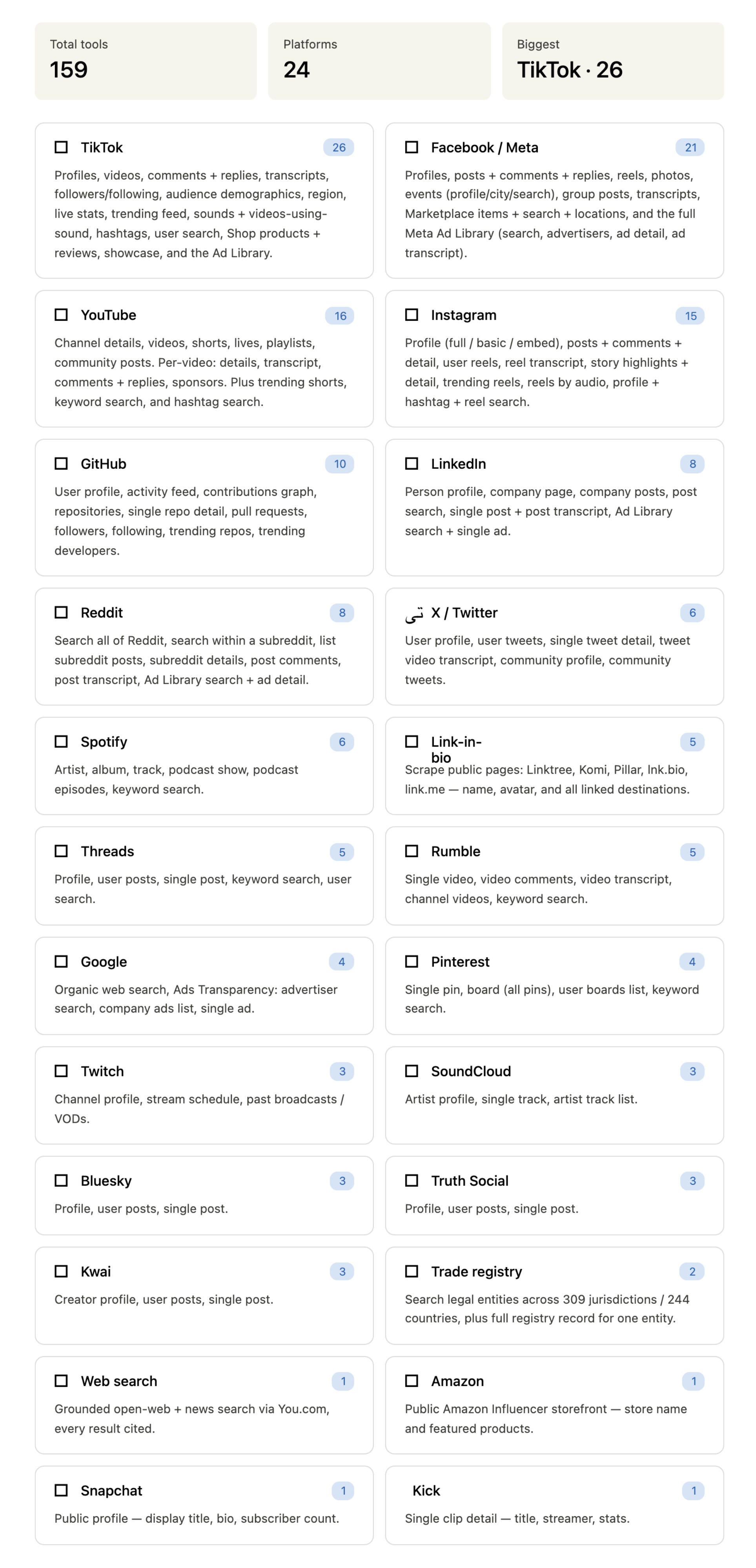
Every platform Amplifiers can pull trend data from
Before anything else, here’s a close look at what you’re working with. These are the platforms Amplifiers can research and pull data from. If the places your audience spends time are on here, you can build this whole system around them.
What my AI trend research workflow does (and what it found on run one)
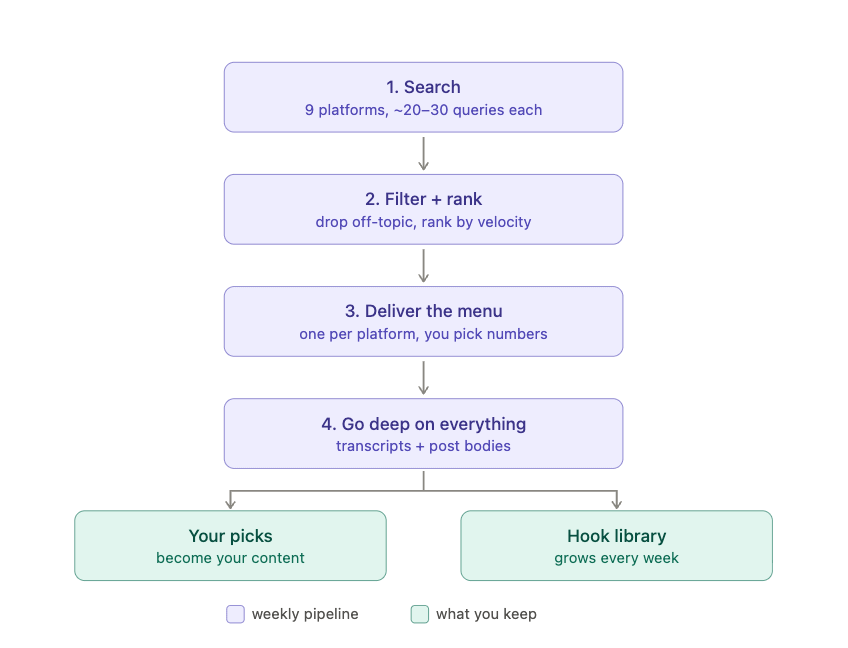
Mine runs in four stages, once a week.
1. It searches. For each platform I monitor, it runs 20 to 30 keyword searches from my starter keyword lists (things like “AI prompts”, “Claude tips”, “AI automation”). On the first full run, this pulled 239 raw items across all platforms.
2. It filters and ranks. Raw engagement lies. A meme from a huge subreddit will outscore everything in my niche, so the workflow first drops anything off-topic. Then it ranks what’s left, with engagement velocity as the biggest factor: how much engagement a post gets for how young it is. The score also considers whether the topic appears on multiple platforms, how recent it is, and how well it fits my audience. I’ll share the exact weights later.
3. It delivers a menu. The ranked list lands in my Slack as one message per platform, every item numbered. I reply with the numbers of the topics I want to explore further and any comments I have. That’s my entire involvement. Each platform surfaces different information depending on what it’s best at. It’s the same menu, but not the same output.
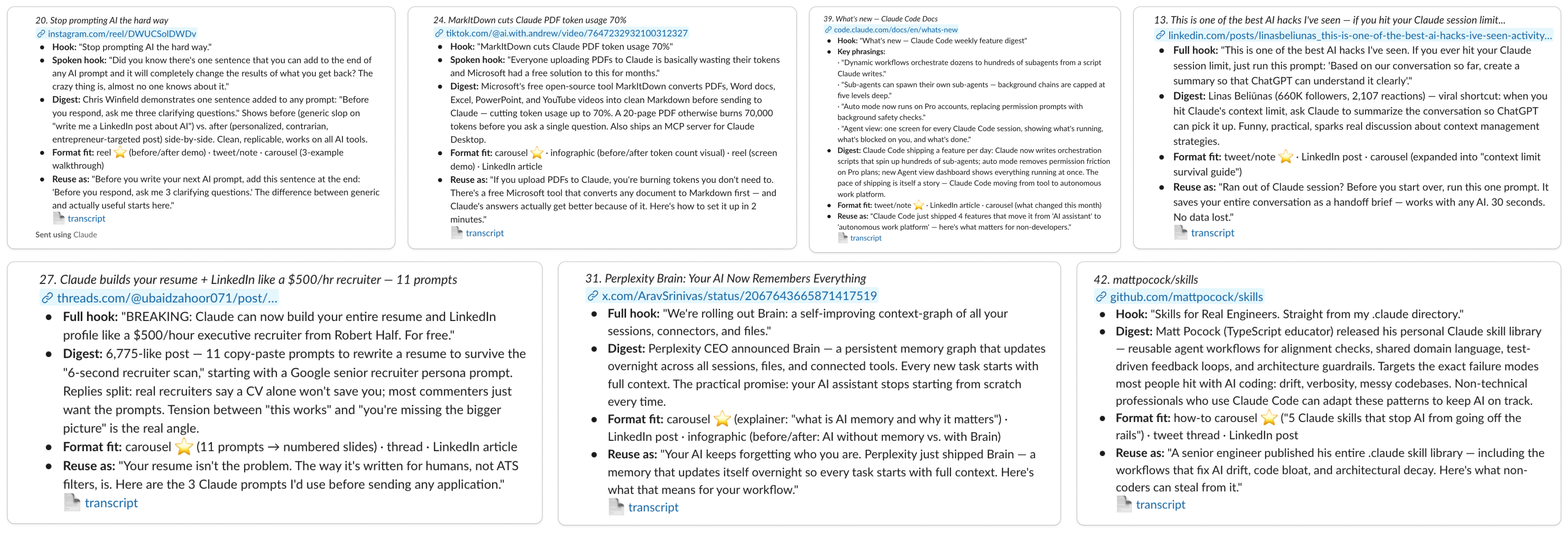
4. It goes deep on everything. A title alone can’t tell you why something worked, so the workflow also collects the actual words behind every item on the menu:
For videos (TikTok, YouTube, Instagram): the transcript. Everything the creator says, written down, so I can read a video in 20 seconds instead of watching it.
For Reddit: the full post plus the top comments.
For LinkedIn, Threads, and X: the complete post text.
So on Saturday I’m not looking at 50 headlines. I’m looking at what a TikTok creator says in the first 3 seconds, and the exact opening line of a LinkedIn post that got 2,000 likes.
One unexpected side effect of stage 4 is that it also builds a hook library. Since the workflow already reads the best-performing posts every week, it saves each opening line, or the first seconds of each video, into one growing file, tagged by platform and hook pattern.
Short term, it’s an idea bank whenever I sit down to create. Long term, it’ll become a hook-writing skill trained on what performed in my niche instead of generic advice. (That’s the fun part about building AI systems. You solve one problem, and a byproduct becomes useful for something else.)
And PS: Don’t confuse this trend monitoring system with the Topic Research Workflow. That one is a deep dive research I run once, when I already know the topic I want to write about. This one is the opposite: continuous monitoring that tells me what to write about in the first place. I need both, but they answer different questions.
Who this AI trend monitoring workflow is for (and who should skip it)
So if you’re:
A newsletter writer or blogger: this hands you a ranked list of what your audience is already engaging with before you plan your issues.
A content creator posting on social: the menu comes with verbatim hooks, engagement data, and the language your audience naturally uses. You’re never staring at a blank calendar again.
A marketer or a marketing team inside a bigger company: you’re expected to know what’s moving in your market before your competitors do. This gives every Monday a briefing you shaped yourself, plus real customer language you can reuse in campaigns, landing pages, and ads.
An entrepreneur or solopreneur: monitor the trends that touch your product. What your customers are shifting toward, which problems next to yours are heating up, what people say they wish existed, and the words they use to describe those problems.
A consultant or agency: run one workflow per client niche. Walking into a Monday call with “this conversation started gaining velocity on Thursday, on three platforms” and actual customer quotes is a different kind of credibility.
And one thing every group above gets from this: the exact words people use. Their questions, frustrations, and quotable lines (especially from Reddit comments). That’s marketing gold, and raw research you can reuse in your content, landing pages, ads, or anywhere you want to sound like your audience instead of like a brand. (If you’re not sure who your audience is, I shared how to build an audience profile skill in this article.)
So if that sounds like you, this workflow is worth setting up. If it doesn’t, don’t overcomplicate it. If you only need trend data once for a single project, run the chat version I’ll show you in a minute. The full system earns its setup time when you need this research every week.
Why automate trend research instead of scrolling or paying for social listening tools
The boring answer is that everyone already agrees monitoring conversations matters. 88% of agencies call social listening critical to business success, and brands using social insights report detecting trends about 3x faster than with traditional research.
The problem is the price of entry. The established tools are excellent at what they do, and they cost accordingly: Hootsuite’s plans start at $99 per user per month and go up to $399, and their own roundup of listening tools puts small-business plans at roughly $79 to $199 a month. That’s a real budget line, and a hard one to justify when what you need is a weekly read on your niche, in a shape you chose.
There’s also a speed problem you can’t dashboard your way out of. Research on the half-life of social media posts puts a post’s useful life in hours on X and TikTok, a few days at best on LinkedIn. A trend you notice “sometime this month” is a trend you missed.
The workflow I’m sharing sits in the gap: you own it, you pick the platforms, you pick the topics, you decide what the output looks like, you decide how often it runs, and it runs on the AI subscription you already have.
And if what you need is closer to classic brand monitoring, meaning what customers say about your company or product, there’s an Amplifier workflow built for exactly that: Brand & Product Sentiment Report. Different job, same toolbox. Once you’ve set up Amplifiers, just ask Claude to use it.
The fastest way to try AI trend research today (in a plain Claude chat)
Before we get to the full system, you can taste the concept in a regular Claude chat right now, because I just added an amplifier called “Find what’s trending on any topic, across every platform” to Amplifiers.
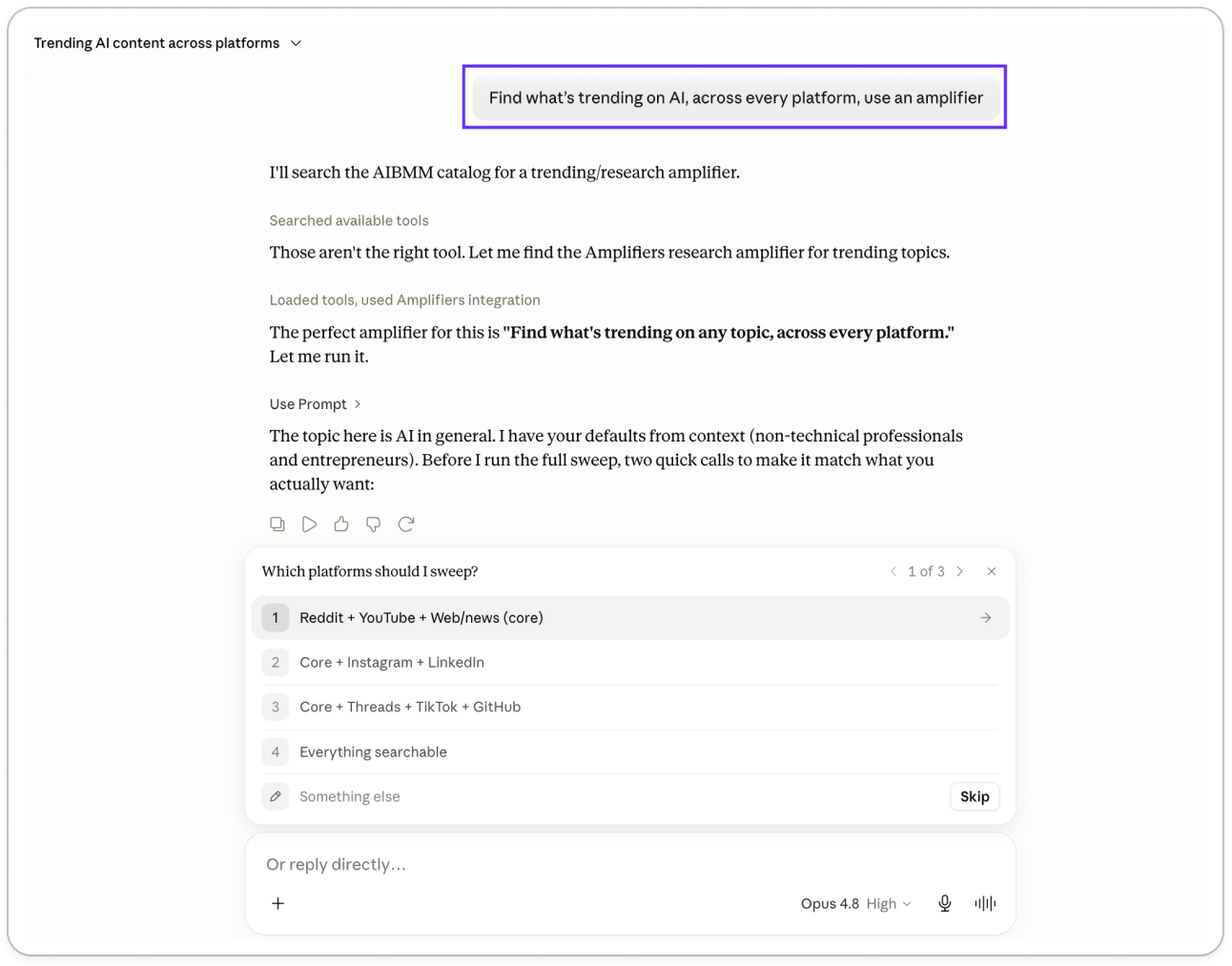
It starts by asking a few quick questions:
Which platforms do you want to include?
How deep should the research be?
How recent should the results be?
Then it runs the research and returns a per-platform digest plus ranked content ideas, each backed by a real post and a live URL:
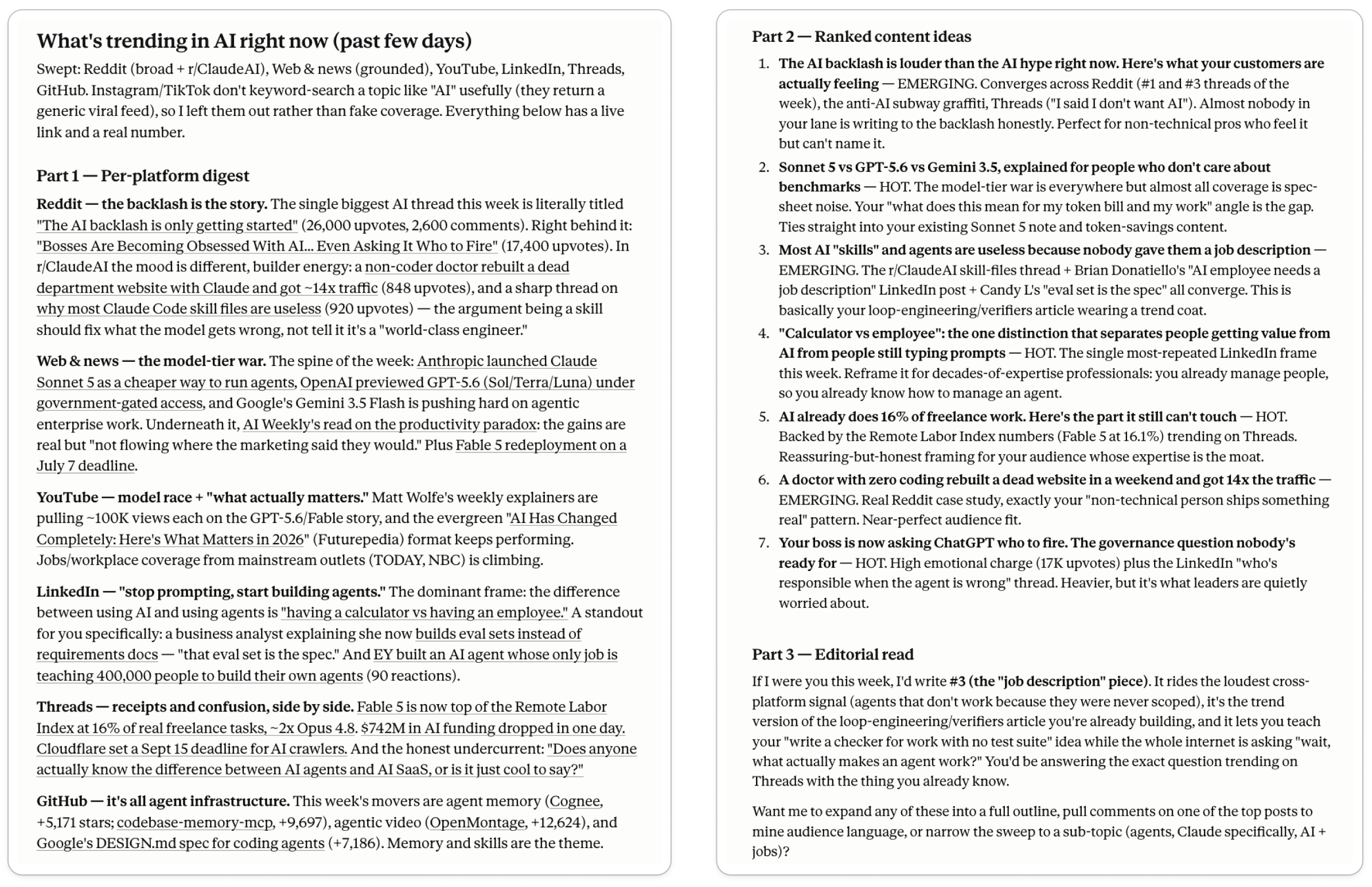
There is one limitation to this workflow, though, and it’s the reason I built the full trend research system I’m about to share next.
In a regular chat, Claude gets lazy on big research jobs. Ask it to cover 9 platforms in one prompt and the first few usually get much better coverage than the last ones. Part of that is the chat’s context window, and part is that Claude tends to decide it has “enough” before exhausting every search.
For a quick scan, it’s great. But for weekly monitoring across many sources, where you want to process a lot of information and get thorough coverage, Cowork or Claude Code gives much more consistent results.
That’s where the workflow below comes in.
The blueprint: how to build your own AI trend research workflow
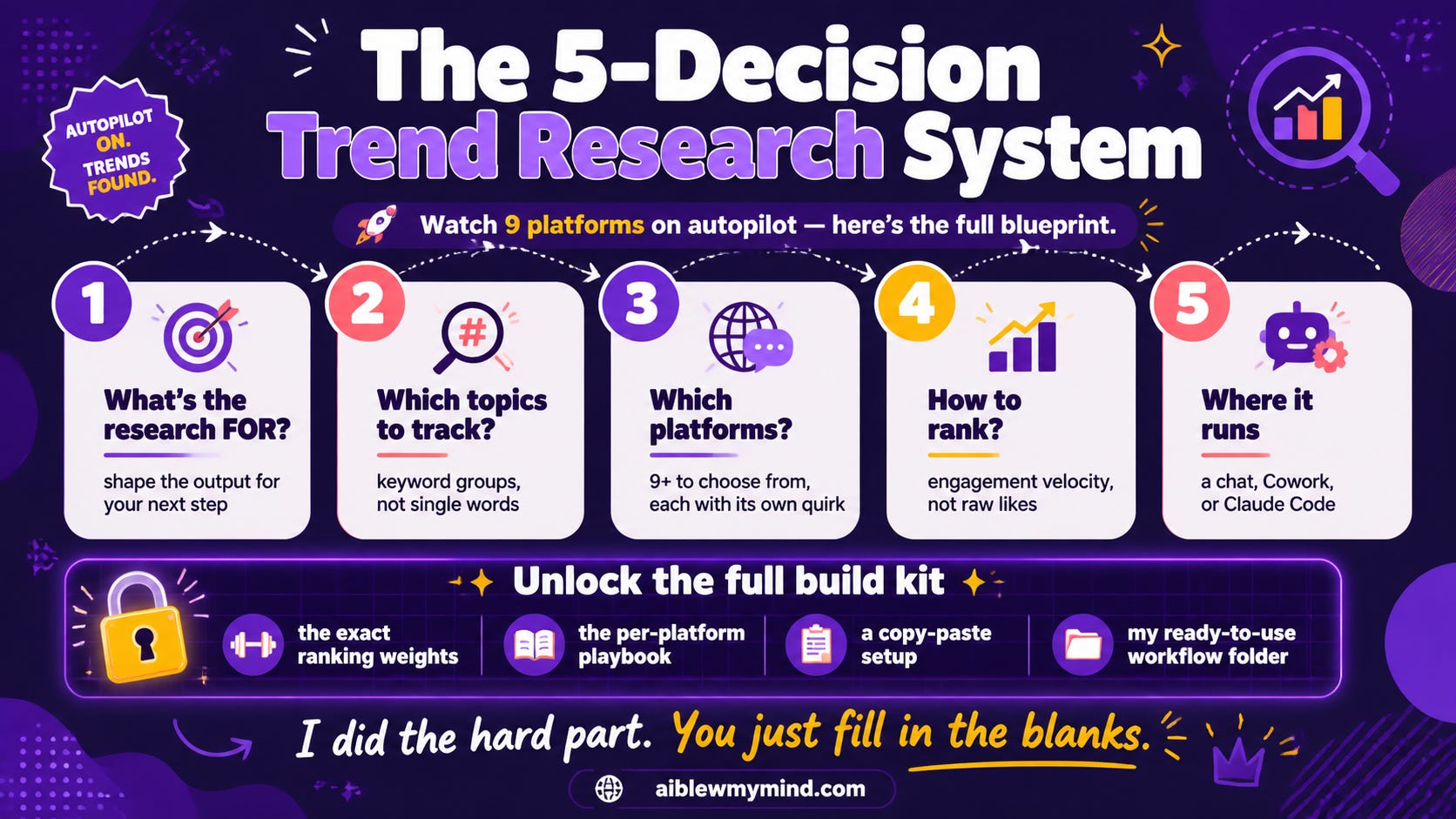
Building this workflow comes down to five decisions. My setup is just one set of answers. Yours will probably look different.
And you don’t have to build any of this by hand. The build kit later in this guide turns your answers into a working workflow for you, and if you run your own Claude Code OS, I even give you my own workflow folder to drop in. So don’t worry about getting the “right” answers yet. We’ll go through them one by one.
Here’s what you’ll get in the rest of the guide:
Learn how the system works: my exact answers to the five decisions, the per-platform playbook, and the ranking formula I use.
Build your own version: either with a setup interview, master template, and first-run quality checklist, OR by dropping my ready-to-use Claude Code workflow into your own OS.
Automate the whole thing: schedule it so the research runs every week without you.
If you want to build your own version, consider upgrading to a paid subscription. It unlocks the rest of this guide, plus access to Amplifiers PRO (including the trend research workflow from above and all the other paid research tools).