
How to use NotebookLM with Claude Code: 5 demos + 50 use cases with prompts
Connect NotebookLM to Claude Code and automate research into deliverables. 5 video demos with real outputs, 50 more use cases with starting prompts, and a 5-minute setup guide.

Someone asked me a while ago in a comment on one of my notes how I use NotebookLM and Claude Code together and what my use cases look like. I remember the question, but I lost the comment before I could reply. So if you’re the one who asked, this one’s for you.
If you’re not already familiar with these two (though I hope you are!), here’s a quick look at what each one brings:
NotebookLM understands your sources and can generate a surprising amount from them: podcasts, audio overviews, videos, reports, slide decks, mind maps, infographics, data tables, flashcards, quizzes, and source-grounded Q&A
Claude Code writes code, creates documents, automates workflows, connects to other tools, and brings its own creativity to whatever you’re building. It transforms, formats, and delivers things in ways NotebookLM on its own can’t
So today I’m demoing 5 use cases of this combo between NotebookLM and Claude Code, and how you can use them together to do much more than you could with either one alone.
And at the end, I'm including 50 more use cases with starting prompts you can copy and use right away.
Here’s what we’ll cover:
5 use cases I tested with video demos
Use case 1: Build a competitive intelligence briefing before your board meeting
Use case 2: Mine your own research for content ideas (across all your notebooks)
Use case 3: Prep for a podcast guest using their past appearances
Use case 4: Turn blog content into vertical video Reels for Instagram
Use case 5: Turn course materials into an interactive learning app
Quick note before we start: AI Blew My Mind is turning one! 💜
On April 6th we celebrate one year, and I’m putting together a special anniversary edition with YOUR stories. Record a 60-second video telling me about one moment AI blew your mind, and I’ll gift you 30 days of free Premium (I’ll add it to your account manually, so give me a little time). Deadline is April 3rd.
Now, back to Claude Code + NotebookLM.
What connecting NotebookLM and Claude Code unlocks
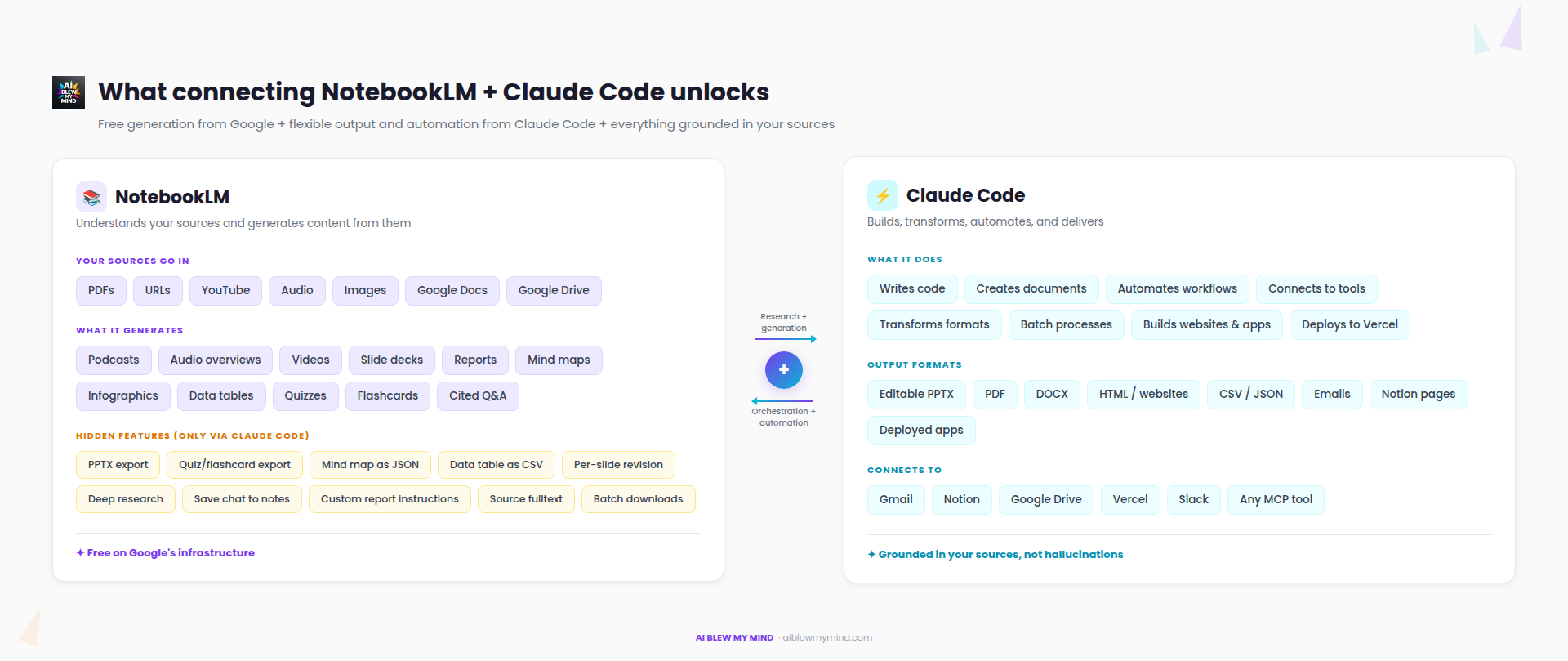
Both tools can do a lot on their own. But each one has limits that get expensive or clunky to work around.
Want Claude Code to work from your research? You can paste it into the context window, but 50 pages of PDFs and transcripts burns through tokens fast. With NotebookLM handling the indexing, Claude Code sends short targeted questions and gets back specific answers. Much cheaper.
Want Claude Code to produce cited answers grounded in your sources? On its own, it works from training data and risks hallucinating. NotebookLM grounds every answer in what you uploaded.
Want Claude Code to generate podcasts, AI videos, or transcribe audio? You’d need external API keys and extra subscriptions.
Want to batch-process things in NotebookLM? Add 50 sources at once, generate multiple artifacts, download them all? The web UI makes you do everything one at a time.
Want to chain multiple steps together? Like generating a podcast, downloading it, then building a website around it? NotebookLM can’t automate that. Claude Code can.
Want NotebookLM’s outputs in a PDF, Word doc, or email? It doesn’t create those. Claude Code does, and can fill them with content pulled from your notebook.
Want to set a task and walk away? In NotebookLM, every step is a manual click. Upload a source, type a question, copy the answer, write a prompt, generate a podcast, wait, download it, open another tool, paste, format. With Claude Code, you describe what you want once, and it handles the entire workflow end to end. You come back to finished deliverables.
When you connect them, you get the best of both: free generation from Google’s infrastructure, flexible output and automation from Claude Code, and everything grounded in your sources.
And you also get access to hidden things NotebookLM can do under the hood but doesn’t let you do from the app.
Where this integration helps (and where it doesn’t)
For casual browsing of a notebook or having a quick back-and-forth conversation with your sources, the web UI is better. You get a richer visual experience, you can see mind maps rendered, play audio inline. No reason to complicate that.
This integration is for when you want to do something with what NotebookLM generates. Export it, transform it, chain it into a bigger workflow, or build something from it.
How to connect Claude Code to NotebookLM in 5 minutes
There’s an unofficial Python API for NotebookLM on GitHub called notebooklm-py, which you can set up in just 5-10 minutes.
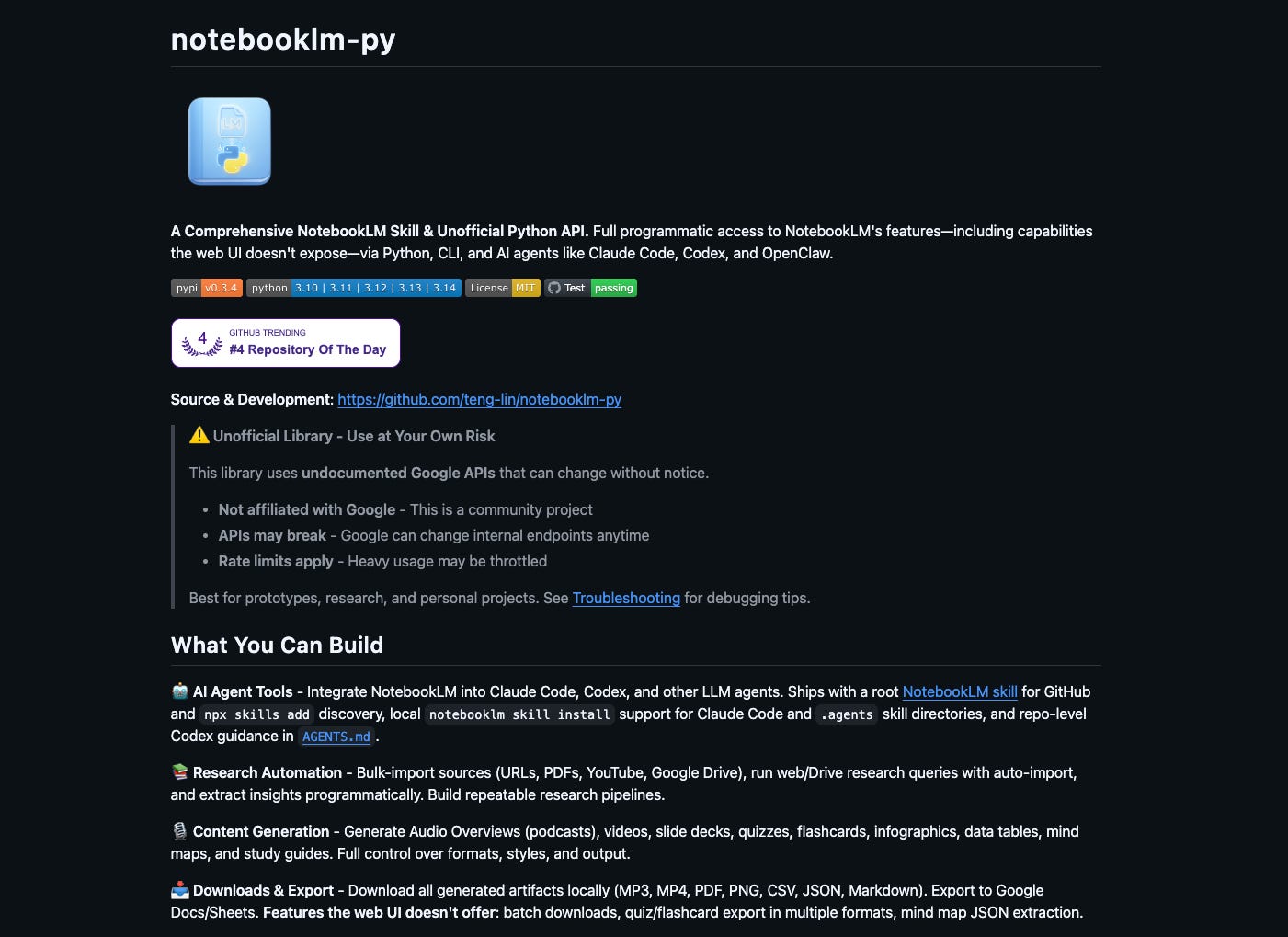
It works the same whether you want to connect Claude Code to NotebookLM via the terminal or through the Claude desktop app.
When you install it, you get two things:
A CLI (command-line interface) that gives Claude Code direct access to NotebookLM. Creating notebooks, adding sources, generating podcasts, downloading files. Everything you’d do manually in the browser, but now Claude Code can do it for you.
A skill that teaches Claude Code how to use that access. So when you say “create a podcast about X”, Claude Code knows the full sequence on its own: create a notebook, add your sources, wait for processing, generate the audio, download the file. You don’t need to know any of the commands yourself.
Once installed, Claude Code can chain NotebookLM with everything else it already does: building websites, creating documents, generating PDFs, connecting to Notion, drafting emails.
The setup
Step 1. Open Claude Code and paste these three lines. They install the NotebookLM package:
# Basic installation
pip install notebooklm-py

# With browser login support (required for first-time setup)
pip install "notebooklm-py[browser]"
playwright install chromium
Step 2. Paste this command to log in to your Google account:
notebooklm loginA browser window will open. Sign in with the Google account you use for NotebookLM. Once you’re signed in, you can close the browser window.
Step 3. Paste this last command to install the skill, which teaches Claude Code how to use NotebookLM:
notebooklm skill installThat’s it. If something goes wrong along the way (I had a small issue with the Chromium browser window in the terminal), just tell Claude Code “it doesn’t work” and it will debug it for you. Mine was fixed after two attempts.
5 use cases I tested with video demos
I picked five use cases that show very different sides of what this combo can do.
Competitor sources → board-ready briefing. A debate podcast, a CSV comparison, a PDF with SWOT analysis, an editable PPTX, and a Gmail draft. All from one prompt, ready before your morning meeting.
Your old notebooks → 45 ready-to-post Substack notes. Claude Code mines your last 10 notebooks for the best findings and writes short-form content in your voice, organized in a spreadsheet.
A guest’s past interviews → podcast prep that sets you apart. You’re hosting. You get a printable prep sheet, a Notion page, and 10 questions that reference things your guest said in past appearances, so you don’t repeat what other interviewers asked.
Blog articles → Instagram Reels, at scale. AI video overviews generated from your posts, converted to vertical, with overlays and subtitles. You set the task for 5 or 50 articles, and it runs.
A folder of course files → an interactive learning app. Mind map, flashcards, quizzes, progress tracker, deployed to Vercel. Students access it from any device.
For each one, I recorded a full video demo where I walk you through my prompt, the Claude Code session, and every output it generated. I’m also linking the prompts and all the files Claude Code & NotebookLM created, so you can look inside everything.
And if these five spark ideas for your own work, there are 50 more use cases with starting prompts at the end of this article.
Quick note on pricing
I recently updated the Premium subscription for AI Blew My Mind from $8/month to $12/month (and from $70/year to $100/year).
If you’ve been thinking about upgrading, I created a 30% discount code that lets you lock in the old rate forever. It’s valid until April 7 (included). Starting April 8, it’s the new price. If you’re already a paid subscriber, nothing changes. Your rate stays the same and you get all new perks automatically.
I'll be using Claude Code through the Claude desktop app for the demos, since it has a friendlier UI and you're probably already familiar with it.