
How to Build a Daily Web Scraper with Claude Code
Step-by-step guide to building an automated web scraper with Claude Code, Playwright, and GitHub Actions. Walkthrough uses Amazon as a demo — adapt it to any site you monitor.


If you sell products online, publish content, or run any kind of website, you probably need to check things regularly. Product ratings, review counts, competitor pages, content archives. The kind of monitoring that takes a few minutes each time but adds up fast when you’re doing it every day.
And whether you’re auditing your own site or keeping tabs on what’s changing somewhere else, the need is the same: fresh data from websites, on a schedule, without doing it by hand. That's web scraping.
Claude Code can help with that, whether it’s tracking Amazon listings, inventorying a WordPress blog, or monitoring competitor pages, as long as the site structure stays relatively stable.
It’s not the kind of AI use case that makes you stop and stare. But it’s the kind that saves real time in your work week by taking the tedious, repetitive stuff off your hands.
In this article, you’ll see how to set that up with Claude Code: a Playwright script that scrapes Amazon daily, email alerts when your data changes, and the whole thing running automatically with GitHub Actions.
The example is built for Amazon, which has a stable page structure that makes it a good fit. But you can adapt the same approach for your own use case, as long as the site you’re tracking doesn’t change its layout too often.
One of my readers, Marylee Pangman, Author, recently asked about using AI to generate a full content inventory for a WordPress site. Post counts, age breakdowns, a bird’s eye view of what’s in the archives. Same web scraping need, different situation.
So Marylee, if you’re reading this, drop the link to this article into Claude and ask it to help you build the same thing for your WordPress site.
Before we get into it, let me introduce who’s walking you through this one.
Expertise, reimagined with AI — featuring Alex Willen
This is Expertise, reimagined with AI. Professionals with decades of experience from the AI Blew My Mind community who chose to reimagine their work instead of protecting it. You might be one of them.
This monthly series brings those stories forward.
You can read the first edition here, featuring Dr Sam Illingworth on reimagining education with AI.
For this one, I wanted someone who isn’t writing about this from a distance. Someone who built it, runs it daily, and hit the walls you’d hit if you tried it yourself.
I came across Alex Willen when he joined the AI Blew My Mind community chat. He’s a former B2B SaaS product manager who left tech to buy and run e-commerce brands on Amazon. He now manages 11 brands generating seven figures in annual revenue, all as a one-man operation.
Once I started reading his articles at The Automated Operator, I loved seeing how far he’s taking things with AI in his business. So I asked him to share something practical for you, something you could take and implement, since I know many of you are running e-commerce businesses or working in retail.
What you’ll learn in this article
Alex walks you through building a daily web scraper for Amazon with Claude Code.
Why he scrapes Amazon daily (and what he tracks)
Claude in Chrome vs. Playwright: which to use for web scraping
How to build the web scraper with Claude Code, step by step
Limitations and pitfalls of web scraping with Claude Code
Now, over to Alex.

How to Build a Daily Amazon Web Scraper with Claude Code

Public sentiment around AI capabilities seems to always follow the same pattern. A lab launches a very early version of some feature, and people try it and complain loudly about flaws and a lack of reliability. The labs keep chugging away, putting out improvement after improvement, and then at some point the flaws get solved, the feature becomes extremely reliable, and nobody talks about it because they’ve all moved on to complaining about the next new feature.
First image generation had all kinds of weird artifacts that made it unusable for anything serious, then it couldn’t do hands, and now it’s basically perfect. Video was low-quality with physics that didn’t make sense, and then some time passed and news outlets were reporting on the near-perfect AI fight scene between Brad Pitt and Tom Cruise. And we all know how it’s gone with coding — SWEs mocking vibe coders and the slop produced by LLMs while models steadily improved with every release, and then all of a sudden Karpathy posts in January that agents are writing 80% of his code and in February that they’re completing entire projects for him.
There’s one place where agent capabilities have recently crossed the threshold into being useful and reliable, and yet I hear almost no one talk about it — web browsing. I’ve been playing with web use since OpenAI launched it as a preview in ChatGPT, and it was unusably bad until suddenly, when Claude launched Opus 4.5, it just worked. Most folks were too focused on that model’s agentic coding capabilities to notice, but all of a sudden it was passing all of my tests with flying colors. Then it got cheaper with Sonnet 4.5 and better with the 4.6 models.
So if you’ve been held back from implementing some AI workflow because it involved using the web, now’s the time to give it a try!
I’ll walk you through a simple web scraping task that I’ve got running daily and how you can set up something similar, plus I’ll discuss some of the limitations that remain.
Why I scrape Amazon daily (and what I track)
I own a dozen brands that sell products on Amazon, and AI in its various forms is critical to my ability to keep up with all of them without having to be working constantly. Mostly I have Claude Code using Amazon APIs, but there’s some information that Amazon doesn’t expose that way.
There are a few things in this category that I’d like to track on a daily basis for each of my products:
Has the number of ratings changed? If so, has the average rating changed?
Have any badges appeared or disappeared? Amazon sometimes puts badges on product pages, and they can be positive (e.g. Amazon’s Choice) or negative (e.g. Frequently Returned).

Have any variants suddenly been separated from the listing? Sometimes, for no particular reason, Amazon will remove a product variant (e.g. some particular color of a product) from the main product page and put it all on its own. Amazon does not tell you when it does this, and frequently it’ll still show up in your seller dashboard as though it has not been separated. The only way to tell for sure is to go to the product page and check all variants.
So, let’s get Claude on it! But first, there are a couple of approaches we can take here that are worth understanding before building out the flow.
Claude in Chrome vs. Playwright: which to use for web scraping
What Claude in Chrome does
In December of last year, Anthropic launched Claude in Chrome in open beta. It’s a Chrome extension that lets Claude take control of your browser to do web-based tasks. It can be used as a standalone tool, in which case you’ll get a familiar chat interface in the right sidebar in which you can ask it to do things.
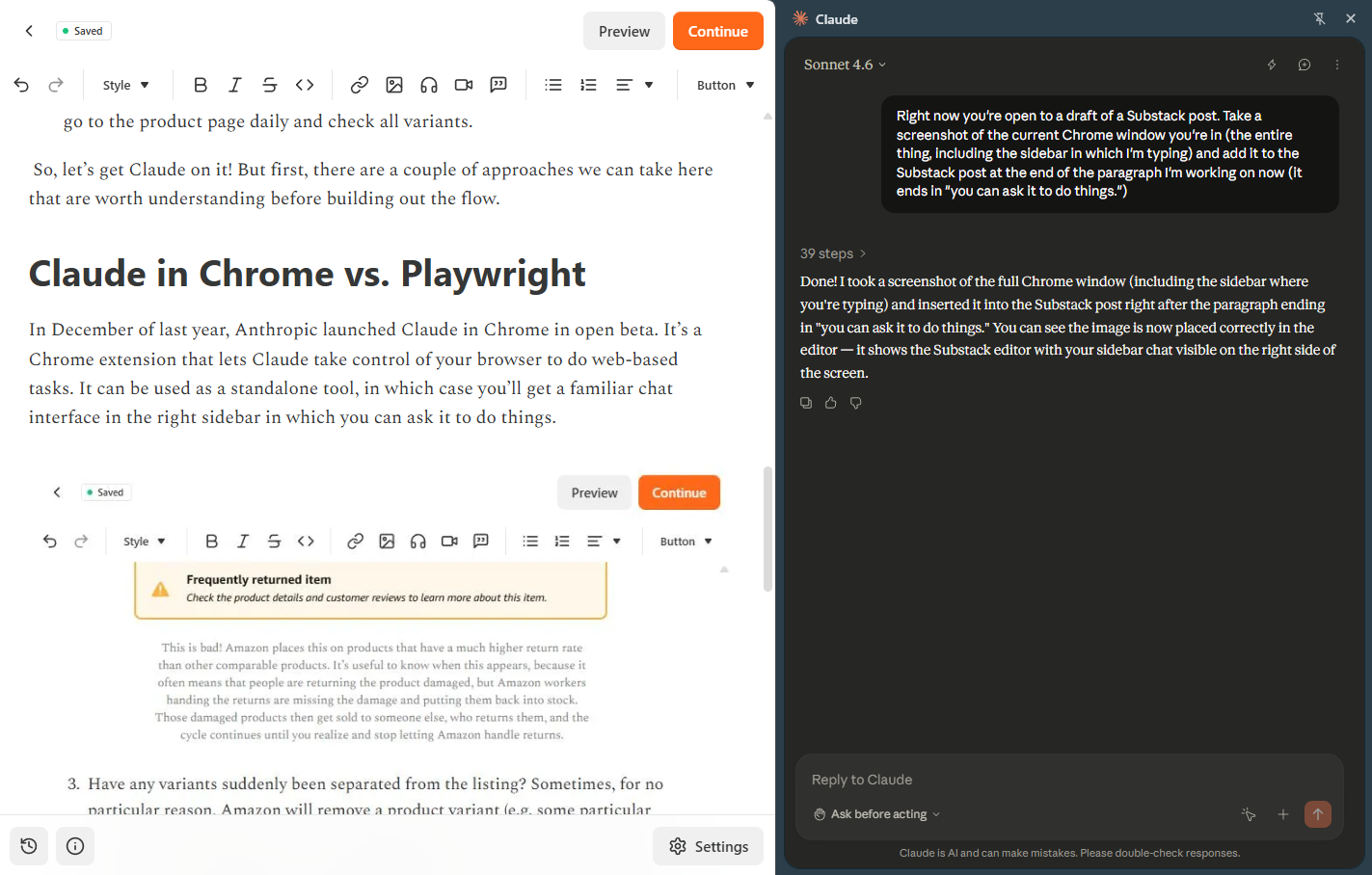
Alternatively, Claude Code can launch Claude in Chrome. This is particularly useful for when Claude Code is building a web application and needs to test it by having a user click around and try things out.
I definitely recommend trying it out — it’s a great way to get a handle on the current state of browser agents. You can download the extension here.
What Playwright does
The other way Claude can access the web is by using Playwright, which is a browser automation framework that lets you programmatically control web browsers. It understands what’s on a page based on the underlying code (different than Claude in Chrome, which takes screenshots to “see” what’s on a page), and then Claude writes code to tell the browser that it wants to do something like click on a button.
Which one to pick for repetitive scraping
So, which do we want to use here? The honest answer is that in the overwhelming majority of cases, Playwright’s the better option. It’s much faster and meaningfully more reliable. Claude in Chrome has the advantage of being able to insert some intelligence in your workflow (e.g. interpreting information on the page and then deciding whether to take an action based on fuzzy criteria), but if you’re just doing repetitive web browsing tasks that don’t require mid-stream decision-making, then you don’t need that intelligence.
Playwright MCP vs. writing Playwright scripts directly
This leads to our second decision: whether to use the Playwright MCP or just have Claude write Playwright code directly. Generally, the MCP is better for ad hoc tasks or explorations that Claude’s performing. It gives Claude Code tools to do tasks like navigate to a page or click on an element without having to write the full code for each action each time.
For repetitive tasks, though, you’re going to want to have Claude write a Playwright script. For one, it’ll execute faster. Beyond that, it’ll also be more robust and consistent, since it doesn’t require Claude to actively make any decisions along the way. That means you can set it to run on GitHub Actions or something similar, without having to use Claude at all once the script is written.
How to build the web scraper with Claude Code, step by step
Install Playwright and the Playwright MCP
First things first: install Playwright and Playwright Chromium, plus the Playwright MCP. The former two are the library Claude needs to use Playwright and the browser it’ll use to execute Playwright code. I mentioned above that we don’t want to use the MCP for daily automation, but you should install it anyway, because it’ll make it easier for Claude to browse around the page at first and figure out where things are before writing the script. I would give the commands to install those, but let’s be real, you should just ask Claude to do it.
Decide what to scrape, store, and notify
With that done, let’s get a simple version of my scraper set up. We want it to visit a pre-set list of Amazon URLs, find the number of ratings and the average and save them, then compare them to yesterday’s numbers and alert me if they have changed.
To do this, we need a few things:
The URLs to scrape
A place to store the info we gather
A mechanism to notify me of changes
A way to run the job daily
We have the URLs, so no problem there. In terms of where to store things, you’ll want to consider both how much data you’re collecting and whether it matters for long-term analytics.
For example, I have a separate job that pulls a lot of numbers from the Amazon Ads API daily. I’m using that to build a historical record of ad performance by day, and it’s quite a bit of data. For those reasons, I store everything in a SQLite database that’s online and also synced to my local machine. That’s optimal for being able to query the numbers, plus it’s backed up lest either my hard drive or the cloud database die somehow.
This case is different; I’m gathering very little information and have no need to run any kind of complex queries of the data. I don’t even really care about the historical record, just the daily update. Given that, just about anything works, from a Google Sheet to a local file. I’m a big believer in not overcomplicating things, so let’s just do the simplest possible thing and use a .txt file.
Test the first scrape and save the data
At this point, we’ve got enough to test the initial part of the flow — scraping the data and saving it. I learned from my many years as a product manager that it’s best to try individual components of a workflow to make sure they each work independently before piecing them all together, so let’s ask Claude to give this a whirl.
Prompt:
We’re going to build a workflow that checks public Amazon product pages each day to scrape the number of reviews and average review, then sends me a notification if either has changed since the previous day. Right now I want you to start with a simple test of the first part of the flow - scrape one URL, get both pieces of information and save them to a local txt file. You have the Playwright MCP installed, so you can use that to explore the page, but ultimately you’re going to need to write a Playwright script that can automatically run each day.
Note that I gave it the broader context before the specific task. Since this is a case where we’re going to be building on this throughout the conversation, it’s a good idea to let Claude know what we’re working towards. I also let it know that it has the Playwright MCP installed, because even though it’ll usually check for that without being prompted, it’s not 100% consistent there and might just start writing its own Playwright code instead.
Your Claude instance might ask you if there’s a particular Amazon page you want to use as your test case; mine knows the URLs of all the products I sell, so it just went ahead with one of them. You’ll see it pop up a new Chrome window, which is separate from any existing ones that you have open and doesn’t share any context like cookies, which is good from a security perspective (it can’t access sites you’re logged into), but has some downsides we’ll discuss later.
Mine took a couple of minutes then came back and confirmed success:
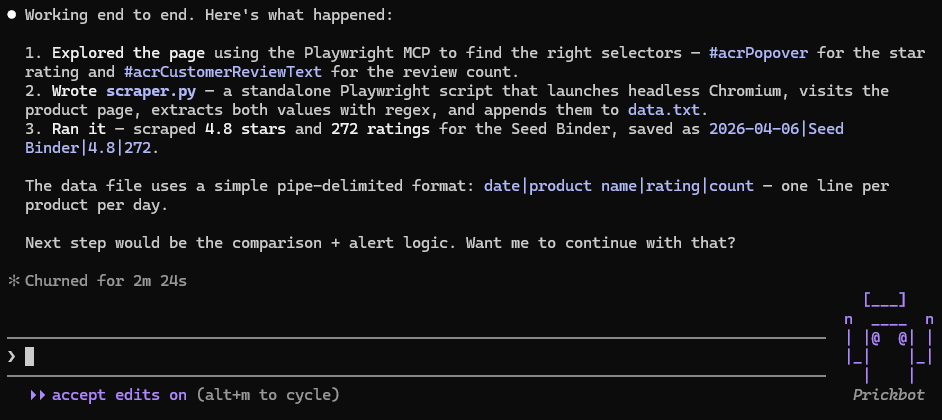
Perfect! Since I gave it full context on the flow, it’s offering to move onto the next step, but it’s always a good idea to ask what it’s going to do before proceeding plus add any more helpful context. Next prompt:
First explain how comparison and alerting will work. Also, I want to be alerted via email - how will you set that up?
Here’s part of the response:
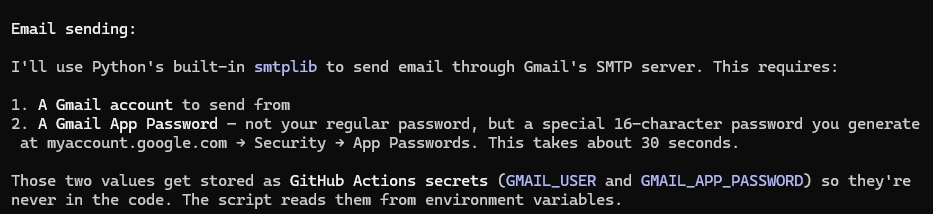
In this case, it’s using historical context of previous alerting systems we’ve built that run via GitHub Actions on my machine and send alerts via Gmail. I recommend both of these for ease and simplicity, so let’s get those set up.
Set up Gmail alerts and GitHub secrets
First, you’ll need a GitHub account; I’m going to assume you have one, but if you don’t just ask Claude to help get that set up. Once that’s done, ask it to create a repo for the project.
From there, get the Gmail App Password by going to https://myaccount.google.com/apppasswords. Give it a name, click Create, and you’ll see a 16 character password. You have two options for how to upload that as a GitHub secret — you can either just give it to Claude and ask it to upload, which is not a great idea from a security perspective, but I’m not going to tell you how to live your life, or type:
gh secret set GMAIL_APP_PASSWORD --repo Awillen/REPO_NAMEWhere GMAIL_APP_PASSWORD is the password and REPO_NAME is the name of the repo that Claude just created (you should also swap out Awillen for your username). It’ll need to store the email address you’re sending alerts from (the one you just got a password for) and the email address you want alerts sent to (these can be the same), but it’s fine to just give those to Claude to set.
Test the comparison and alert logic
Once that’s done, let Claude get to building! It will probably do some testing on its own, but if not, ask it to test the following:
Add a line to the txt file that shows changes in the number of ratings and average rating, then trigger the comparison and alert workflow
Add a line that shows no changes and trigger the workflow
If everything’s working correctly, the first case should trigger an email. In my case, I got this:
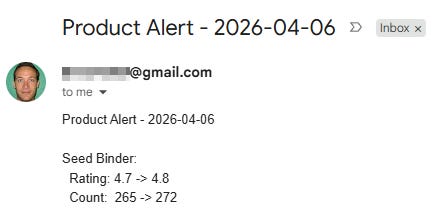
Functional but not exactly aesthetically pleasing… let’s ask Claude to spruce it up.
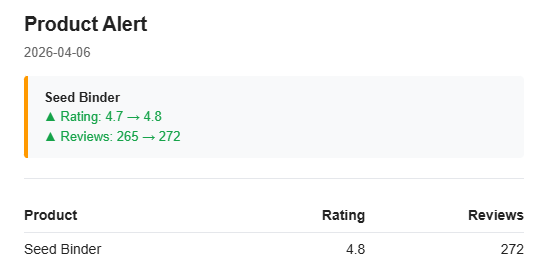
Much better!
The second case shouldn’t send anything (though Claude will confirm in the console that it did run).
Schedule the workflow to run daily
Now our last step is to automate it. Everything’s already configured in GitHub, so all we need to do is set it up to run daily. Just ask Claude, and make sure to specify that you want it to run locally on your machine (more on this below) — it’ll take care of it, and you’re all set! You’ll receive an email daily any time there are changes to the Amazon reviews of the product you’ve specified.
Limitations and pitfalls of web scraping with Claude Code
That was easy (I hope) but there are a few ways this sort of task can get a bit more complicated:
Access Challenges: IP blocking and authentication
For this project in particular, you must use a GitHub Actions Runner on your local machine (as opposed one hosted by GitHub), because Amazon is notorious for blocking attempts to scrape its pages and recognizes GitHub’s IP addresses. Amazon’s not the only company that does this, so if you’re planning to use a hosted service for a job like this, make sure you test it first.
Another issue you may run into is the need to authenticate into a user account in order to access non-public pages. For actual implementation of this demo, when there are new ratings on my product, I’d like to check if there are new reviews (most people just give products a star rating but don’t actually write a review). Unfortunately, you can only access the full list of reviews if you’re logged in.
If you run into a similar case, you can give Claude your account credentials to log in (ideally securely, as secrets in GitHub or similar) or create a user account just for it. Here, I’m just too worried about Amazon associating any sort of bot activity with my own account or another account that’s logging in from my IP, since that sort of thing will get automated systems to flag your account, which would be a nightmare since that would likely impact my Amazon Seller accounts. Just not worth it, I’m afraid.
I’ll also just flag here that using a Google app password is convenient but not the most secure option. Be thoughtful about where to trade off convenience against security.
Playwright script fragility (and CAPTCHA handling)
At the last job I worked at as a PM, we used Playwright to access some of our customers’ software when there was no viable alternative like an API. This mostly worked fine and gave us a big advantage over competitors who would just shrug and tell prospects that if there’s no API, integration is impossible.
I can’t say whether or not they knew that Playwright was an option (this was mortgage-related software, so most companies in the industry did not employ the greatest engineers) or whether they just didn’t want to use it because they knew of its major weakness — it can be fragile.
The problem with running a pre-written Playwright script every day is that if the page you’re scraping changes, there is a very solid chance it will break your script. That’s obviously a problem if you want to use it for anything critical, so consider how likely it is that a page is going to change.
One thing I didn’t mention above is that while building this, Claude ran into an Amazon CAPTCHA while trying to access a page. This was a very simple one (it just had to click a button to continue), so it was easy to add logic to the script to handle that if it arose. If it had thrown up something more complex, though, a script wouldn’t have been able to handle it.
The good news is that if you expect to encounter a more dynamic website or one with potential roadblocks, you can take the alternate approach of having Claude Code do the scraping with a scheduled job. If you go that route, it can use the Playwright MCP to navigate the page and figure out how to get what you need, even if it’s not in the place you expect. For simple web scraping cases, that’s overkill (and if you’re scraping a lot of pages it’ll burn tokens very quickly), but it’s worth keeping in mind for complex or critical workflows.
Monitoring and alerting when your scraper breaks
Since I only care if the number of ratings for a product has changed, I set up the flow so no email gets sent if everything is the same as it was the day before. The downside is that if I don’t get an email, there’s no way for me to distinguish whether that’s because there were no changes or because the whole workflow failed.
That’s not ideal, because once you’ve got enough daily monitoring tasks running, some of them will fail eventually, and you’re going to want to know that. So, some options:
Have it send you an email even if there are no changes. That way you know the absence of an email is a problem. Speaking from experience, though, if you’re busy you might not notice that you missed your daily email right away.
Use GitHub Actions notifications. These are on by default and will email you if something fails, so they’re very helpful. However, they won’t work if the runner never starts (e.g. if you’re running locally and your computer is off) and they aren’t smart enough to know if something goes wrong with your script that’s not a failure of the run itself (e.g. the web page changes and your scraper isn’t able to collect information).
Have a separate service to monitor for failure. A scheduled Claude Code job is a pretty good option here — have it run daily after your GitHub Action to check and make sure that it updated the txt file properly. If you’ve got a bunch of these running daily, it’s absolutely worth having an external service do a quick check on all of them.
I hope this was useful, and if you have any web scraping questions please don’t hesitate to tag me in the AIBMM chat!
Your turn
If you’ve been doing any kind of regular website checking by hand, this is a good place to start automating it.
Pick one thing you check weekly, share this article with Claude Code, and ask it to help you build a scraper for it.
And if you try it, we’d love to hear how it goes. Leave a comment with what you’re tracking, what you’d want to scrape, or any other use case in your work you’d like to automate.
Found this useful? Share it with someone who could use it too.
You can follow Alex Willen’s work at The Automated Operator. He’s documenting the whole journey of running his e-commerce brands with AI, so if you sell on Amazon or work in e-commerce, you’ll get a lot out of it.
This post is free. Paid subscribers get access to all premium prompts and tools inside Amplifiers (the AI Blew My Mind MCP), weekly premium articles, all premium resources inside the AI Blew My Mind Lab, and exclusive partner discounts. Upgrade here.
Hey all, author of this post here — I hope folks found this useful! If you have any questions about how to set something like this up for yourself, just @ mention me in the AIBMM chat, and I'd be happy to help.
Although I'm fond of web scraping, yet very fearful of the consequences of it, as web scraping is kind of mining gold, but no one wants to hand it over that easily.
I'm not sure about small, but almost every big player has set their guardrails around it to stop it and I'm pretty much sure that it has been raised now days, due to AI capability of doing almost anything.
What guardrails do you use before scraping these big players? or do you have any guide which tells what to take care of before doing or building any tools like this.