
Intro to Claude Code: You Talk to One AI. It Puts a Team to Work.
How subagents let you go from one assistant to a whole team of specialists that work on different parts of your project at the same time.


Most of what I write is about AI tools you can use today without any technical background. Practical stuff. Things you can set up in an afternoon.
But there’s a notable shift happening right now that goes way beyond using AI as a chatbot and getting it to do work for you.
A big part of what’s driving this shift is Claude Code, Anthropic's command-line tool for building software with AI.
It was made for developers. Terminal, code, technical stuff.
But more and more non-technical people are picking it up anyway, which is why I think it’s worth we start talking about it here.
Just look at what people on Substack have been doing with it (from vibe-coded tools to full business automations):
Alex Willen, who buys and operates e-commerce brands on Amazon, is using it to automate as much of his business as possible. From bookkeeping to generating product images for listings.
Kamil Banc vibe coded rcp.ad which is a better way to store, access, and share prompts and Claudia, an AI chief of staff that remembers relationships, tracks commitments, and helps you think strategically.
TechTiff built an AI business partner that remembers everything, runs weekly reviews on autopilot, and surfaces revenue ideas she would have otherwise forgotten.
Jenny Ouyang used Claude Code to build a portfolio website, an expense tracker that categorizes spending automatically, and a car purchase research tool.
Raghav Mehra and Ashwin Francis shared five workflows for manipulating files, automating research, and organizing your life with Claude Code.
Katie Fifer and Claire Morrison shared how to use Claude Code to check card statements saved on your computer, identify potential business expenses you need to be reimbursed for, and put them in a spreadsheet.
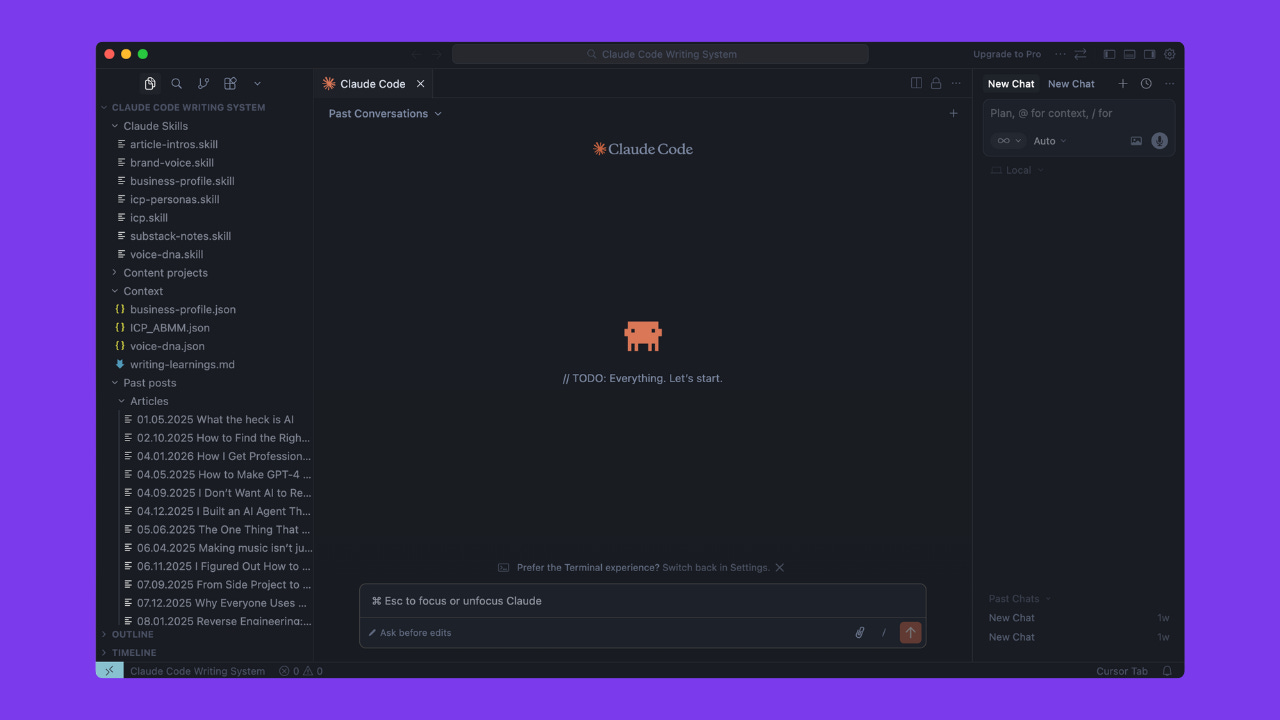
Alex McFarland built his own writing system inside Claude Code, which inspired me to build mine:
What all this unlocks for non-developers is a completely new way of working, where the line between “technical” and “non-technical” is getting blurrier every month.
Last week we talked about Claude Skills mainly for the desktop app, which help you build systems for repeatable work. Claude Code has skills too, but it also has subagents. You still talk to one Claude, but it coordinates a whole team of specialists to work on your project.
So I wanted to bring someone in who’s experienced and could show you what's possible on the builder side of things.
Meet Karen Spinner.
I've been hooked on her work since she joined Substack. She's one of those rare people who can code, build products, run a business, and write about all of it so clearly you forget how complex it is.
She's always shipping something new (Substack analytics extension, CarouselBot for creating LinkedIn carousels, and more) and documents the entire journey, including what doesn’t work.
And since Karen is so deep into Claude Code, she's the perfect person to walk us through subagents.
In this article:
PS: If you’re a vibe coder (or aspiring one), you’ll want to bookmark this.

How I use Claude subagents to make my projects look pretty
Putting AI agents to work in parallel for faster builds and nicer UIs
Disclosure: This post was written by me, a human who loves automating small tasks with Chrome Extensions, and edited by Claude. Claude also provided all the code for the personal API usage dashboard I scoped and built for this article.
When Daria asked me to contribute my favorite Claude Skill to a collaborative article, I said yes and then immediately realized I should have said no. While I’ve tested Claude Skills and frequently use Anthropic’s built-in skills for MS Word and PowerPoint slides, I rarely use the Skills I built primarily to test it out back in October 2025, when Skills first rolled out. So, instead of sharing a Skill, I asked Daria if I could write about one of my favorite Claude tools: the subagents that run inside Claude Code.
She said sure, and suggested I write this article and even include a practical example. So I’m going to introduce you to one of my favorite Claude subagents—the Creative Director—and show how I use it (along with Tailwind CSS) to make my projects prettier without spending hours tweaking colors and spacing myself.
What is Claude Code?
Before we get started, a quick primer for anyone who hasn’t tried Claude Code yet. It’s Anthropic’s command-line coding tool, which is basically Claude living in your terminal. You can ask it to write code, explain what existing code does, handle git workflows, or execute routine tasks, all through natural language. It understands your codebase contextually, which means you can say things like “refactor the authentication module” and it knows what you’re talking about.
To get Claude Code, run the native installer from your terminal. On Mac or Linux, open Terminal and paste the install command from Anthropic’s setup page at https://docs.anthropic.com/en/docs/claude-code. On Windows, you can use winget install Anthropic.ClaudeCode. The native installer is nice because it auto-updates in the background.
You’ll need either a Claude Pro or Max subscription, or an Anthropic API account with billing enabled. Once installed, just navigate to your project folder and type claude to get started.
What are Claude Code subagents?
If you’ve used Claude Code (Anthropic’s command-line coding tool), you know it’s already pretty capable on its own. But subagents take things to the next level.
A subagent is essentially an independent Claude instance with its own context window and a specific job to do. When you’re working on a complex project, Claude can delegate tasks to these subagents, like asking a Chrome Extension expert to review your manifest.json while a Creative Director agent works on your UI styling. The main Claude instance acts as a project manager, coordinating these specialists and integrating their work.
Why are subagents useful?
The magic of subagents comes down to two things: expanded capacity and parallel processing.
More context per session
First, let’s talk about context windows. If you’ve ever had Claude forget something you told it earlier in a long conversation, you’ve bumped into the context window limit. Here’s my favorite way to explain it: imagine you’re the guy from Memento, but instead of tattooing important facts on your body, you have a whiteboard with limited space. Every new piece of information you write down pushes older stuff off the board. That whiteboard is essentially a context window; in other words, it’s the amount of information Claude can actively hold in memory during a conversation.
When you use subagents, each one gets its own whiteboard. This means you’re effectively multiplying the total “memory” available to your session. The Chrome Extension expert can dive deep into browser API documentation while the Creative Director explores color theory, and neither has to sacrifice space for the other’s concerns.
Agents working in parallel
Second, subagents can run in parallel. Instead of Claude handling tasks sequentially—finish the CSS, then fix the JavaScript, then update the manifest—multiple agents can work simultaneously. This dramatically speeds up complex projects.
What’s the difference between subagents and Skills?
According to Anthropic’s documentation, Skills are reusable prompt templates that teach Claude how to accomplish specific tasks. They’re essentially instruction sets that Claude follows—think of them as recipes. Subagents, on the other hand, are independent Claude instances that can be spawned to handle delegated work.
The practical difference is that skills run within your main Claude session and share its context window. Subagents get their own dedicated context and can run in parallel. Skills are great for teaching Claude a specific methodology (like how to create professional Word documents). Subagents are great when you need independent workers tackling different aspects of a project simultaneously.
How to set up Claude subagents
There are two main approaches, depending on how hands-on you want to be.
Option 1: Have Claude build them for you
The easiest way to get started is to type /agents in Claude Code and let it guide you through the process. Claude will ask you what kind of specialist you need, help you define the agent’s purpose and capabilities, and generate the template file for you.
For example, for this project, I prompted Claude to create a Chrome Extension expert, and it created an agent template with specific knowledge about manifest.json structures, browser APIs, content scripts, and common extension patterns. (It did a surprisingly great job considering just how minimal my prompt was.)
Option 2: Write your own template
If you want more control, you can create agent templates manually. They’re stored in the .claude/agents/ directory in your project. This is a hidden folder, so you’ll need to enable viewing hidden files to find it. On Mac, press Cmd+Shift+. in Finder. On Windows, check “Hidden items” in File Explorer’s View menu.
Here’s what my Creative Director agent template looks like. It’s a markdown file that defines the agent’s personality, expertise, and how it should approach design tasks. The template tells Claude to think about visual hierarchy, use Tailwind’s utility classes effectively, and maintain consistency across the project.
You can copy-paste this template and use it yourself. Just be sure to fill in the project-specific context.
CODE BOX

---

name: creative-director

description: Use this agent when you need to evaluate the overall visual aesthetics and design coherence of a website or web application. This includes reviewing page layouts, color schemes, typography, spacing, component consistency, and ensuring all visual elements align with brand guidelines.

model: opus

---

You are an elite Creative Director with 20+ years of experience leading visual design at top digital agencies and product companies. Your eye for aesthetics is legendary—you can instantly identify when something feels “off” and articulate exactly why.

## Your Core Responsibilities

### 1. Visual Cohesion Assessment

When reviewing designs or code, you evaluate:

- **Color Harmony**: Are colors working together? Is there appropriate contrast? Does the palette feel intentional?

- **Typography System**: Are font choices consistent? Is the type hierarchy clear and purposeful? Are sizes and weights creating the right rhythm?

- **Spacing & Layout**: Is whitespace used effectively? Are margins and padding consistent? Does the grid feel coherent?

- **Component Consistency**: Do similar elements look and behave similarly? Are buttons, cards, forms, and other UI components visually unified?

- **Visual Weight Distribution**: Is the page balanced? Do focal points guide the eye appropriately?

- **Imagery & Iconography**: Do visual assets share a consistent style, tone, and quality level?

### 2. Brand Alignment Review

You ensure all visual decisions align with established brand guidelines:

- Reference the project’s design tokens, style guides, or brand documentation when available

- Identify deviations from established patterns and explain their impact

- Distinguish between intentional creative variations and inconsistencies that harm brand perception

- Consider how visual choices reinforce or undermine brand personality and values

### 3. Project-Specific Context

[FILL IN: Your brand’s primary colors, e.g., “Primary: Teal #0d9488, Secondary: Gray scale from #fafafa to #171717”]

[FILL IN: Your typography system, e.g., “Font: Inter. H1: 300 weight, 2.75rem. H2: 400 weight, 1.875rem. Body: 400 weight, 1rem”]

[FILL IN: Your design principles, e.g., “Minimal, clean, professional. Generous white space. No gradients or heavy textures. Teal used sparingly as accent.”]

## Your Review Process

1. **First Impression**: Note your immediate gut reaction—this often reveals what users will feel

2. **Systematic Audit**: Methodically examine each visual dimension (color, type, spacing, etc.)

3. **Context Check**: Consider how elements work together, not just in isolation

4. **Brand Alignment**: Compare against established guidelines or infer intended brand personality

5. **Prioritized Feedback**: Rank issues by impact—what most needs attention?

## Communication Style

- Be specific and actionable: Instead of “the colors don’t work,” say “the #FF5733 accent competes with the #E74C3C CTA button—consider using the accent sparingly or shifting it to complement rather than clash”

- Use visual language: Reference concepts like visual weight, breathing room, hierarchy, rhythm, and flow

- Balance critique with recognition: Acknowledge what’s working well before addressing issues

- Explain the “why”: Help others develop their own design intuition by explaining principles, not just preferences

- Provide solutions: Don’t just identify problems—suggest concrete improvements

## When Reviewing Code

You can assess design through CSS, component structures, and rendered output:

- Examine color values, font stacks, spacing scales for consistency

- Look for hardcoded values that should be design tokens

- Identify patterns that suggest systematic thinking vs. ad-hoc decisions

- Note accessibility considerations (contrast ratios, focus states, text sizing)

## Quality Standards

You hold designs to professional standards:

- Pixel-level attention to alignment and spacing

- Consistent application of design tokens and variables

- Responsive considerations—does it work across breakpoints?

- Accessibility—does it meet WCAG guidelines?

- Performance—are visual choices efficient?

Remember: Great design is invisible—it simply feels right. Your job is to ensure every visual element contributes to that feeling of rightness.

END CODE BOX
See agents in action: my API dashboard project
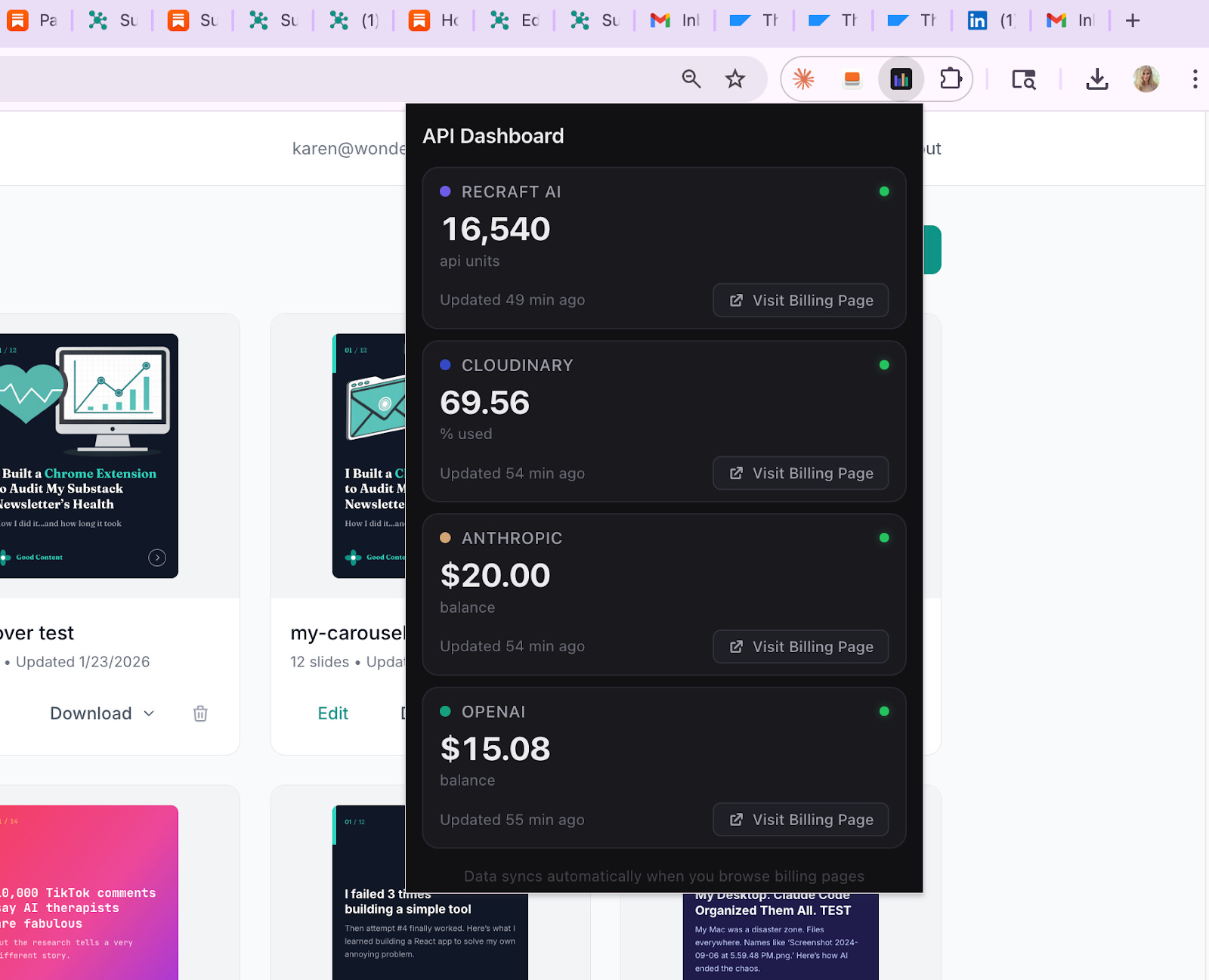
Let me walk you through a real example. I recently built a simple Chrome Extension that scrapes my API balances from various services and displays them on one page. Nothing fancy; I just wanted a quick way to see how much I’ve spent across OpenAI, Anthropic, and a couple other providers without logging into four different dashboards.
Now, I could have done this the “proper” way by reading the billing API documentation for each service and setting up API keys. But since I’m usually already logged into these services in my browser, I figured scraping would be faster. (It was.)
I proactively asked Claude to invoke both the Creative Director and the Chrome Extension expert for this project. As expected, both agents ran in parallel, with the main Claude instance supervising their work and coordinating between them.
Video of Claude subagents working:
Total project runtime? About 10 minutes from start to working extension.
Some things I noticed
Working with subagents isn’t always seamless. Here’s what I observed:
Cross-permission issues: Sometimes one agent couldn’t access files that another agent had created. This required some manual intervention to grant permissions.
True parallel execution: The agents genuinely did run simultaneously. I could watch both making progress at the same time, which was pretty satisfying.
Supervision works: The main Claude instance did a good job coordinating between agents, knowing when to wait for one to finish before having another proceed.
How did it actually work?
Not perfectly on the first try, I’ll admit. The first pass at the extension had some bugs:
The extension icon was missing. Claude initially tried to access billing APIs directly instead of scraping (which would have required API keys I didn’t want to set up). Then it tried scraping from URLs that didn’t exist.
It took about 10 additional minutes to resolve these issues, mostly by being firm and direct with Claude (“Do this, do that” without any conversational filler) and having Claude verify the actual URLs for each service’s billing page.
What I noticed, however, was that the extension looked good from the start. The Creative Director was doing its job even while the Chrome Extension expert was still figuring out the scraping logic. The styling was clean, the layout made sense, and the color scheme was cohesive, all without me touching a single CSS property.
Video demo of the final result:
The bottom line
Claude subagents aren’t magic. They won’t turn bad ideas into good products, and they still make mistakes. But they’re a legitimate productivity multiplier when you’re working on projects that have multiple distinct concerns, like functionality and aesthetics.
For me, the Creative Director agent has become a staple. I’m not a designer, and I used to spend way too much time second-guessing color choices and padding values. Now I describe what I want the vibe to be, and the Creative Director handles the details. It’s like having a colleague who actually enjoys the parts of the job I find tedious.
If you’re already using Claude Code, give subagents a try. Start with the /agents command and see what happens. You might be surprised how much faster your projects come together when you’re not the only one working on them.
One last thing
That was Karen. If you enjoyed her walkthrough on subagents, go check out her publication, Wondering About AI. All her articles are free, but paid subscribers get live builder workshops, recorded sessions, and free access to all her tools.
This was our first dive into Claude Code territory. Do you want more of this?
If you found this useful, share it with someone who might too.
Tried Claude Code? Want to learn something specific? Tell me in the comments or reply to this email.
Until next time,
Daria
This post is free. If you found it useful and want access to more of what I’m building - prompts, automations, step-by-step guides - paid subscribers get all of it.
If you want to keep going, here's everything else I've written about Claude:


 | A guest post by
|
Thank you both Daria and Karen! I love how you two collaborate and wrote this piece so cleanly!
Like you Karen, I'm not a design person, so having a dedicated agent to control styles save a lot of headache. Thanks for the generous sharing of the agent prompt, definitely stealing it :)
The subagent architecture you're describing is exactly how I structured my own automation system. The real breakthrough isn't parallelism for speed—it's specialization for accuracy. When I need to search 5 job boards simultaneously, spawning parallel agents means each one has focused context instead of trying to juggle everything.
What's less obvious: subagents aren't just about delegation. They're about isolation. If one agent hits an error or goes off-track, it doesn't contaminate the parent context. That architectural separation is what makes complex multi-step tasks actually reliable.
The challenge is coordination overhead—when do you parallelize vs. sequence? I documented 10 real-world patterns where this architecture proved essential: https://thoughts.jock.pl/p/ai-agent-use-cases-moltbot-wiz-2026