If you’ve been anywhere near AI on X or YouTube lately, you’ve probably seen people try Jev AI for the first time and stare at the screen in disbelief at how fast it is. I did exactly the same.
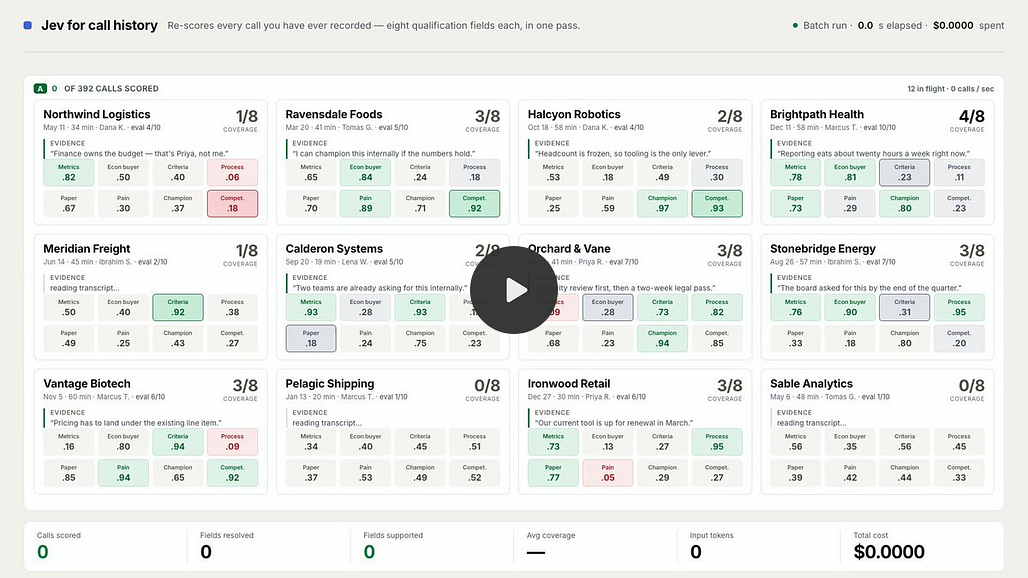
And if you missed them, here are a few that show what I mean:

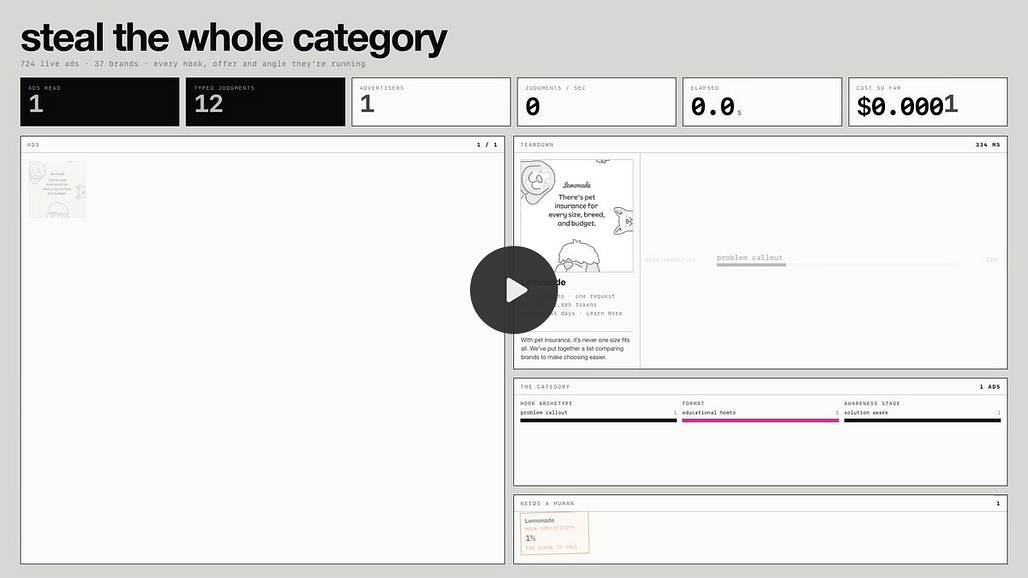



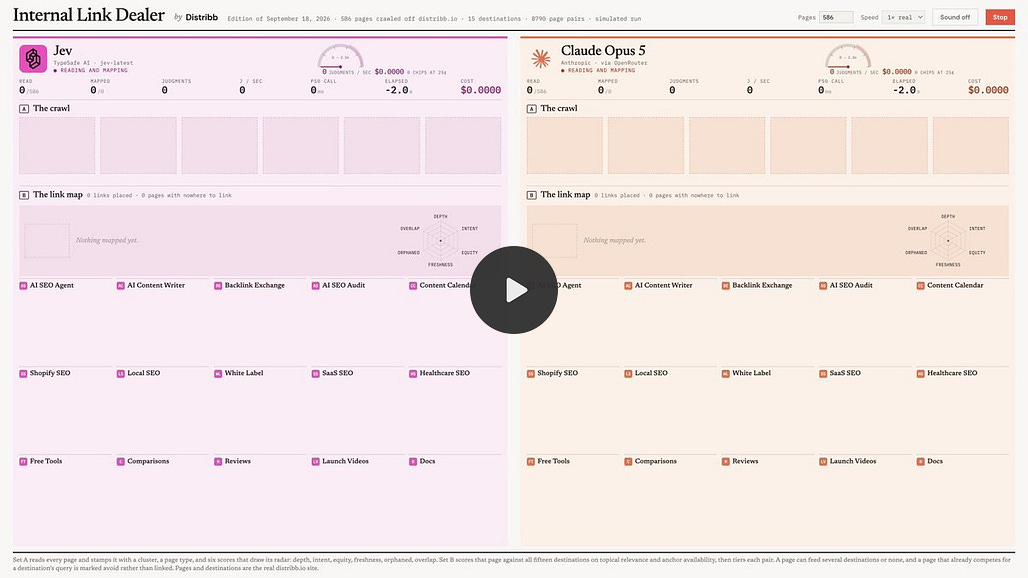

Hundreds of ads, leads, and web pages, handled in under a minute, for a few cents. No wonder Jev took the internet by storm.
But what the heck is Jev?
It’s the first of a new class of AI models, built by TypeSafe, a company co-founded by Diogo Almeida, who spent about four years at OpenAI helping build ChatGPT.
And the reason everything you see online sounds preeeetty crazy?
In TypeSafe’s own workflow tests, Jev was 193.6 times faster and 444.6 times cheaper than the leading AI models it was tested against. TypeSafe says those numbers are likely the high end of what you’d see in real life, but even a fraction of that is huge.
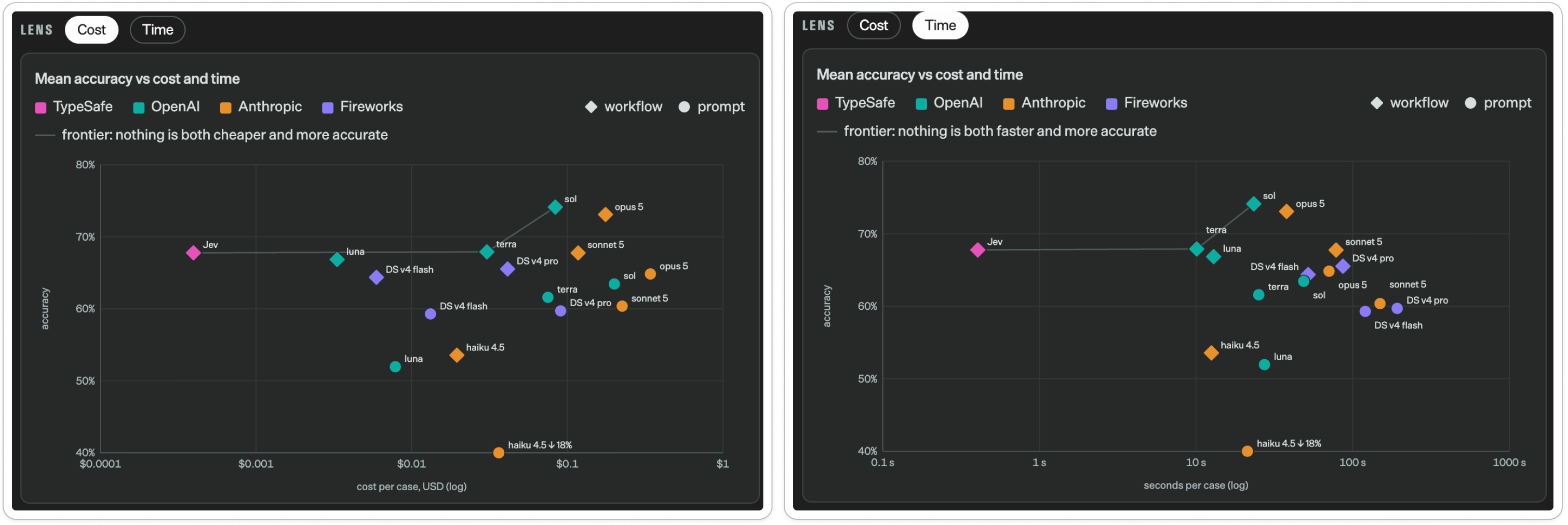
So you can imagine why everyone got so excited. When a decision costs a fraction of a cent, a lot of work that used to be too slow or too expensive for AI suddenly makes sense.
Large organizations can run it across millions of records. Small businesses can finally sort the inbox, the leads, and the reviews they never had time for.
And if you’re watching your AI limits or dreading the upgrade to a bigger plan, you now have a cheaper option for all the small decisions your assistant makes along the way.
It blew my mind. So let me show you, in plain language, what makes Jev so different, and then we’ll dive into the many, many ways you can put it to work.
Here’s what we’ll cover:
What is Jev AI?
If you have tried to understand Jev from its website or from half the content about it, you may have run into phrases like “frontier-intelligence function call”, “typed probabilistic decisions”, and “RLCD”.
I read them too. And I know they sound like alien language unless you’re at least a little technical.
So let me explain what Jev is in normal human language, with visuals, because they make everything easier to understand.
Here’s everything in one picture and I’ll walk you through each part below.
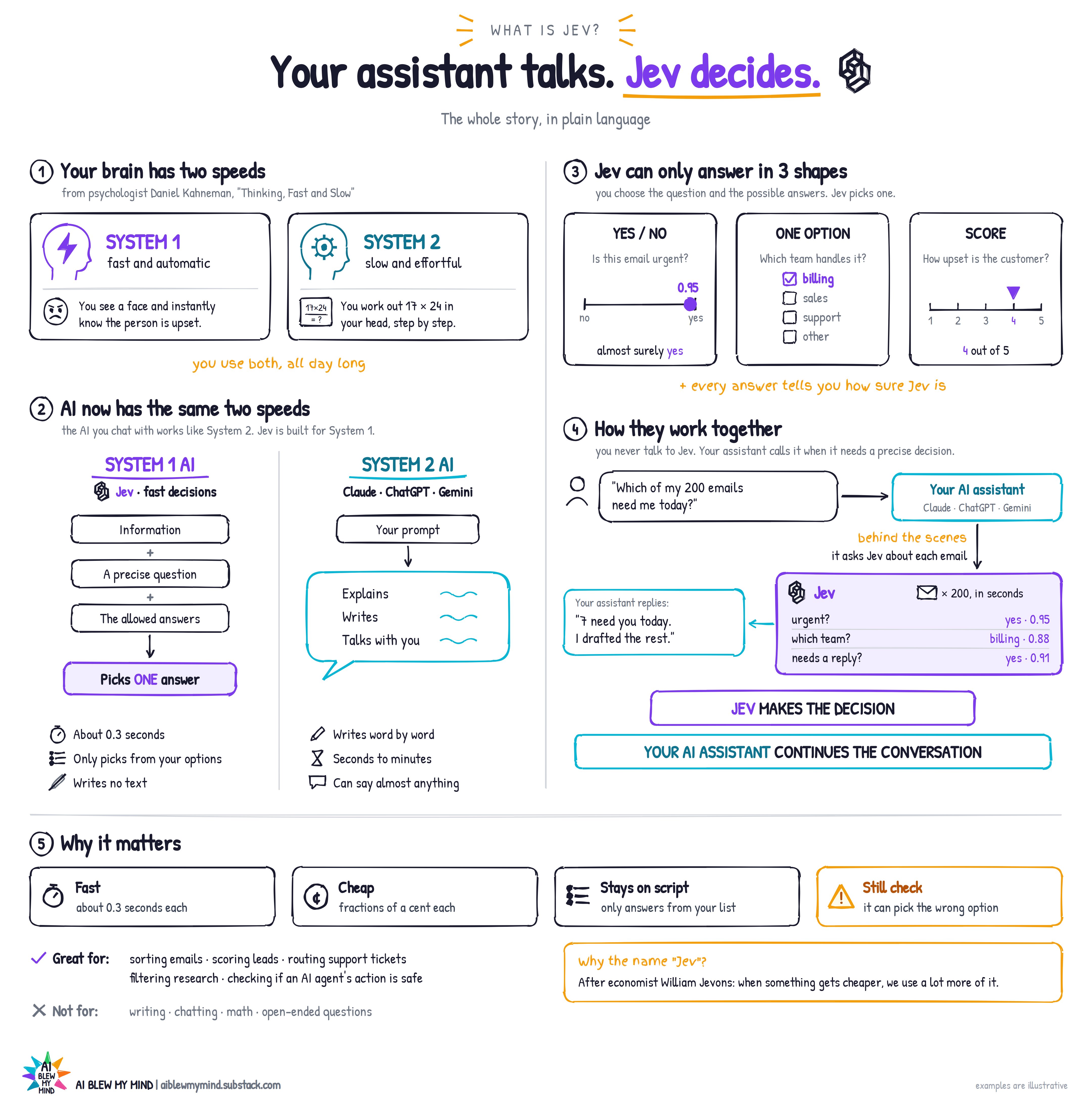
Long story short, Jev is an AI model built to make precise decisions.
You give it some information, ask it specific questions, and tell it which answers are allowed.
Each question you ask Jev can only be one of these three types: 1) a yes or no (TypeSafe calls it Noul), 2) one option from a list of possible answers (Choice), or 3) a place on a scale you define (Score).
Then, for each question, Jev gives you an answer and probabilities that show how confident it is about its answer.
So no, it doesn’t write or talk to you like Claude or ChatGPT, because it’s not a large language model (LLM) like them.
I know, that might still sound foggy, so let me show you with one example.
What happens when you give Jev a real task?
Imagine you run an online shop and this email lands in your inbox:
“I ordered a birthday present for my daughter two weeks ago and it still hasn’t arrived. Her party is on Saturday. If it’s not here by Friday, I want my money back.”
I asked Claude to send that email to Jev along with three questions (notice I used all three question types from earlier). Here’s what came back:
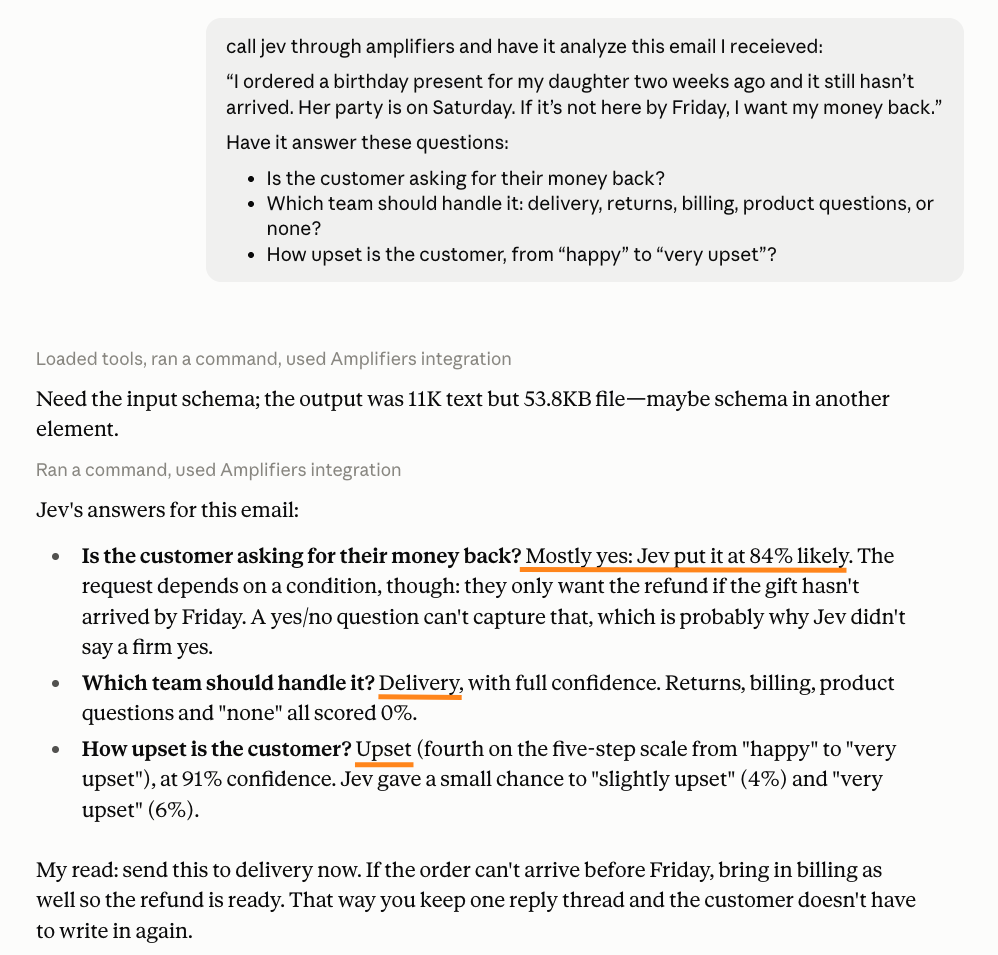
That was one email, though. A real shop gets dozens every day, and to keep things running well, you need to know which ones to answer first and which team should see each one, so nobody waits too long for a reply.
And that’s exactly where Jev shines: turning a mountain of messy data into fast, consistent decisions.
How is Jev AI different from ChatGPT and Claude?
And now you might be thinking: “But what’s so special about Jev? My AI could sort a pile of messages like that too.”
And you’d be right! Claude, ChatGPT, or Gemini could do it too. The difference is how they get there. They’d reason through each email and write their answer word by word, because that’s what they’re built for.
Jev works like a classifier, which means it sorts things into the options you give it. It reads each email once and weighs all the allowed answers at the same time, without writing a single word. It’s built only for the quick judgment.
That’s why TypeSafe calls Jev a System One model, after Daniel Kahneman's book Thinking, Fast and Slow.
System One is our fast, automatic thinking, like knowing 2 + 2 is 4 without trying, which is the kind of quick judgment Jev makes. System Two is the slow, deliberate kind, like working out 17 × 24 in our head, which is closer to how AI assistants like Claude or ChatGPT reason through a task.
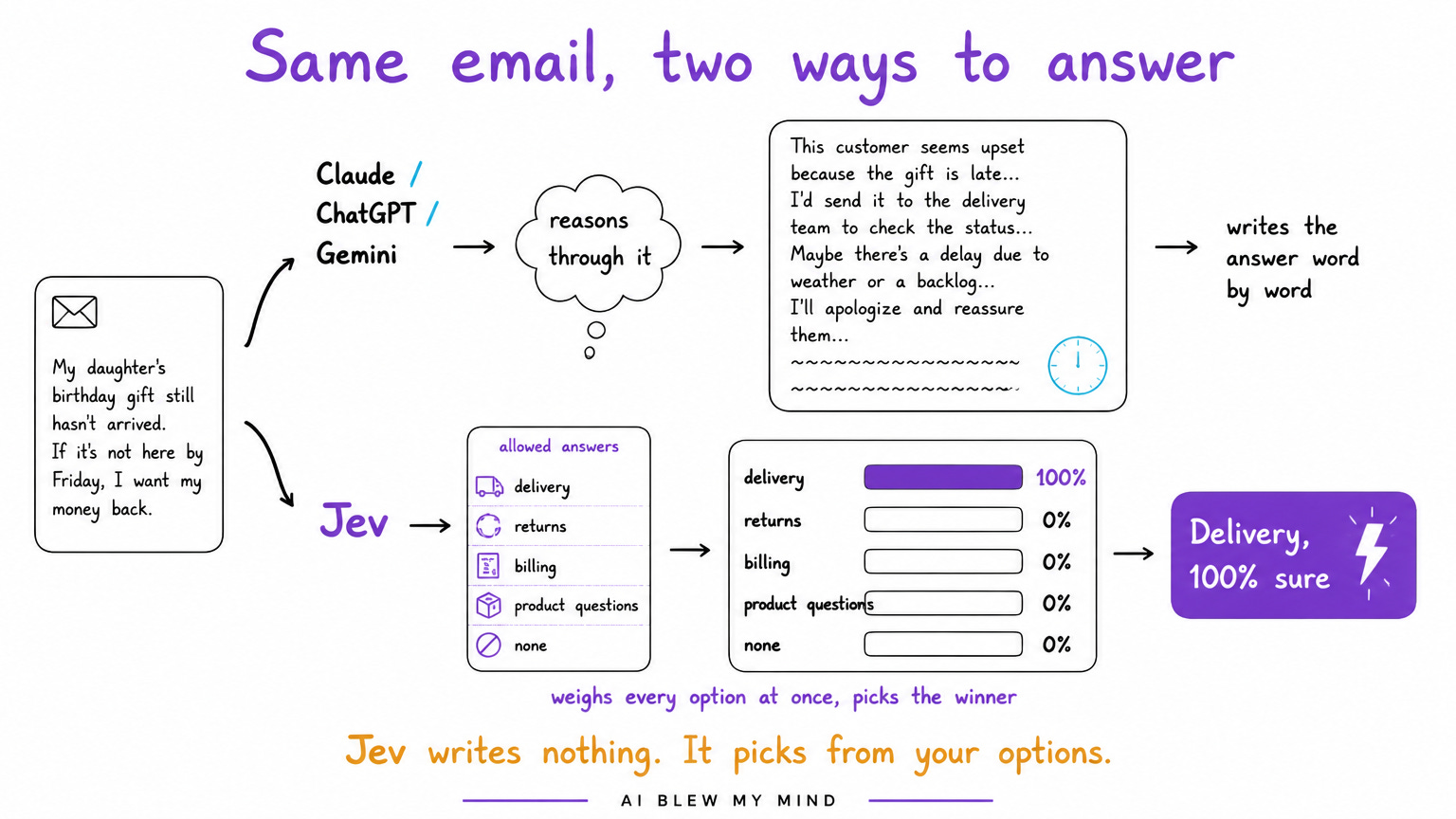
And because Jev skips all that slow reasoning, it’s crazy fast. And crazy cheap.
That’s why everyone is talking about it.
Until now, having AI make the same small decision thousands of times was slow and expensive, so most people didn’t bother. With Jev, each decision takes a split second and costs a fraction of a cent, so you can run it on as much data as you have.
How to set up and use Jev AI (no coding needed)
You can connect and use Jev through TypeSafe’s API, OpenRouter, Vercel AI Gateway, Cloudflare Workers AI, or add TypeSafe’s official skill for Claude Code and Codex.
But if you’re not that technical and don’t live in the terminal or in coding assistants, you’ll probably want to use Jev from the tools you already work in, like Cowork or even a regular chat in Claude or ChatGPT.
For that, there’s an easier way in: Amplifiers.
Once it’s connected, you can ask your AI assistant to call Jev whenever a task requires it:
“Use Amplifiers to call Jev to [sort today’s customer emails by team and flag anyone asking for their money back.]”
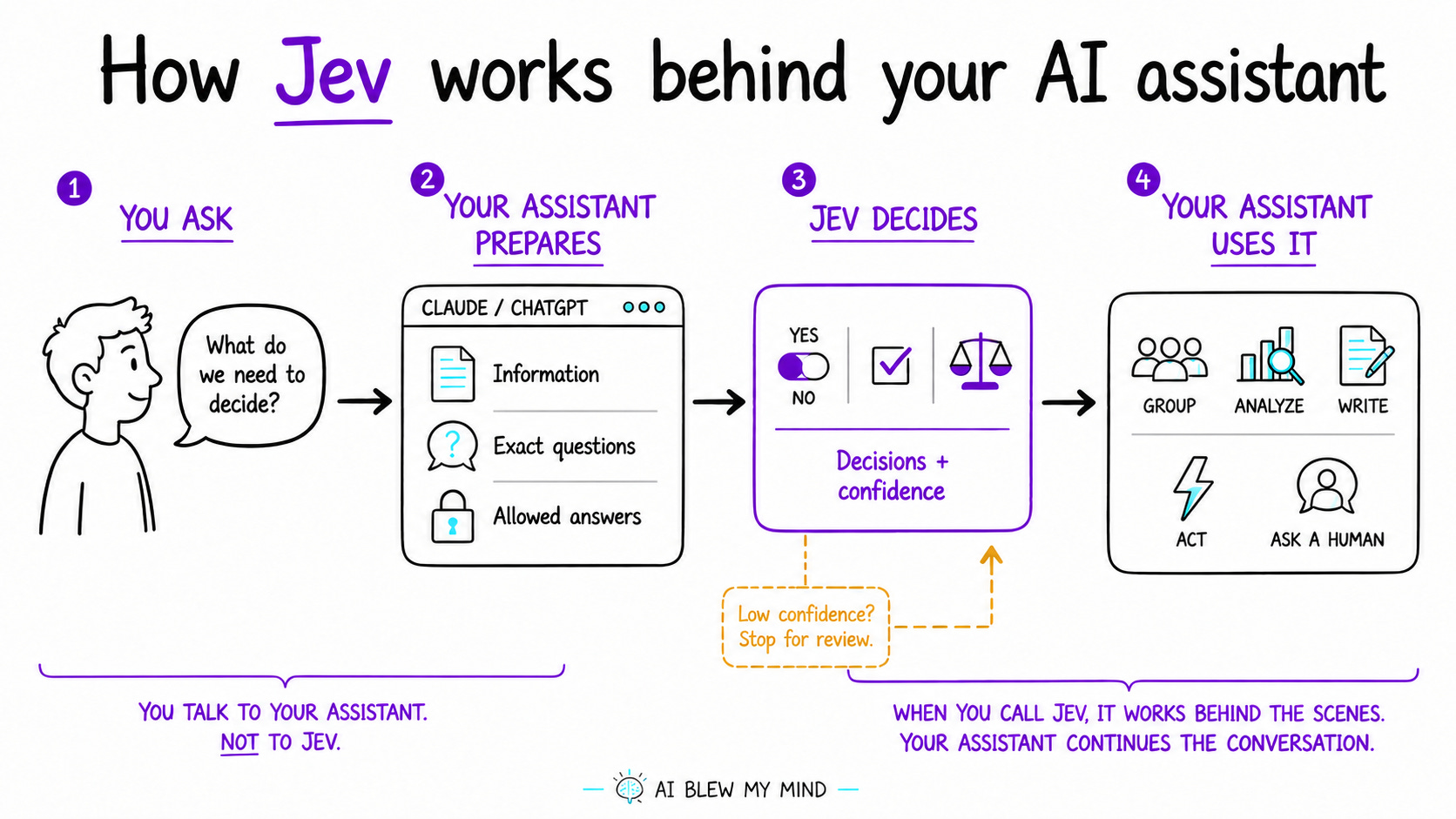
Your assistant does the talking and reasoning, while Jev does the deciding. Here’s what that looks like behind the scenes:
You ask your assistant for something in plain language.
Your assistant works out what needs to be decided and sends Jev the information, the questions, and the allowed answers.
Jev makes the decisions and sends them back, along with how confident it is in each one.
Your assistant communicates Jev’s answers to you and handles any additional reasoning the task requires.
If you’re a paid AI Blew My Mind subscriber, Amplifiers Pro is already included, and Jev comes with it.
Each Jev call uses your monthly Amplifiers credits, and you don’t need a separate TypeSafe account or API key. So that’s one less AI bill and one less technical setup to add to the pile.
And if you don’t have Amplifiers yet, set it up here.
Now let’s put Jev to work.
15 Jev AI use cases (with prompts and screenshots)
Jev can feel limited beside the LLMs we’re used to. It cannot write an article, explain its thinking, research a company, or hold a conversation with you.
And it’s true, you wouldn’t use it for absolutely everything. But there are limitless ways to put it to work doing what it does best: making fast, precise decisions at scale.
To make all the use cases I’m about to share easier to follow, I’m dividing them into three main buckets:
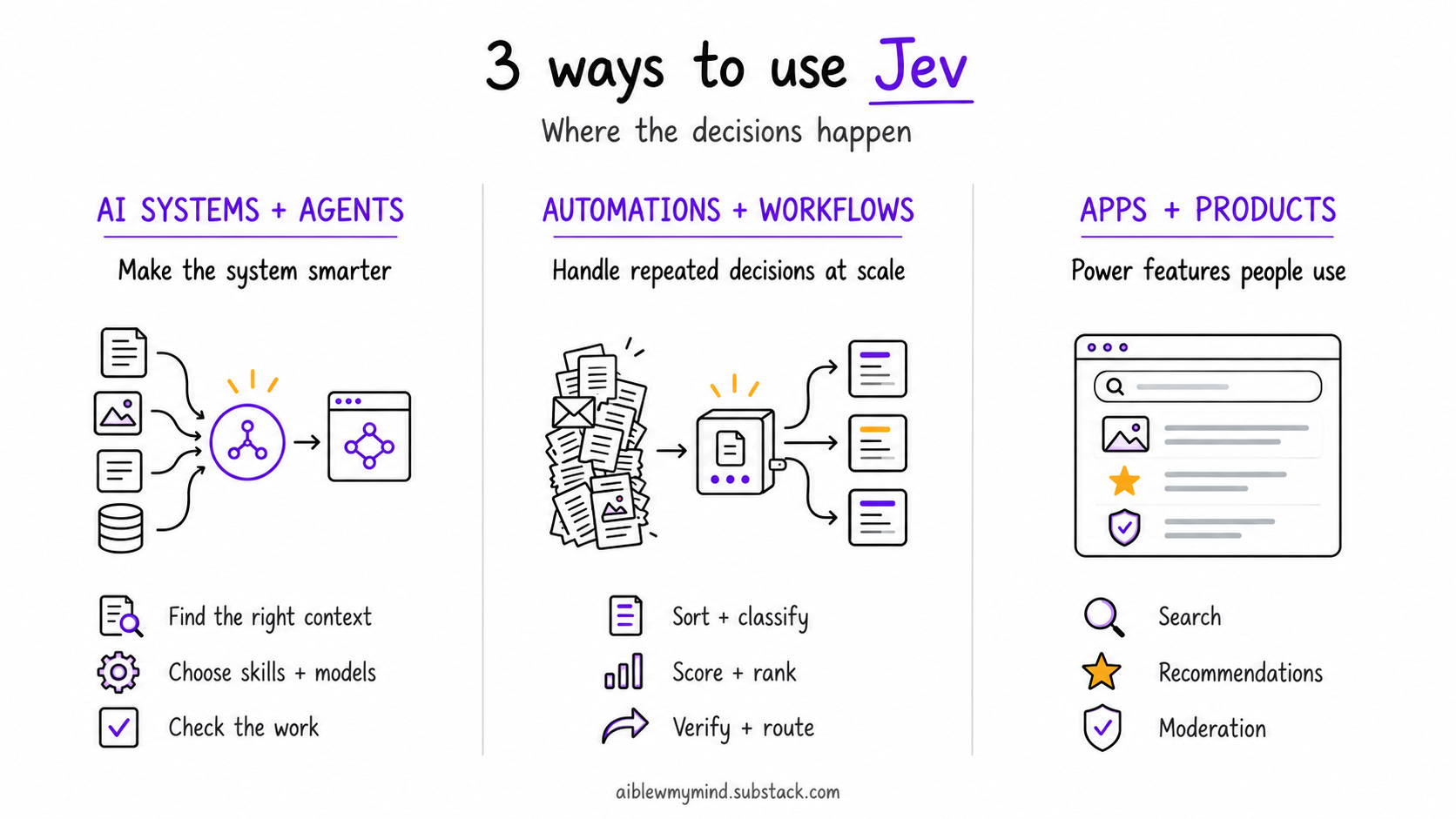
A quick note before we start: I won’t rebuild the speed demos you’ve already seen online, since plenty of creators have shared those.
I’d rather give you variety and depth, with ideas for both business and personal use, each one with the prompt behind it, so you’re never left wondering “but how do you actually do that?”
Let’s start with the more flashy ones.
Use Jev to make decisions at scale inside your automations
Because Jev can make those decisions much more cheaply and quickly, you can run far more automated work without burning through your AI limits or paying for the biggest subscription.
Use case 1. Create a self-organizing second brain with Slack and Notion
Jev’s job: Classification + routing. Decide what every thought is, how important it is, and where it belongs.
The problem: Ideas, tasks, reminders, references, and random thoughts rarely appear when you have the right Notion page open. You drop everything somewhere convenient, planning to organize it later, and eventually create another pile you never revisit.
What Jev does: You create a private Slack channel where you can send anything that comes to mind and connect Claude to it by giving it the Slack Channel ID. Jev classifies every message by type, topic, priority, and destination. Claude then saves it inside the correct Notion database or page.
The same setup can work with other tools too, but Slack and Notion make a simple second brain: one place to capture everything and another where it organizes itself.
Prompt:
Build me a second brain using Slack and [Notion or another tool]. Whenever I post something in [Slack channel ID], send it to the
call_jevamplifier and ask Jev to decide:
Type: [idea, task, reminder, reference, opportunity, or your options]
Area: [list your areas of work]
Priority: [low, medium, high, urgent]
Destination: [list the pages, databases, folders, or tools it can choose from]
Then have Claude save the original message, Slack link, date, and Jev’s classifications in the selected destination.
If Jev is uncertain, the entry may be a duplicate, or no destination fits, keep it in a review list and ask me. Never invent deadlines or start working on an idea automatically.
Schedule this task to run every day at [12:00 AM].
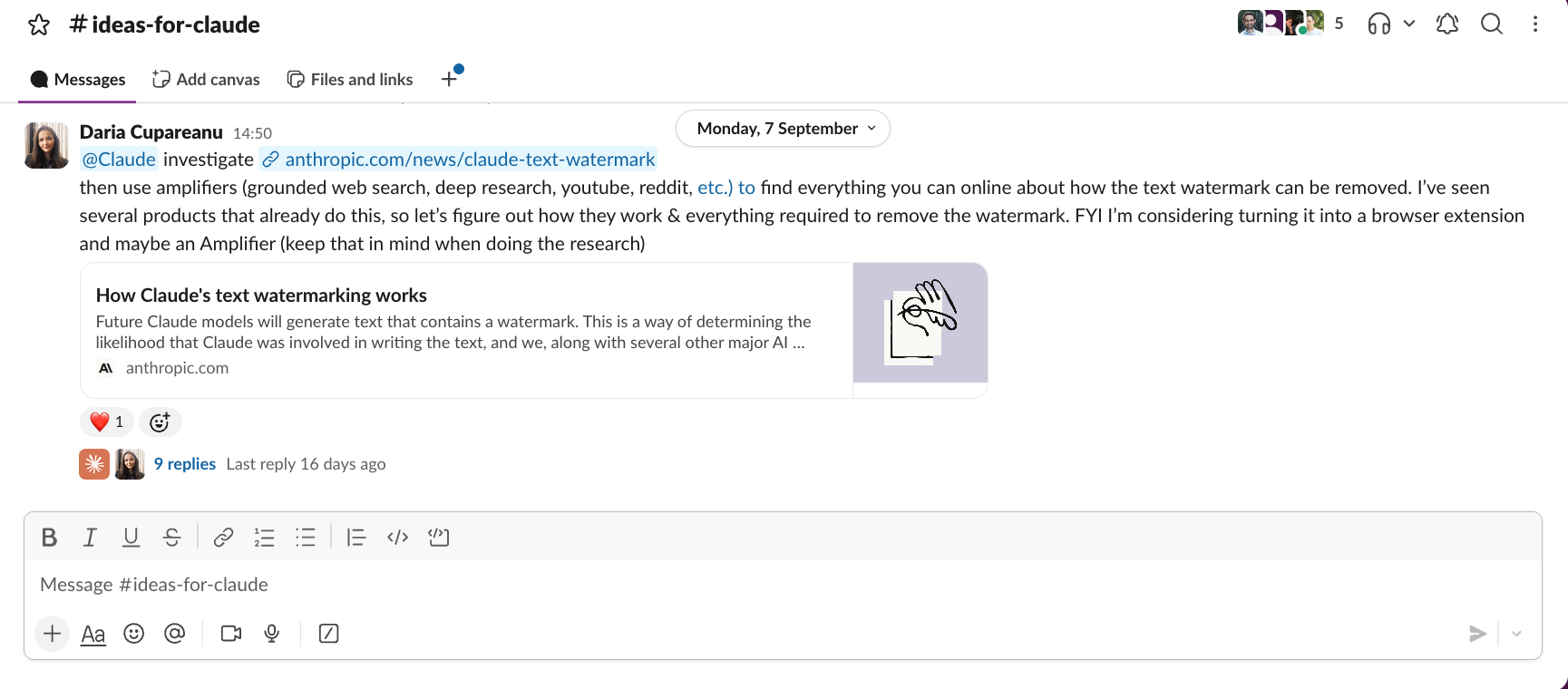
You could even expand this to capture voice notes. Your AI could transcribe them, use Jev to categorize your on-the-go thoughts into the right buckets, and have your AI automatically add reminders or deadlines to your calendar.
I’d say that’s a pretty useful second brain for busy people! All you have to do is talk.
Use case 2. Reach inbox zero and keep incoming work organized
Jev’s job: Classification + routing. Decide what each email, ticket, lead, file, or request is and what should happen next.
In my article with 30 Google Workspace automations, I showed how much of your work you can automate across Gmail, Drive, Calendar, and Sheets. Jev could handle the repeated decisions inside most of those workflows.
The problem: When several automations run every day, Claude may have to judge hundreds or thousands of individual items before it can act. That can burn through your limits very quickly.
What Jev does: Jev decides the category, priority, and next step for each item. Claude then takes the appropriate action through Google Workspace.
Prompt:
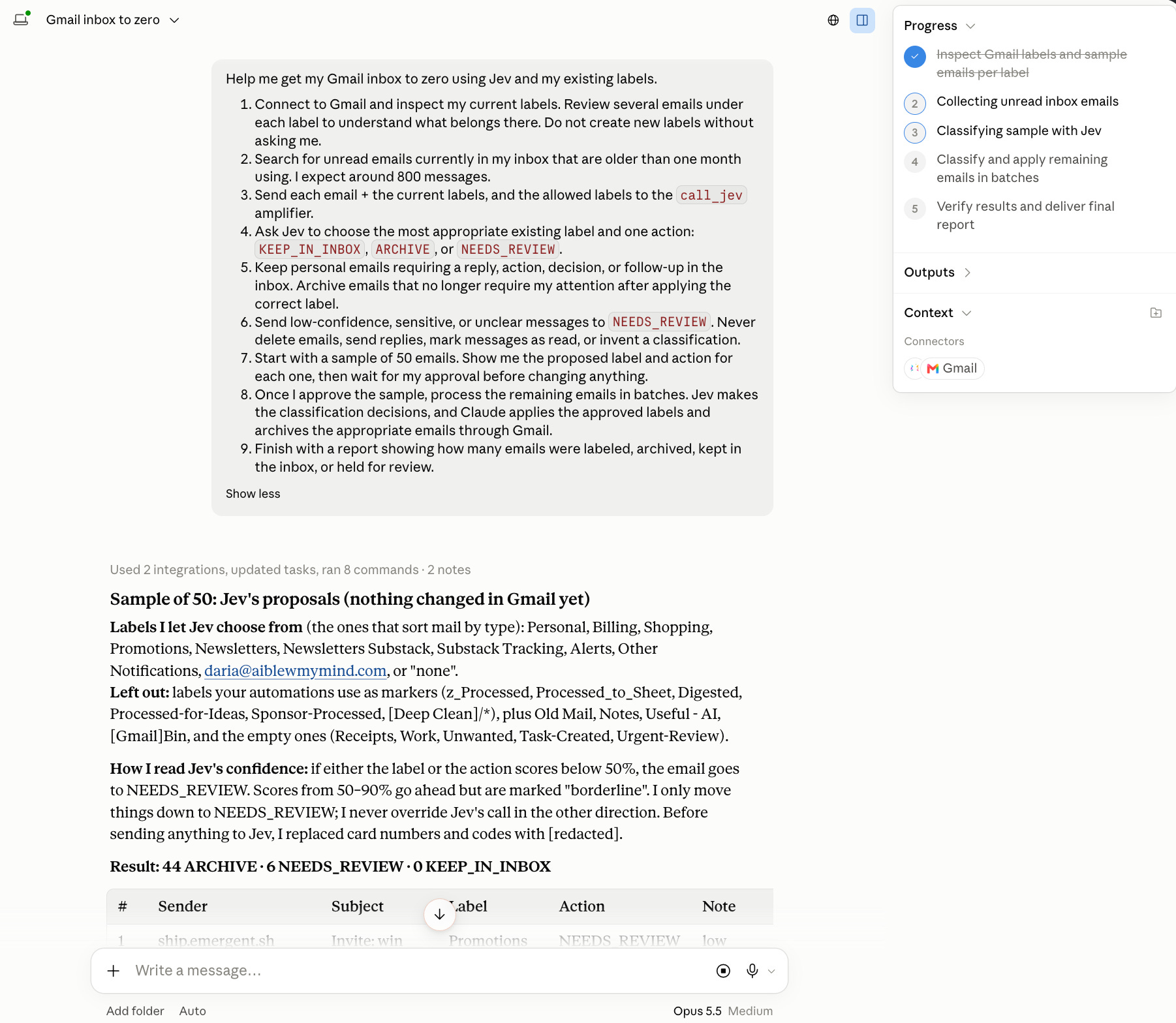
After I approved the results, it continued through the remaining batches, applied my existing labels, archived the right messages, and got me to inbox zero (almost).
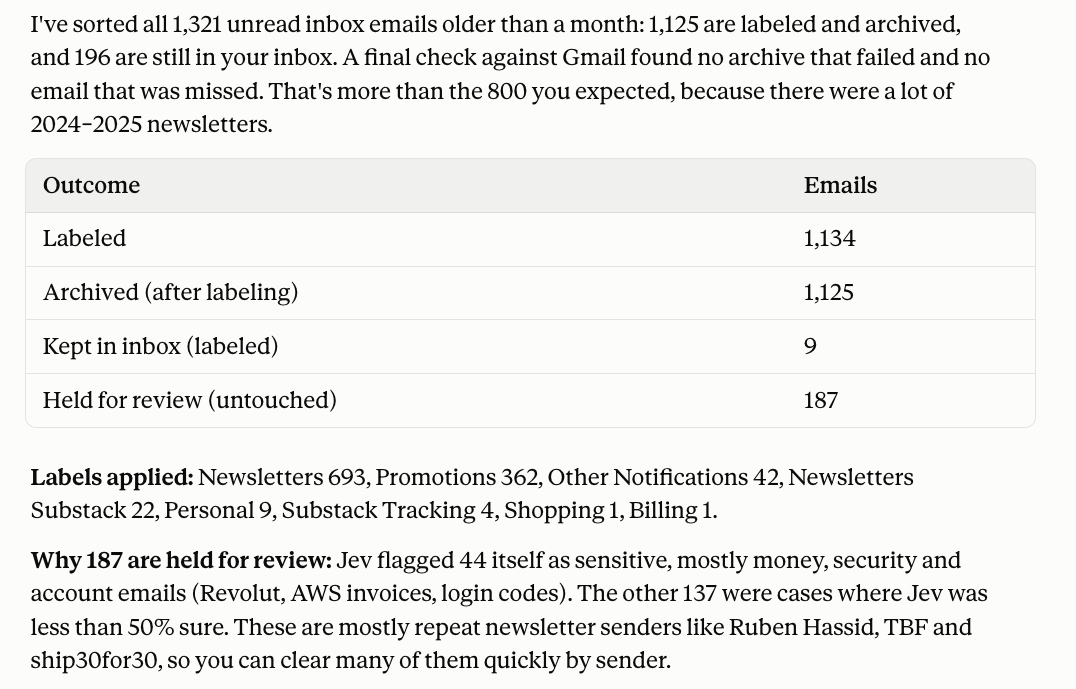
The same setup could manage your inbox every day or help a business organize a shared inbox, classify support tickets, qualify inbound leads, match customer questions with approved answers, and route each message to the right person or workflow.
Use case 3. Qualify leads and automate decisions across your sales process
Jev’s job: Scoring + ranking. Decide which opportunities deserve attention, what should happen next, and where a human needs to step in.
The problem: A B2B sales process contains repeated decisions at almost every stage. Which companies match your ideal customer? Which inbound leads are serious? Who should you contact first? Is the opportunity ready for a proposal? Does the contract contain anything you should question?
Making all those decisions with a large model becomes expensive when you have hundreds or thousands of companies, leads, and documents to review.
What Jev does: Amplifiers finds and researches the companies. Jev scores each one against your criteria and ranks the strongest opportunities. Claude then prepares the outreach only for the companies worth pursuing.
You could use the same setup throughout the sales process:
Find leads that match your ideal customer profile.
Qualify and prioritize inbound leads.
Decide which prospects need deeper research.
Route each opportunity to the correct next step.
Identify leads with unclear budgets, scope, or decision-makers.
Classify contract clauses and flag possible risks, renewals, restrictions, or one-sided terms for human review.
Spot renewal, churn, or upsell opportunities after the deal is signed.
Example prompt:
Use the Prospect Research Finder from Amplifiers to find [number] companies that match [describe your ideal customer].
Gather [company information, decision-makers, growth signals, needs, budget signals, or other useful details], then send the results to Jev through Amplifiers.
Ask Jev to score each company against [your qualification criteria], classify it as
HIGH_PRIORITY,POSSIBLE_FIT,NOT_A_FIT, orNEEDS_REVIEW, and choose the appropriate next step.Have Claude research only the strongest matches using Amplifiers and prepare a ranked list for me. Do not contact anyone without my approval.
And this can continue after the first sales call too.