

TL;DR: Claude Opus 5.5 makes mind-blowing videos by writing code that draws every frame, then rendering it all into an MP4. It can’t make a natural voiceover, real music or live footage on its own, so we added new Amplifiers for that: generate_audio (Gemini 3.1 Flash TTS, ElevenLabs, Lyria 3 Pro) and generate_video (Seedance, Veo). Below are 10+ videos I made with every prompt, plus a Video Director that makes any video for you.
If we haven’t met yet, hi! I had Claude and Amplifiers make this short video about how I got into AI and how this newsletter started, so you get a sneak peek at how great this combo is and meet the person behind it all.
Claude Opus 5.5 for videos? Gosh, it’s just too good to skip.
But first, let me tell you how glad I am that the Claude 5.5 models are here. This is the comeback I’ve been waiting for!
The last few models frustrated many of us, myself included, and before I knew it, I was doing more and more of my work in ChatGPT (yes, me, the one who’s always writing about Claude). But now... things are back to how they’re supposed to be.
And what caught my eye from the very first day were the videos. The moment Opus 5.5 launched, Claude’s own accounts on X and Instagram started posting videos and animations made with it, and it was obvious something big had changed.

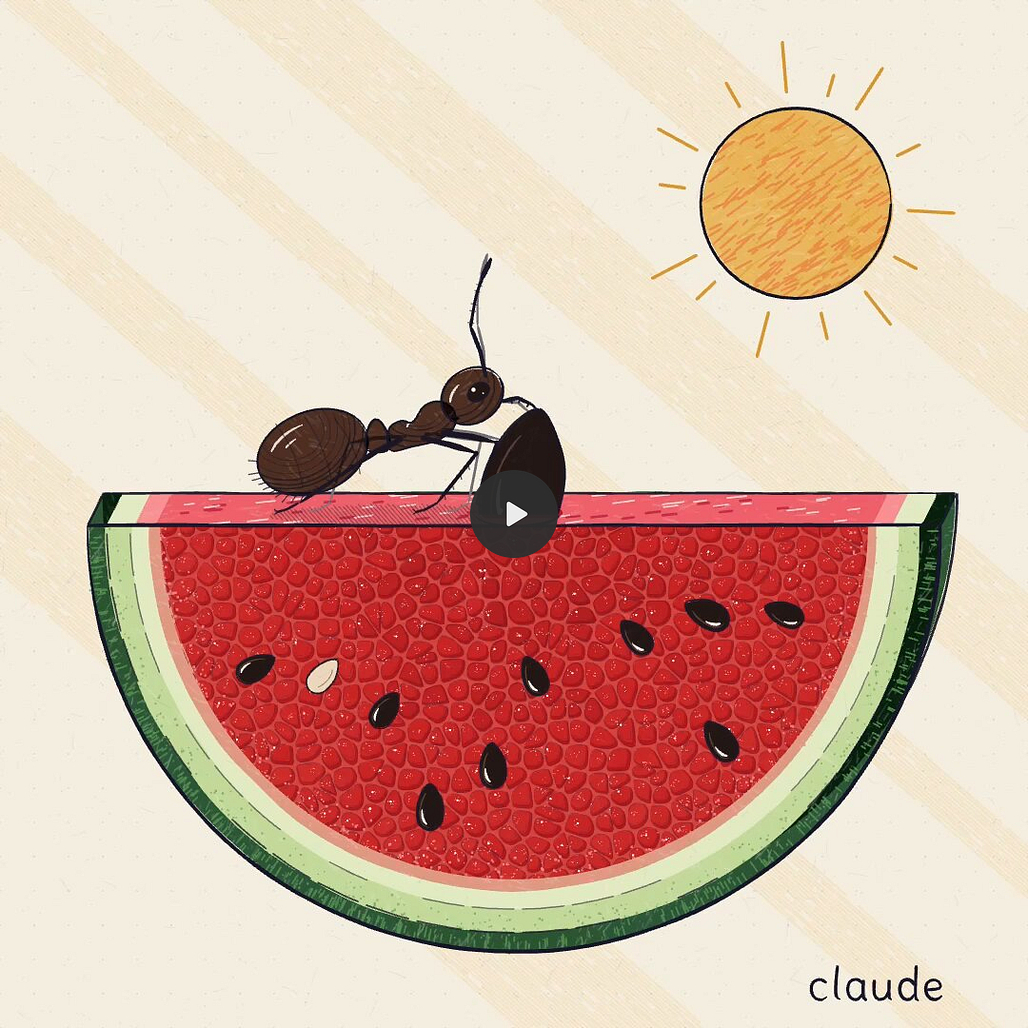
In the days that followed, my feed filled up with more and more of them.
The catch is that it’s the same few things on repeat: one video goes viral and then everyone runs the exact same prompt on their own product.
And since I’m not one to recycle things, we’ll go beyond the viral prompts and make videos for your real work, from ads and pitch videos for your business to explainers, trailers and YouTube-ready edits for your content.
For videos like that, though, Claude needs a few things it can’t make on its own: a natural voice, real music, and live footage.
So we built it all into Amplifiers. Set it up once, and your Claude turns into a full video production studio, with everything it was missing in one place. I still can’t get over it!
And no, you don’t need any design or animation skills for any of it (PS. if you loved my Claude Design animations article last month, trust me, this is even better).
Now, as usual, we’re doing this hands-on. By the end, you’ll get a spreadsheet with every prompt I used, plus a template version of each one you can fill in with your own details.
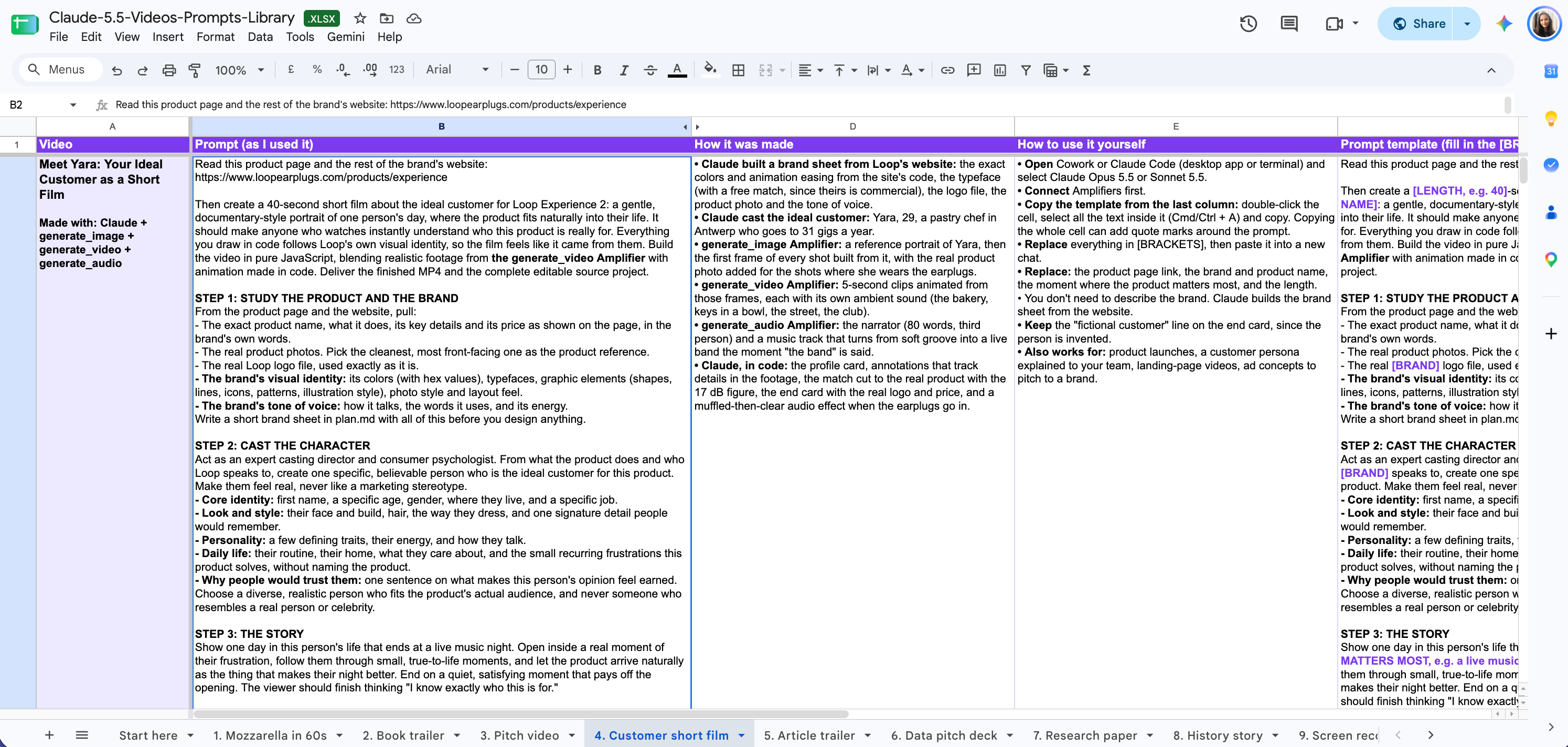
Don’t feel like writing prompts yourself? I also built the Video Director workflow inside Amplifiers. Tell it what you want to make, and it first writes you a great prompt for it. Once you approve the direction, it takes it all the way to a finished video, voice, music and footage included. I’ll show you how it works in a bit.
If what I’m about to show you blows your mind the way it blew mine, share it with someone who needs to see it. It’s free, and it’s the only form of support I’d ever ask from you.
Here’s what we’ll cover:
How Claude makes videos (and how it’s different from video generation models)
Create any video you can imagine with the Video Director from Amplifiers
10 Claude video examples (with every prompt)
2 Videos that tell a story: a true story from history and a movie trailer for a book
4 Videos for your content: an article trailer, a research paper explained, a YouTube video retold as a cartoon and a raw screen recording turned into a YouTube video
4 Videos for your business: a video pitch deck from real numbers, a personalized pitch for a prospect, an ASMR product ad and a short film about your ideal customer
Let’s begin.
What’s new in Claude Opus 5.5 (and the other 5.5 models) and why it matters for video
Claude Opus 5.5 landed on September 22, 2026, kicking off a new generation of Claude models. After about ten minutes with it, I caught myself yelling “Hell yeah, Claude is back!” at my screen.
Anyway, back to the launches: Sonnet 5.5 followed a few days later, on September 28, and Haiku 5.5 is on its way.
I went through the launch announcement so you don’t have to, and these are the parts that matter for us:
It writes well again. Anthropic says it writes more clearly and gets to the point faster, and after testing it, I can confirm it’s true. You already know how keen I am on making AI write like me, so I’ve made some big improvements to my Voice DNA skill. I’ll share everything with you soon.
It works on its own for longer. Long, multi-step tasks where Claude plans, builds and checks its own work, which is what makes these videos possible.
It’s cheaper and faster. 40% cheaper to run than Opus 5 (good news for your usage limits!) and more than 30% faster.
It comes with five effort levels. Low, Medium, High, Extra and Max, basically a dial for how hard Claude thinks.
It’s on every paid plan and in the API, at $4 per million input tokens and $20 per million output tokens.
Funny enough, the announcement doesn’t mention video once, but it was clear it was coming: one week earlier, on September 16, they brought Claude Design right into the chat and Claude Code.
Now you may be wondering... Opus or Sonnet for videos? Well, Sonnet 5.5 is half the price, and it makes great videos too. One of this week’s most upvoted videos on r/ClaudeAI was made with it.
My recommendation: if you want to be careful with your usage limits, start with Sonnet, then switch to Opus when you want to push a video further.
Just know that every video I’m sharing in this article was made with Opus 5.5 on High effort.
How Claude makes videos (and how it’s different from video generation models)
Now, if you’re picturing AI video tools like Veo, Seedance or Gemini Omni, forget that picture for a second.
Those are video generation models: you describe a scene and they generate the whole clip at once from the millions of videos they learned from, which makes them great at realistic footage and unpredictable with exact text or small changes. (I tested Gemini Omni a few months ago, if you want to see what that looks like.)
Claude Opus 5.5 and Sonnet 5.5 write code instead. Claude builds your video the way a motion designer would, piece by piece. Then it plays it in a hidden browser, records it into an MP4, and checks its own frames to fix what looks off.
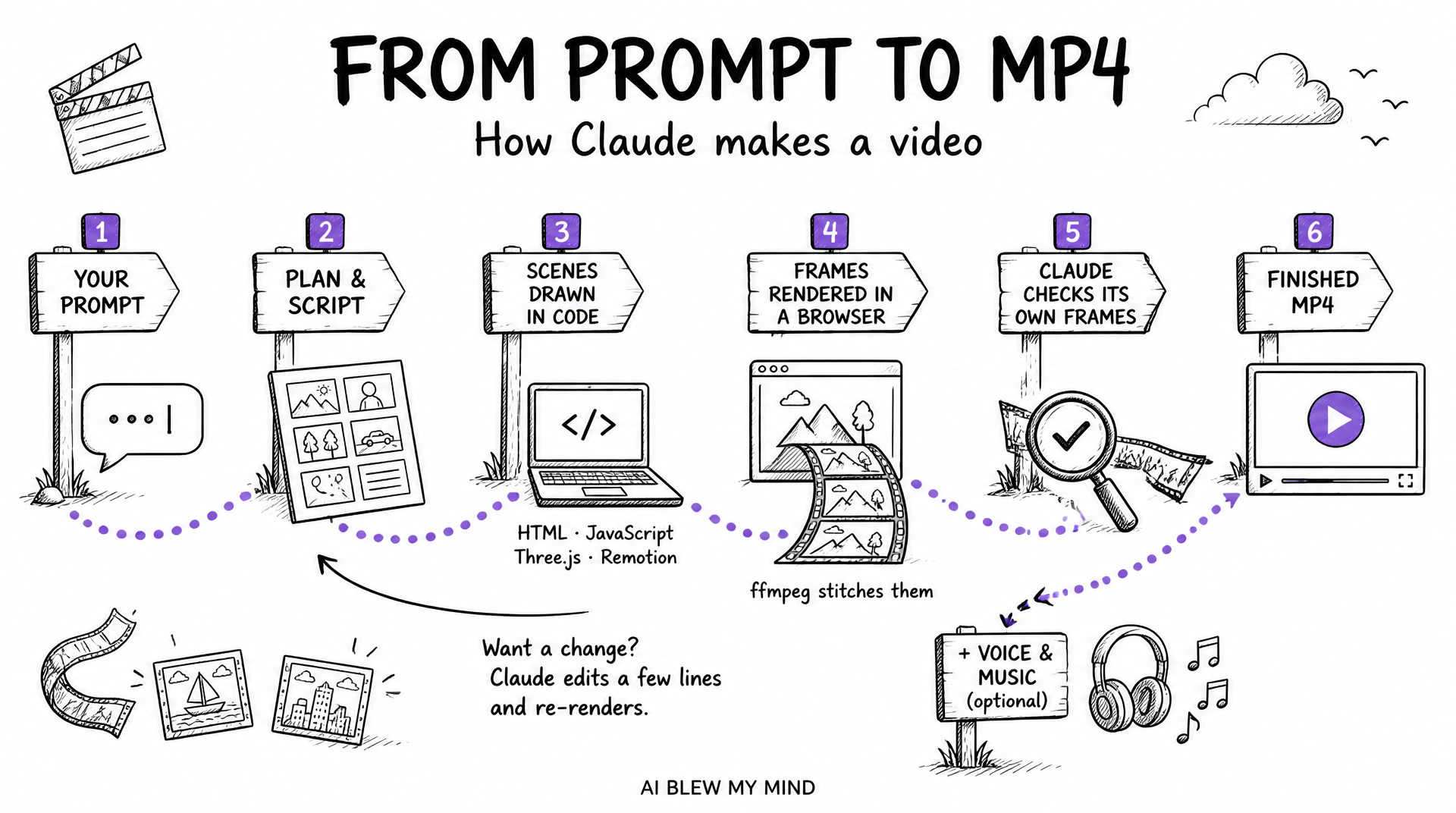
Claude and video generation models work great together, since each one covers exactly what the other can’t, and to be honest, I can’t believe nobody online has thought of combining them.
But now that Amplifiers gives you a full video production studio in one place, we’ll combine them in this article, and you’ll see what I mean when I say the possibilities are now endless.
Where to make videos with Claude Opus and Sonnet 5.5
Claude needs a place where it can run code and render the video, so you have two options:
Claude Code (desktop app or terminal). Most of the videos online were made here (people said the regular chat app times out on long renders).
Cowork. I used it on more than half of the videos in this article, and it works just as well.
Whichever you pick, set the effort to High or above for the final video. Lower effort is fine only for small fixes.
Claude video limitations (and how to get around them)
Since Claude draws everything in code, it has some of the same gaps we had with Claude Design animations:
No natural voiceover. Claude writes a great script, but the free voice models it can install sound flat. Voice was also the most common complaint under the viral videos.
No real music. Claude can code whooshes, clicks and a simple beat, but a soundtrack that sounds produced needs a music model.
No realistic footage. Claude draws, so real people or a product on a kitchen counter are out of reach.
Time and usage. A full (30-60-seconds) video takes 30 minutes to over an hour and a good chunk of your usage.
The first three limitations are where Amplifiers comes in.
How Amplifiers fills the gaps
I know you don’t want the hassle of making the voice in one tool, the music in another, and stitching it all together in a video editor.
And you definitely don’t want to connect all those tools yourself and pay for a separate subscription for each one.
So we added new Amplifiers that give Claude exactly what it’s missing, and now you can mix it all into one full video, right inside the chat:
Voiceover with Gemini 3.1 Flash TTS (Google’s text-to-speech model) and ElevenLabs
Music with Lyria 3 Pro, Google’s music model
Real footage with Seedance and Veo, the video generation models from ByteDance and Google
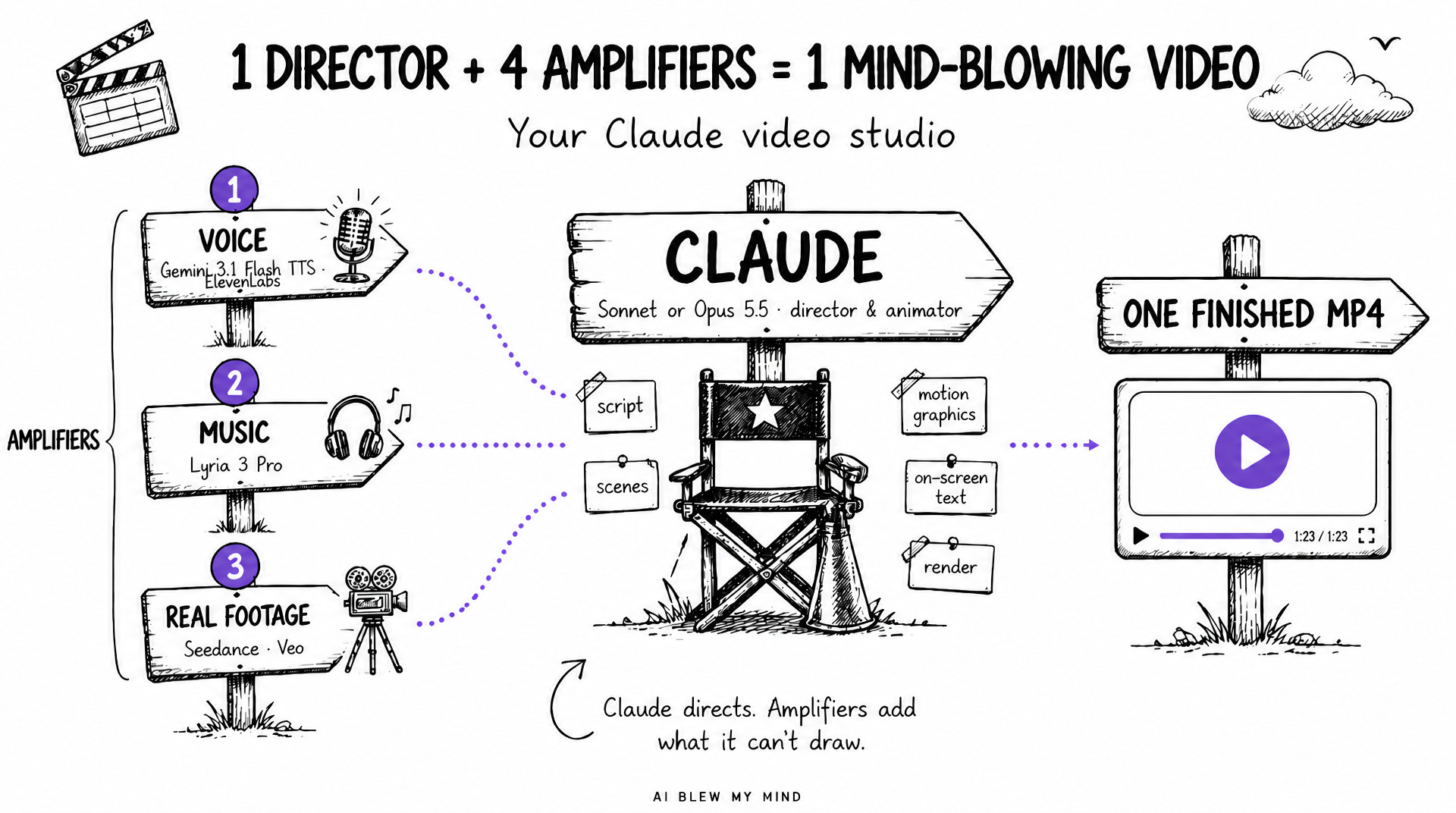
So when I say Amplifiers supercharges your AI assistant, this is what I mean.
Getting it all set up is simple!
New to Amplifiers?
Add Amplifiers to your Claude by following this setup guide. It takes 2 minutes.
Upgrade to a paid AI Blew My Mind subscription ($12/month or $100/year) and Amplifiers Pro comes included, new video Amplifiers and all (besides everything else that’s already inside).
Already have Amplifiers?
In your Claude settings, open the Amplifiers connector and set the new tools to “Always allow”, so Claude can use them.
Once you’re set up: open Cowork or Claude Code, select Sonnet or Opus 5.5, and try a video with me.
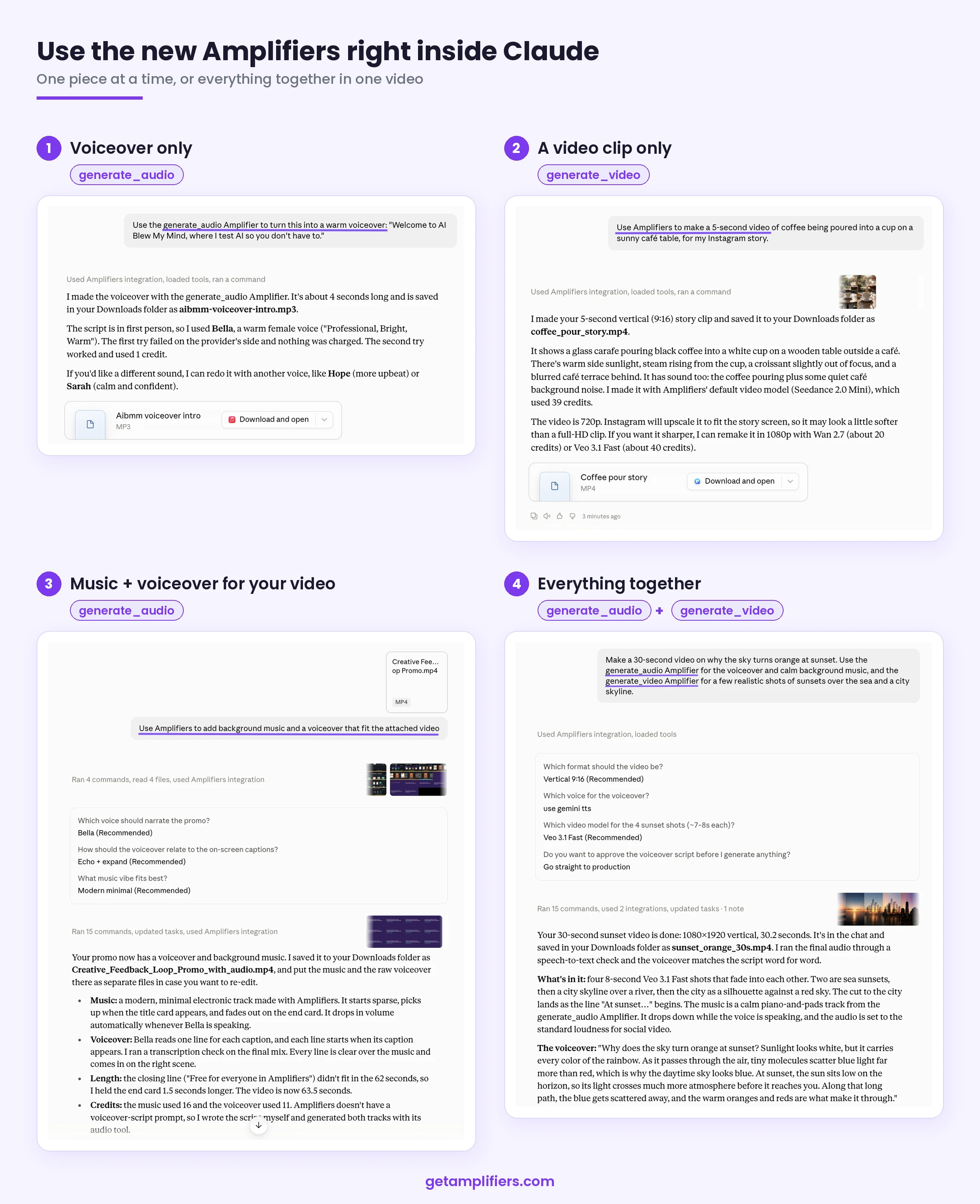
You don’t need to remember which model does what. Just ask Claude to use the generate_audio Amplifier for voiceovers and music, and the generate_video Amplifier for video clips, and it picks a good model for you.
If you have a favorite, just name it: Gemini or ElevenLabs for the voice, Seedance or Veo for the footage.
Create any video you can imagine with the Video Director from Amplifiers
Below, I’ll show you a bunch of videos and share every prompt behind them. Once you see them, though, you’ll want to make your own, so I wanted to give you more than a list of prompts: a way to create any video you can imagine.
That’s why I built the Video Director inside Amplifiers.
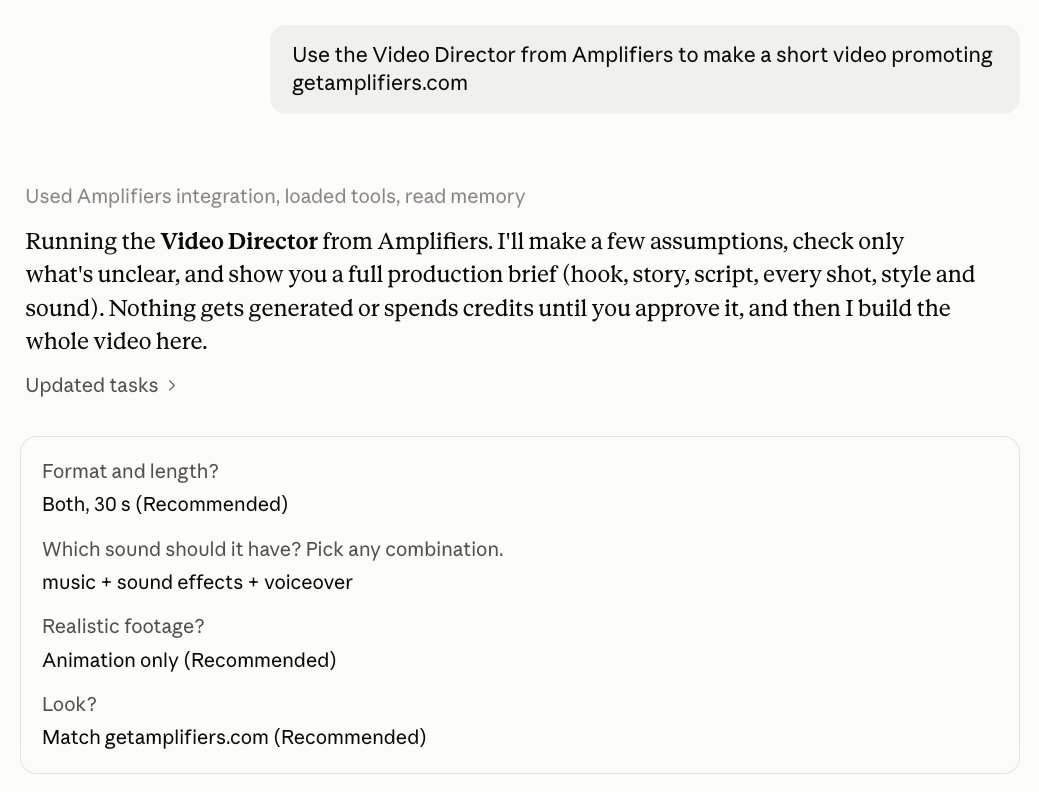
You tell Claude to use it and describe the video you want. It asks you a couple of quick questions, writes a detailed prompt built to get you a great video, and then produces the video right there, in the same session.
It’s as simple as this:
10 Claude video examples (with every prompt)
I’m very excited about creative work with AI, and this is the most fun I’ve had testing something in a while. That’s why there are so many videos here: I literally couldn’t stop, and I wanted you to see how many different things you can make!
You’ll find every prompt in a spreadsheet at the end of this section. I wrote most of them to be general, so they work just as well for your own ads, trailers, book promos or article teasers.
Ok, now let’s make some videos. Grab your popcorn, there’s a lot of cool stuff to watch (and it won’t take more than 10 to 15 minutes)🍿
Videos that tell a story (books and history)
Let’s start with stories, since this is where Claude and the video models blend best.
1. Tell a true story from history as an animated video
True stories are full of drama, and a one-minute video can carry a whole book’s worth of it. I picked the story from Steven Johnson’s The Ghost Map: how John Snow traced the 1854 London cholera outbreak to a single water pump.
I love how the real footage blends with Claude’s graphics, and I’d happily watch videos like this if they popped up in my feed.
Made with: Claude for the motion graphics, the generate_video Amplifier for the scenes with realistic footage, and the generate_audio Amplifier for the narration, music and sound effects.
Also great for: biographies, true crime, science discoveries, documentaries, history lessons for your students or your course, your company’s origin story, or a whole YouTube channel of stories on any topic or niche.
2. Make a cinematic book trailer from your manuscript
Here’s a creative way to announce a book: a movie-style trailer. I made this one for the launch of Rich Carr’s Stake Skills, turning a non-fiction book into a workplace thriller to make people curious to read it. I wrote its foreword, by the way, so go grab a copy!
Made with: Claude for the motion graphics, the generate_image Amplifier for Nora’s portrait and the first frames of her shots, the generate_video Amplifier for the scenes with realistic footage, and the generate_audio Amplifier for the voices and music.
Also great for: a trailer for your own novel, a teaser for a course or a podcast season, a launch video for a new product or feature told like a thriller, a “coming soon” teaser for a conference, or the trailer for a short film or movie idea you’re pitching.
Videos for your content (newsletters and YouTube)
These four turn things you already have (an article, a research paper, a video you love, a raw recording) into videos people want to watch.
3. Turn a blog post or newsletter into a video trailer
You spent hours on an article, and a one-minute trailer gives people a reason to open it. I made one for last week’s article on Jev AI, and it looks so good (and on-brand)!
Made with: Claude for the motion graphics, and the generate_audio Amplifier for the narration, music and sound effects.
Also great for: a teaser for your newsletter’s next issue, a “what’s inside” video for an ebook or a course module, release notes for a new feature, a webinar replay worth clicking on, or your best LinkedIn post turned into a Reel.
4. Explain a research paper in a 40-second video
Research papers are long and dense, and a short explainer helps your customers, students or team get the one finding that matters. I picked Anthropic’s research on emotion concepts in Claude and explained it for people who chat with Claude every day.
Made with: Claude for the motion graphics, and the generate_audio Amplifier for the narration, ambient music and sound effects.
Also great for: a medical study explained to patients, a new law or policy explained to your customers, the results of your own survey, a science lesson for kids, a whitepaper your sales team can finally use, or a market report for your clients.
5. Turn any YouTube video into an animated explainer
When I was little, I loved watching How It’s Made on Discovery Channel with my dad, and I can’t tell you the thrill I felt every time it came on, learning how all these everyday things were made.
So I recreated an episode, shorter and as a cartoon. First, I used Amplifiers to watch this YouTube video on how mozzarella is made, and a bit later, I got this:
Made with: Claude, the YouTube transcript Amplifier and generate_audio Amplifier for the voiceover and music.
Also great for: a long podcast episode retold in one minute, your favorite talk redone in your brand’s style, onboarding videos made from internal training recordings, a kids’ version of a documentary, a recipe for your café’s socials, a “how it’s made” story about your own product, or a whole social media account full of explainers.
6. Edit a raw screen recording into a YouTube video and a Short
I was curious to see if Claude could take a longer raw video, cut it down and animate it while keeping the real footage of my screen, so it ends up short and to the point, the way you’d share it on socials. So I gave Claude the video I shared in this article on how I use the Creative Feedback Loop Amplifier, and asked for a YouTube Short.
Made with: Claude for the editing and the motion graphics on top of my real recording, the generate_image Amplifier for my AI avatar stickers and the thumbnail, and the generate_audio Amplifier for the music and sound effects.
Also great for: a feature launch video, onboarding tutorials for new customers, a Loom update your team will watch to the end, course lessons, a bug report your developer gets in 30 seconds, or webinar highlights cut for social.
Videos for your business (ads and pitches)
And these four are made to sell, from a pitch for investors to an ad for your product.
7. Turn your company’s numbers into a video pitch deck
A slide full of charts is easy to skim past, while a one-minute video that climbs toward one big number gets watched to the end. I used Buffer’s public numbers, since they share everything from revenue to customer counts online, but the same prompts work with your own spreadsheet and data.
Made with: Claude only, no Amplifiers. Even the music is synthesized in code.
Also great for: a fundraising announcement, investor updates, your newsletter’s subscriber milestone, a case study video with a client’s real results, a sponsor media kit, your team’s quarterly wins for an all-hands, or a Spotify Wrapped-style recap for your customers.
8. Make a personalized pitch video for a prospect
A cold email is easy to ignore, and a video made for one person, about their business, is much harder to skip. I picked Flour Bakery + Cafe in Boston, since at my last corporate job I led a team that managed a portfolio of 5,000 restaurants (bakeries too), and pitched them the AI systems I could build for them today.
I’d still polish the storyline in this before sending it, but it looks pretty good.
Made with: Claude for the motion graphics, the research Amplifiers to study Flour’s business, and the generate_audio Amplifier for the narration and background music.
Also great for: a partnership proposal, a sponsor pitch for your newsletter or podcast, a pitch to be a guest on someone’s show, a job application that shows what you’d do in your first 90 days, a follow-up after a discovery call, or a welcome video for a new client.
9. Make an ASMR product ad that shows how it’s made
I made a 30-second vertical ad for Dandelion Chocolate’s Maya Mountain 70% bar, from roasting the beans to the snap of the bar.
Made with: Claude for the motion graphics and the packshot, the generate_video Amplifier for the realistic close-up footage (each clip with its own sound), and the generate_audio Amplifier for the music.
Also great for: coffee roasters, bakeries, candle makers, ceramic studios, skincare brands, a restaurant’s signature dish, a craft brewery, or a behind-the-scenes look at how your own handmade product comes to life.
10. Turn a product page into a short film about your ideal customer
A product page tells people what something does, and this film shows them who it’s for. All I gave Claude was the link to Loop’s Experience 2 earplugs.
You could run a version of it as an ad, or keep it in-house so your product and sales teams know exactly who they’re building and selling for.
Made with: Claude for the motion graphics, the generate_image Amplifier for Yara’s portrait and the first frame of each shot, the generate_video Amplifier for the scenes with realistic footage, and the generate_audio Amplifier for the narration and music.
Also great for: a landing-page video, a customer persona your whole team can picture, an ad concept to pitch to a brand you’d love to work with, a day in the life of the people your nonprofit helps, a recruiting video about a day at your company, or an investor pitch that shows exactly who you’re building for.
Get every prompt (plus a template for each)
Here it is: every prompt from this section, plus the one behind my story video at the top as a bonus.
Each tab has the prompt exactly as I used it and a template where you fill in the [BRACKETS] with your own details.
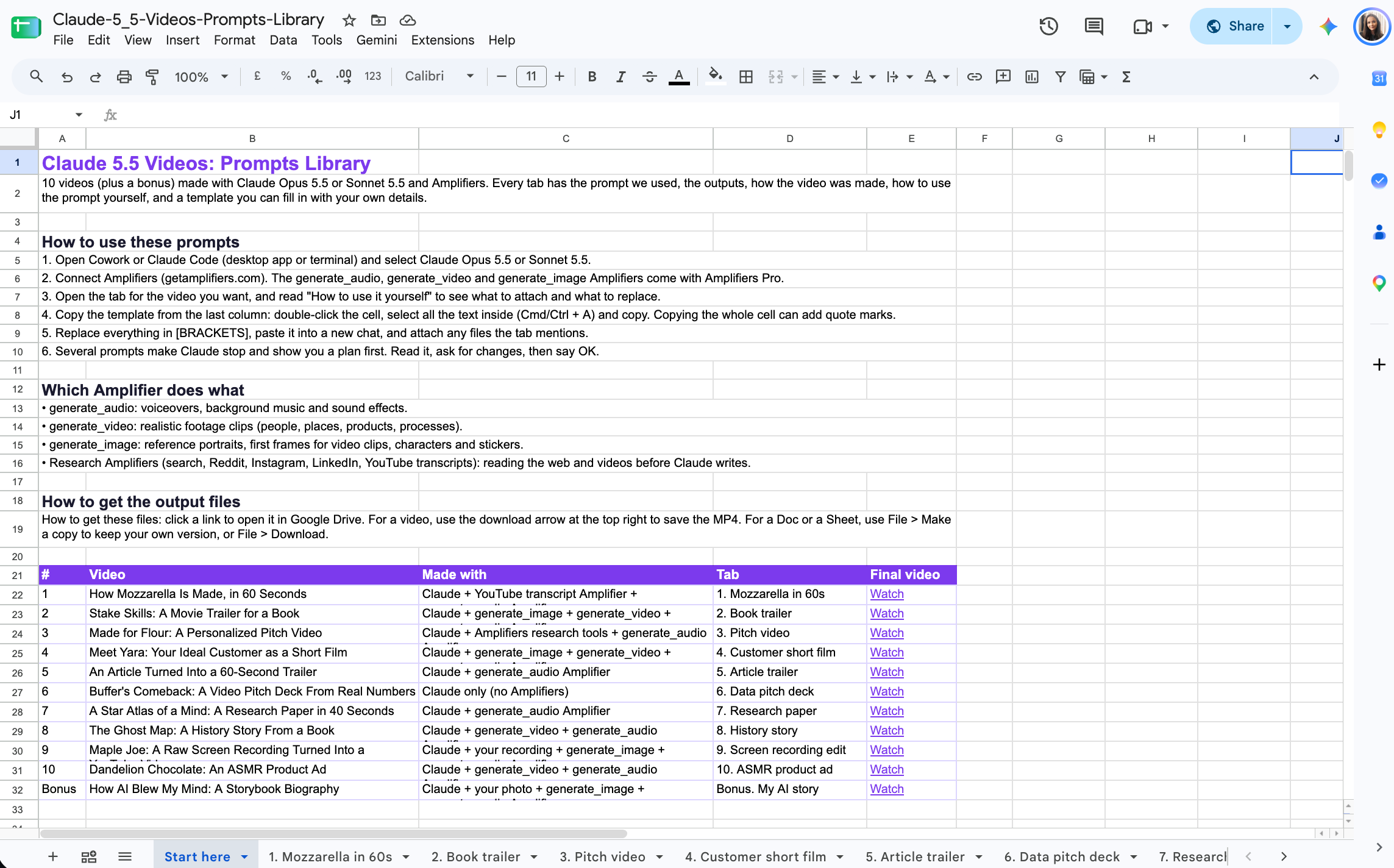
Click here to get the Claude 5.5 Videos prompts library: