

TL;DR: This is a 20-prompt roadmap that takes you from a vague idea to a live business — all built with AI. Phase 1 helps you find and validate your idea. Phase 2 builds your brand identity. Phase 3 gets your website live and taking payments. Phase 4 makes you visible and grows your audience. Each prompt is inside the AI Blew My Mind MCP and works with Claude or ChatGPT. You use them one by one, at your own pace, and each one personalizes its output to your situation.
When I published my article on OpenClaw, I created a poll asking what you’d want an AI agent to help you with. The most voted option was building a side hustle with AI.
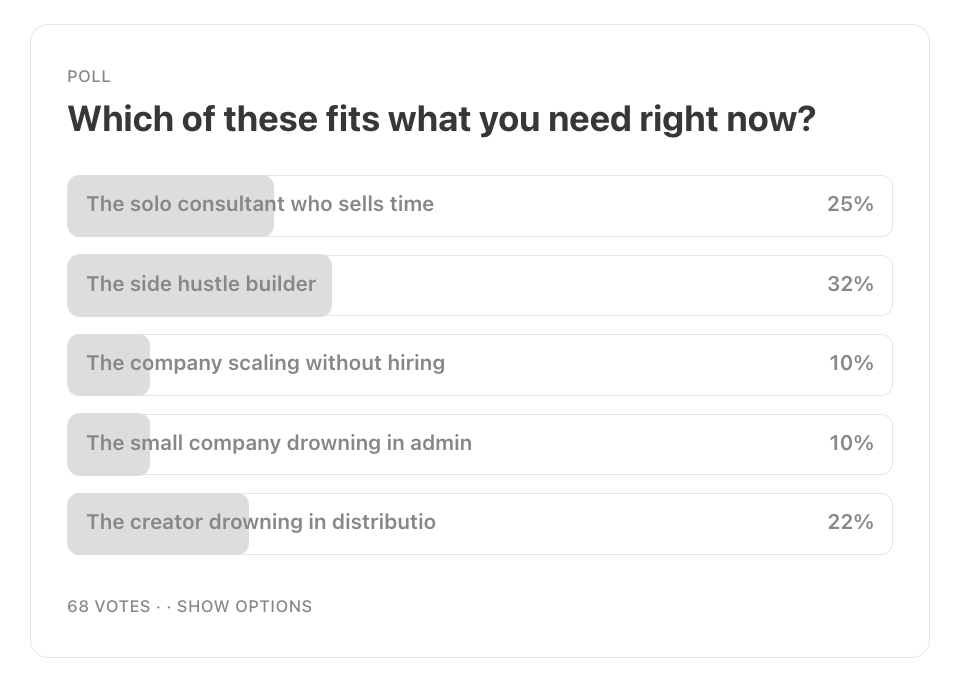
And ever since I launched the AI Blew My Mind MCP, this question has been on my mind every time I create a new prompt or skill builder inside it: How can I connect all of these into a sequence, like a path that takes you from point A to point B?
It materialized now because the MCP went from 22 prompts last week to 40 this week, and most of the new ones I added are related to what we’re talking about today:
A path from a vague idea to a live business built on systems you can grow from. 20 prompts, 4 phases, step by step.
You use the prompts one by one, working through each at your own pace. You brainstorm, validate, build, and launch. Every prompt asks you questions, builds context about your specific situation, and personalizes its output to you.
Today I’m giving you the roadmap so you can get started. In a future post, I’ll walk through this entire sequence myself and demo video the whole process of building a side hustle with Claude from scratch, step by step.
Here’s what this AI side hustle roadmap covers:
How to set up the AI Blew My Mind MCP (and access the prompts)
20 AI prompts to build a side hustle from scratch, step by step
That’s 20 prompts in one journey. Let’s walk through every step.
Before we start: the 30% discount ends today
There’s still a 30% discount on the premium subscription, but it ends in a few hours.
With a premium subscription, you get access to all the perks:
The MCP and all the paid prompts and workflows inside it (including many of the ones I’m talking about today)
Weekly paid editions of the newsletter
Full access to the AI Blew My Mind LAB: documented builds, automation chains, step-by-step guides
50% off AI Migrator, and $100 in credits for MyGhosts app
There is no better time to upgrade than right now, for the smallest price this publication will ever be. I wouldn’t want you to miss it.
Ok, now that you know, let’s get back to the MCP.
How to set up the AI Blew My Mind MCP (and access the prompts)
Step 1: Install the MCP in Claude
Open Claude in the desktop app: Go to Customize from the left side panel. Click Connectors, then the + icon. Select Add custom connector. Name it AI blew my mind and paste this URL: https://mcp.aiblewmymind.com. Click Add.
Now connect it: Go back to the Connectors section. Scroll down to Not Connected. Find the AI blew my mind MCP and click on it. Hit Connect. This takes you to auth.aiblewmymind.com where you'll create your account. (Make sure you use the same email you subscribed to AI Blew My Mind with). Then click "Always allow" for all tool permissions.
If you want to set it up in Claude Code CLI (the terminal) or in ChatGPT, follow the instructions in this post.
Step 2: How to use the prompts
Once you're connected, open a new session from wherever you prefer: Claude chat, Cowork, Claude Code. Then ask for the prompt you need.
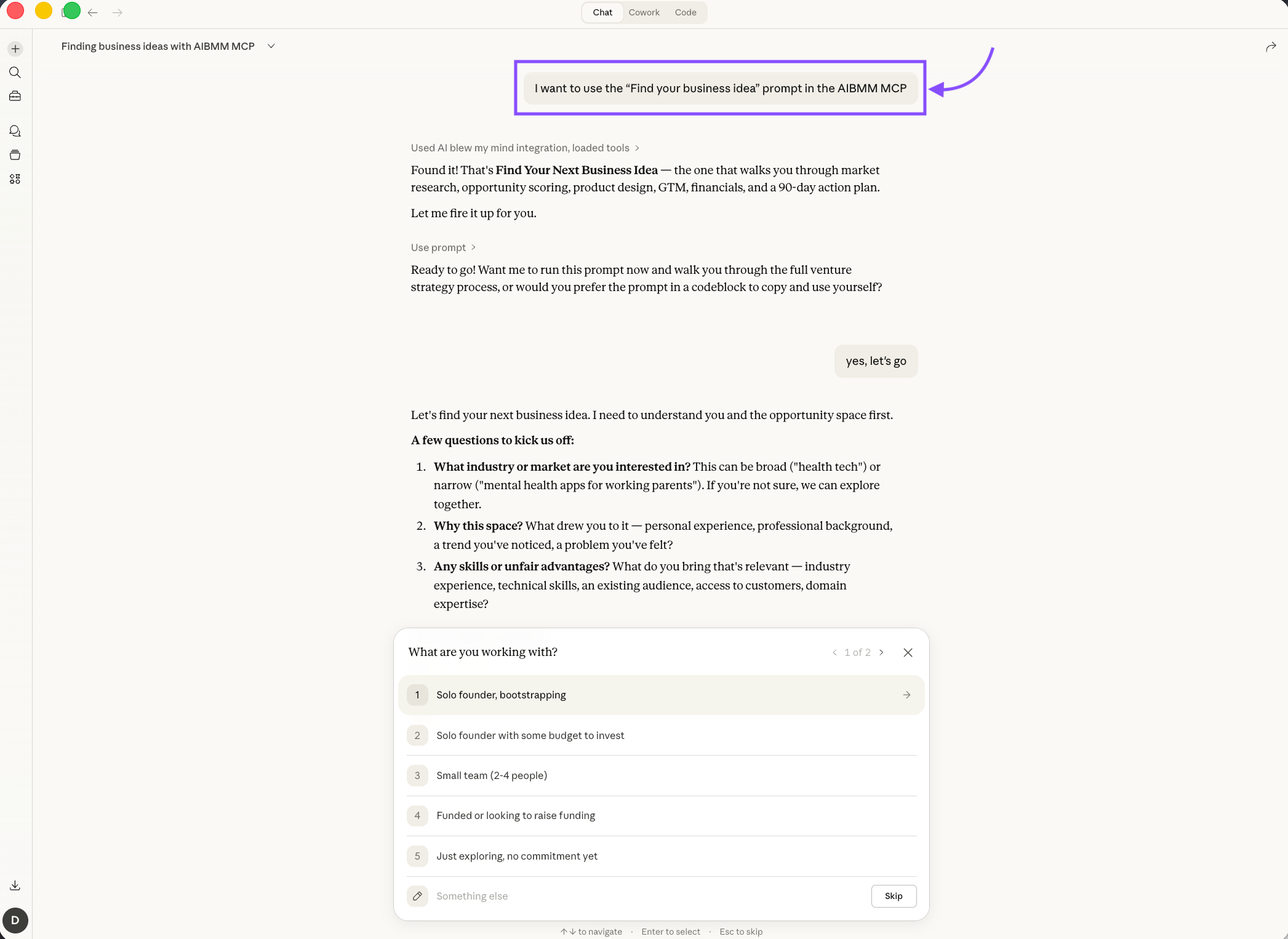
Something like:
I want to use the “Find your business idea” prompt in the AIBMM MCP.
Find the prompt that helps me create my mission statement from the AIBMM library.
Claude finds the prompt, loads it, and walks you through it. That’s it.
20 AI prompts to build a side hustle from scratch, step by step
This path is packed, but you don’t have to do all of it. You choose which prompts to use based on where you already are, what you already have, or what you need.
Maybe you already have a name and a brand, so you skip Phase 2. Maybe you don’t want to post on LinkedIn, so you skip those prompts. You only use the ones that interest you.
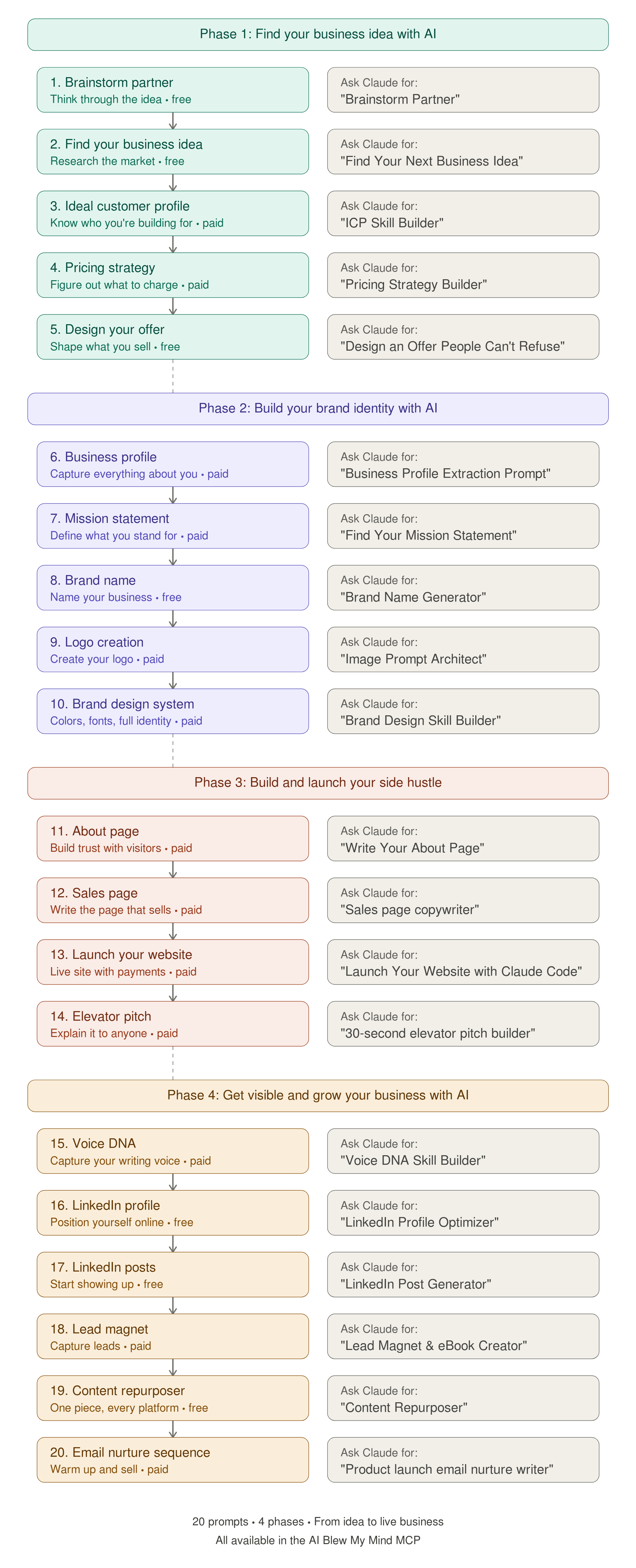
Phase 1: Find your business idea with AI
This is where most people get stuck: they have too many ideas or no idea at all. These five prompts turn that into clarity.
So whether you have an idea, or three, or zero, this phase takes you from “I’ve been thinking about something” to “I know what I’m building, who it’s for, what I’m charging, and why it will work”.
Prompt 1. Brainstorm partner
What it does: It asks you one question at a time, explores multiple approaches with tradeoffs, and won’t let you jump to solutions before you understand the problem. It proposes 2-3 different directions and recommends one with reasoning.
What you get out of it: Clarity. Your messy idea gets structured into something you can explain in two sentences. You also get a stress test: what’s the biggest risk, what assumption are you least sure about, and what’s the simplest way to test it before going all in.
Works for anything: Side hustles, content ideas, events, product concepts, even career decisions. It adapts to whatever you’re thinking through.
Prompt 2. Find your next business idea
What it does: This is a very thorough prompt. It researches your market with real web searches, maps the top growth areas, identifies unaddressed pain points with evidence from Reddit, app reviews, and forums, then scores each opportunity on a matrix: market size, urgency, ease of building, pricing power, and fit with your skills.
What you get out of it: A full venture blueprint. Business thesis, product design with an MVP scope, go-to-market strategy with specific channels (not “social media” but “LinkedIn outreach to freelance designers in these 3 communities”), financial projections, risk analysis, and a week-by-week 90-day action plan. All tailored to your resources, whether you’re solo and bootstrapping or have a small team.
The process is collaborative. It stops at every decision point and asks for your input. Your instincts and experience matter as much as the research.
Prompt 3. Ideal customer profile skill builder
What it does: Walks you step by step through building a detailed profile of who you’re building for. It interviews you about who your ideal customer is, what they’re trying to accomplish, what frustrates them, what makes them buy, what makes them leave, and how they talk about their own problems. If you have real data (testimonials, messages, survey responses), it analyzes that too and flags where your assumptions don’t match reality.
What you get out of it: A complete customer profile packaged as a reusable Claude skill. Once you upload it, every prompt you use after this one (the offer design, the pricing, the sales page, the emails) can pull from it. Claude stops guessing who your customer is and starts knowing.
Works whether you have real customer data or are starting from scratch. It adapts either way.
Prompt 4. Pricing strategy builder
What it does: Identifies your value metric (the unit your customers care about most), maps competitor pricing with actual web research, estimates three willingness-to-pay bands (floor, midpoint, ceiling), builds a tier structure with psychological pricing, and writes your checkout copy.
What you get out of it: A complete pricing strategy with reasoning. Not “charge $50-$100” but “$79, here’s why, and here’s how to validate it”. It includes a validation plan matched to your traffic level, so if you’re just starting out with a small audience, you get different advice than someone with 5,000 monthly visitors.
Works across business models. SaaS, digital products, services, memberships, newsletters, courses.
Prompt 5. Design an offer people can’t refuse
What it does: A sparring session built on Alex Hormozi’s value equation. Four questions to start, then it builds your offer across each lever of that equation.
What you get out of it: A tiered offer (Core, Premium, Full Stack) with suggested pricing, a one-paragraph Grand Slam Offer statement you could put on a landing page, and a stress test where the prompt switches to skeptical buyer mode and attacks your own offer. Then it tells you exactly how to fix the weak spots.
You can use this for any offer: digital products, services, consulting, courses, memberships. It’s not tied to a specific business model.
Phase 2: Build your brand identity
You know what you’re building and who it’s for. Now make it look and feel like a real business. This phase takes you from “I have an idea” to “I have a name, a logo, a visual identity, a captured business profile, and a mission that guides everything I do”.
Prompt 6. Business profile extraction
What it does: Interviews you section by section about your professional background, your origin story, what your business does, who you serve, how you make money, what makes you different, your content pillars, your offers in detail, and your social proof. It digs deeper when your answers are vague.
What you get out of it: A complete business profile packaged as a Claude skill, with a quick reference (one-paragraph bio, positioning statement, key differentiators) and detailed reference files covering your background, pillars, offers, and positioning. Once uploaded, every prompt after this can pull from it automatically. Your sales page, about page, elevator pitch, and email sequence all stay consistent because Claude knows your business.
This is where you capture everything you figured out in Phase 1 so it doesn’t get lost between conversations.
Prompt 7. Find your mission statement
What it does: Goes way deeper than a tagline. It asks you questions, then it generates 7-10 mission statements.
What you get out of it: A mission statement that’s been stress-tested against four checks: the decision test (does it help you say no to the wrong opportunities?), the longevity test (does it survive a platform change?), the clarity test (would a stranger get it?), and the authenticity test (would you say this to a friend over coffee?). If it fails any test, it rewrites until it passes.
This works for: newsletters, consulting practices, products, communities, personal brands, and side projects. It doesn’t matter what you’re building.
Prompt 8. Brand name generator
What it does: Generates 12-16 names across 4 creative directions (descriptive, suggestive, invented, experiential), does real web searches to check for conflicts, flags domain and social handle availability, then narrows to a top 5 with tagline pairings.
What you get out of it: A shortlist of names that are memorable, easy to say and spell, and clear of obvious conflicts. Each name comes with reasoning, a potential concern (every name has a tradeoff), and suggestions for how it works visually or as a tagline pair.
Use it for naming anything: a business, a product, a newsletter, a community, a course.
Then pressure-test the winner. The name generator gives you a quick conflict scan, but before you commit, run your top pick through the Business Name & Trademark Clearance prompt. It checks registered trademarks in your actual niche (a clothing brand and a software company can share a name legally), confirms the domain and social handles are free, and gives you a straight verdict: proceed, proceed with caution, or avoid. Better to find out now than after you’ve printed the logo.
Prompt 9. Image prompt architect (logo creation)
What it does: You describe what you want, and it thinks like a creative director: camera angles, lighting, composition, color grading, mood. It shows you 2-3 distinct directions, and generates the image once you approve (right inside Claude!).
What you get out of it: An image you can use right now. For this journey, you’d use it to create your logo. Just tell Claude you want a logo and describe the business, and the prompt handles the creative direction and optimization.
Works for anything visual: logos, thumbnails, social images, product shots, illustrations.
Prompt 10. Brand design skill builder
What it does: This is the foundation for everything visual you’ll create going forward. It walks you through building a complete design system: colors with roles (primary, secondary, accent), font pairings, corner radius, shadow style, spacing rules, layout patterns, and even a “never do this” list. Then it creates sample documents in three formats (PDF, PPTX, DOCX) so you can see your brand in action. Then it packages the whole thing as a reusable Claude skill.
What you get out of it: Every document, presentation, PDF, or website you create from that point forward will automatically look like your brand. You don’t think about fonts or colors again. Claude just knows.
Works whether you have an existing brand or are starting from scratch. It adapts either way.
Phase 3: Build and launch your side hustle
You have an idea, an offer, a brand. Now make it real on the internet. By the end of this phase, you’ll have a live website on your own domain, taking real payments.
Prompt 11. Write your about page
What it does: Treats your about page as a conversion page disguised as a story. It uses 8 building blocks: hook (opens with the reader’s problem, not your bio), promise, who it’s for, what makes you different, origin story, what you get, social proof, and a CTA. It picks which blocks fit your situation and skips the rest.
What you get out of it: A complete about page that answers the three questions every visitor has: “Is this for me?”, “Can I trust this person?”, and “What do I get?” Each section gets written separately so you can approve as you go.
Works for: newsletters, personal brands, consulting, products, communities.
Prompt 12. Sales page copywriter
What it does: Runs a value equation analysis on your offer first, then writes section by section: above the fold (headline, subheadline, CTA, social proof hint), problem agitation, transformation, features-as-benefits, social proof strategically placed to match specific objections, FAQ, offer stack, and final CTA.
What you get out of it: A full sales page calibrated to your price point. A $47 product gets lighter, faster copy. A $5,000 service gets longer, more proof-heavy copy. If you already built your offer with prompt #5, the sales page should pull from that work to keep messaging consistent.
If you don’t have testimonials yet, it writes placeholder prompts describing exactly what kind of testimonial you need and which objection each should address.
Prompt 13. Launch your website with Claude Code
What it does: This isn’t a website builder. It’s a project manager. It walks you through putting a website live on the internet with Claude Code: accounts (Vercel, Supabase, Stripe, Resend), connectors, environment variables, deployment, custom domain, testing, SEO, Google Analytics, Search Console, and legal pages. It’s menu-style: pick what you need, skip what you don’t.
What you get out of it: A live website on your own domain, taking payments, capturing leads, sending emails, optimized for Google, with analytics, and legally covered. Not a demo. Not a preview. Your business address on the internet.
If you’ve built your visual brand skill with prompt #10, the website matches. The whole point of doing identity first is that the site starts from a foundation instead of generic templates.
Prompt 14. 30-second elevator pitch builder
What it does: Checks if you have a business profile skill already, diagnoses your positioning, then builds: a core 30-second pitch, adapted versions for each context you need (conferences, sales calls, podcasts, LinkedIn DMs, casual “so what do you do?” situations), and a “panic version” for high-pressure moments where you have 10 seconds, so you can start talking about your new side hustle.
What you get out of it: The ability to explain your business clearly in any situation. The panic version alone is worth it. Two sentences, instantly understandable, specific enough to be memorable, and interesting enough that the other person asks a follow-up.
Run every version through a stress test: the “so what” test, the jargon test, the uniqueness test, and the cringe test (would you say this at a dinner party without cringing?).
If you made it here and thought “I could actually do this”, you’re right. The first three phases take you from zero to a live business. Phase 4 is what turns it into something that grows.
Quick reminder: There’s only a few hours left for the 30% discount on AI Blew My Mind premium. The paid prompts in Phase 2, 3, and 4 are what take this journey from “interesting exercise” to “live business”.
Phase 4: Get visible and grow your business with AI
Your site is live. Now bring people to it. But before you start creating content, two foundational steps: capture your voice and understand your audience.
Prompt 15. Voice DNA skill builder
What it does: Analyzes your writing samples and extracts everything about how you write: your tone, rhythm, sentence patterns, vocabulary choices, words you never use, how you open and close, how you transition, how you teach, how you handle opinions. Then it interviews you about your non-negotiables and the things AI always gets wrong about your voice. It packages all of this into a reusable Claude skill.
What you get out of it: Every piece of content you create after this (LinkedIn posts, emails, your about page, your sales page, lead magnets) sounds like you. Not like AI pretending to be you. Like you. This is the skill that makes all the writing prompts in Phase 4 work at a different level, because Claude stops defaulting to generic and starts writing in your patterns.
If you: already have writing you’re proud of (articles, posts, emails), upload them. If you’re starting fresh, the prompt builds your voice profile through questions.
Prompt 16. LinkedIn profile optimizer
What it does: A blunt, section-by-section audit of your current LinkedIn profile, followed by full rewrites: 3 headline options, a complete About section rewrite (hook → bridge → proof → CTA), and your top 2-3 experience descriptions rewritten with outcomes and numbers instead of responsibilities.
What you get out of it: A LinkedIn profile that matches what you’re building. Before/after for every section, so you can see exactly what changed and why. It positions you for what you want: clients, audience, authority, or all three.
Wherever your LinkedIn is right now, this prompt meets you there.
Prompt 17. LinkedIn post generator
What it does: Gathers your topic, angle, goal, and tone, then applies a library of 9 hook techniques (specificity bomb, stolen thought, contradiction, open loop, tension bridge, and more) and LinkedIn-specific rules: hook under 210 characters, short paragraphs, no links in the body, engagement CTA at the end.
What you get out of it: A complete post with the hook technique labeled, a character count, and a first-comment suggestion if the goal is driving traffic. It quality-checks against 12 criteria before it hands it to you.
Use it every week. The more you show up, the faster your side hustle finds its audience.
Prompt 18. Lead magnet and eBook creator
What it does: Takes you through a structured interview (goal, audience, topic, existing materials, format), then builds a complete, polished lead magnet. It decides the best format based on your situation: guide, checklist, template, infographic, swipe file, or email mini-course. Then it designs and creates the actual PDF with branding (if you built your brand with prompt #10, it uses that).
What you get out of it: A ready-to-share lead magnet, plus the social post to promote it. You put this on LinkedIn, people comment a keyword, you DM them the link. That’s how you start building an email list for your new business.
Works from scratch or from existing content. If you’ve already written articles or have notes from client work, it can build the lead magnet from those.
Prompt 19. Content repurposer
What it does: You paste or upload one piece of content (an article, podcast transcript, talk, newsletter), and it analyzes every repurposable asset inside: the main thesis, standalone insights, stories, data points, frameworks, quotable lines. Then it generates platform-native content for LinkedIn, Twitter/X, Substack Notes, Instagram, email, and YouTube.
What you get out of it: Multiple pieces of content from one piece of work. Each is rethought for how that platform works, not just shortened. Each comes with two different hook options labeled by technique. If you’re promoting something that’s already live, teasing something coming up, or creating standalone posts, it handles all three modes.
This is how you stay visible without creating new content from scratch every day.
Prompt 20. Product launch email nurture writer
What it does: You now have leads. So this prompt writes a complete 20-email sequence using a value-first framework: 10 emails that give 90% value and 10% pitch, followed by 10 sales emails that close. Each email has a specific job (introduce the offer, list the problems, tell your story, bust myths, give away tips, share a framework). Plus 3 abandoned-cart emails.
What you get out of it: A complete launch sequence with subject lines, preview text, full copy, CTAs, and an objection map showing which emails handle which objections. It adapts based on where your audience is coming from (cold traffic from ads vs. warm newsletter subscribers) and whether you have social proof yet.
If you built your offer with prompt #4 and your sales page with prompt #12, the emails pull from that work to keep messaging consistent across everything.
Your turn: which phase are you starting with?
I’ve been working on connecting all these pieces so that you can use the AI Blew My Mind MCP as a sequence, not just a collection of individual prompts. Ask for each prompt, work through it with Claude (or ChatGPT), and build in order until you have something.
It’s on your terms, your time, your rhythm. Some of you might sprint through the first four prompts in a weekend. Some might spend a week on just the brainstorming. There’s no rush. The prompts wait for you, and they pick up where you left off.
And this is just one path. The 40 prompts in the MCP cover writing, marketing, operations, thinking, positioning, coding, and image generation.
If you’re already running a business and just need a pricing strategy or a sales page, those prompts work on their own. If you’re a creator who needs a brand system and a content repurposing workflow, pull those out individually.
I have so many exciting things planned for the MCP beyond what’s already in there. I guarantee your mind will be blown by how much smarter your AI gets with it.
Whether you’re starting from scratch or already have something going, these 20 AI prompts meet you where you are. Pick a phase, open Claude, and start building. And if you’re still deciding what to actually sell, the simplest digital product you can launch is a skill. Here’s how to package your own expertise into one and sell it.
Now I’m curious about you. What would you build first? Which phase are you already in?
Last call: The 30% discount on AI Blew My Mind premium ends in about 7 hours. With it, you get full access to the MCP and all the paid prompts, weekly paid articles, partner discounts, and perks.
AMAZING work
only rare people can find such content
This is amazing work. Well done Daria! I have more than 40 years experience creating new businesses and 15 years helping people starting new businesses. I have teached for the last 10 years the Lean Entrepreneurship Course for international master students at one of the best Universities in Europe. Your 20 prompts are extremely useful for anyone that wants to have their own business. It's clearly not just about planning (like some people wrongly complained) but rather about creating/doing. I have now doubt that if an entrepreneur uses your 20 prompts the chances of launching the business and making it a sucess increase exponentially. Congratulations!